Ever seen a YouTube name or description with text that looks completely different from normal typing and wondered, “How did they do that?”
That’s fancy text.
You don’t need to download a font or install anything. You type your text, pick a style you like, copy it, and paste it where you want.
For example:
Normal:
How to Grow on YouTube
Fancy:
𝐇𝐨𝐰 𝐭𝐨 𝐆𝐫𝐨𝐰 𝐨𝐧 𝐘𝐨𝐮𝐓𝐮𝐛𝐞
Or:
𝑯𝒐𝒘 𝒕𝒐 𝑮𝒓𝒐𝒘 𝒐𝒏 𝒀𝒐𝒖𝑻𝒖𝒃𝒆
The words haven’t changed. The way they look has.
And that’s really the appeal. Sometimes you just want your channel name, profile, or a particular line in your description to feel a little more like you.
So, What Actually Is Fancy Text?
Fancy text isn’t the same as changing the font in Canva, Photoshop, or a document.
It uses Unicode characters that look different from regular letters.
That technical part sounds more complicated than it really is. You don’t need to know how Unicode works to use fancy text.
You simply:
Type → Choose → Copy → Paste
That’s the whole idea.
A fancy text generator does the annoying part for you by giving you different versions of the text you entered.
Why Do People Use It on YouTube?
Usually, it’s not because they’re trying to crack some secret YouTube algorithm.
They just want their text to look different.
Your YouTube channel is part of your online identity. Your name, description, links and other little details all add to how your channel feels.
A gaming creator might want something bold.
A creator making aesthetic videos might prefer something cleaner.
Someone else might just want their name to look a bit more interesting.
There isn’t one “correct” style.
That’s the fun part.
You get to try different ones and see what fits.
How to Generate Fancy Text for YouTube?
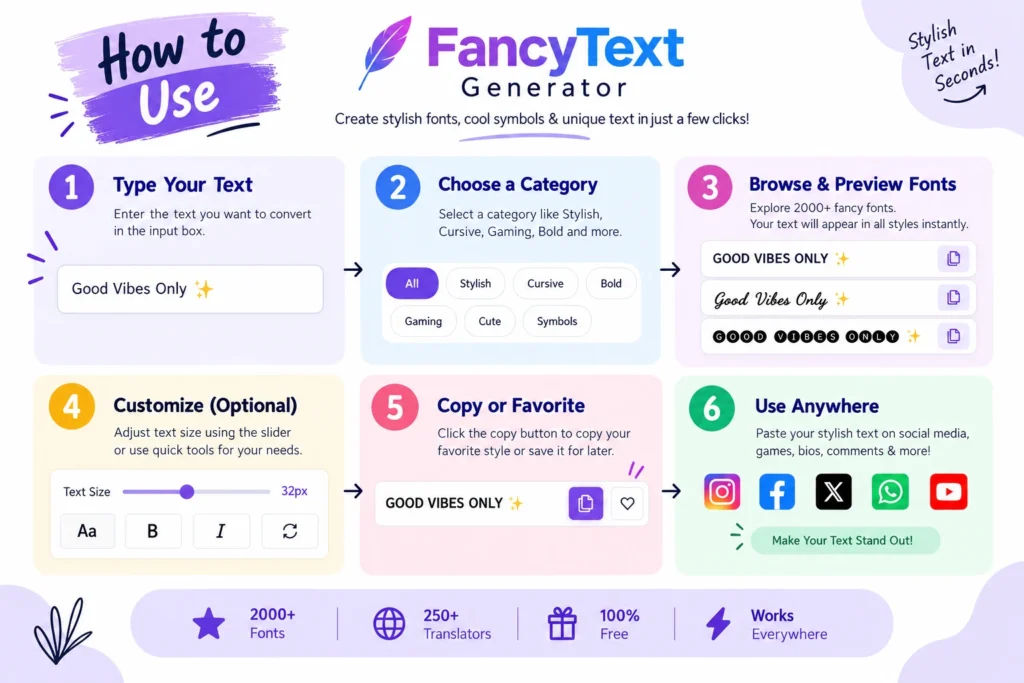
The easiest way is to use a fancy text generator instead of trying to find individual Unicode characters yourself.
Start with your normal text.
For example:
How to Get 1000 Subscribers
Put it into a generator and you might get:
𝐇𝐨𝐰 𝐭𝐨 𝐆𝐞𝐭 𝟏𝟎𝟎𝟎 𝐒𝐮𝐛𝐬𝐜𝐫𝐢𝐛𝐞𝐫𝐬
𝙃𝙤𝙬 𝙩𝙤 𝙂𝙚𝙩 𝟭𝟬𝟬𝟬 𝙎𝙪𝙗𝙨𝙘𝙧𝙞𝙗𝙚𝙧𝙨
𝑯𝒐𝒘 𝒕𝒐 𝑮𝒆𝒕 𝟏𝟎𝟎𝟎 𝑺𝒖𝒃𝒔𝒄𝒓𝒊𝒃𝒆𝒓𝒔
Now comes the part people often skip:
Actually look at your text before copying it.
A style can look great in a sample but not look as good with your name or sentence.
So try a few.
See how your actual text looks.
Then copy the one you like.
Where Can You Use Fancy Text?
There are a few places where it can make sense.
Your Channel Name
If your channel name is short, you have more freedom to experiment.
For example:
Alex Gaming
could become:
𝐀𝐥𝐞𝐱 𝐆𝐚𝐦𝐢𝐧𝐠
or:
𝘼𝙡𝙚𝙭 𝙂𝙖𝙢𝙞𝙣𝙜
A simple style can completely change the feel of the name.
Your Channel Description
Fancy text can also be useful for short headings inside a description.
For example:
🎮 𝐆𝐚𝐦𝐢𝐧𝐠 𝐕𝐢𝐝𝐞𝐨𝐬
📩 𝐁𝐮𝐬𝐢𝐧𝐞𝐬𝐬 𝐄𝐧𝐪𝐮𝐢𝐫𝐢𝐞𝐬
🔥 𝐍𝐞𝐰 𝐕𝐢𝐝𝐞𝐨𝐬 𝐄𝐯𝐞𝐫𝐲 𝐖𝐞𝐞𝐤
You don’t need to make the entire description fancy. Using it for short sections is usually cleaner.
Video Descriptions
This is another place where short styled headings can help separate different parts of your description.
For example:
📌 𝐔𝐬𝐞𝐟𝐮𝐥 𝐋𝐢𝐧𝐤𝐬
🎥 𝐖𝐚𝐭𝐜𝐡 𝐍𝐞𝐱𝐭
📱 𝐅𝐨𝐥𝐥𝐨𝐰 𝐌𝐞
Pinned Comments
You can also use it for a short line in a pinned comment.
For example:
🔥 𝐖𝐚𝐭𝐜𝐡 𝐭𝐡𝐞 𝐧𝐞𝐱𝐭 𝐯𝐢𝐝𝐞𝐨
Short text generally works better here than turning the whole comment into a fancy block.
Don’t Make Everything Fancy
This is probably the easiest mistake to make.
You find a style you really like, so naturally you want to use it everywhere.
But after period of time, everything in your content starts looking the same.
For example:
𝑯𝒐𝒘 𝑻𝒐 𝑮𝒓𝒐𝒘 𝒀𝒐𝒖𝒓 𝑪𝒉𝒂𝒏𝒏𝒆𝒍 𝑭𝒂𝒔𝒕
It looks interesting.
But if your whole description looks like that, it becomes harder to read.
We’d rather use fancy text as a small visual change than force it into every sentence.
Something like:
How to Grow Your Channel 𝐅𝐀𝐒𝐓
is much easier to scan.
For a gaming username, we’d be more open to a heavier style because the username itself is part of the identity.
For a long piece of text, we’d keep things much simpler.
That’s the difference between using a style because it fits and using it just because it’s available.
One Thing We Learned While Building Our Generator
This was actually one of the bigger lessons behind BestFancyTextGenerators.com.
When we first started looking at other fancy text generators, we expected that different websites would give us lots of different options.
Instead, we kept seeing the same styles.
One website had a style.
We opened another.
There it was again.
Another one?
Same thing.
That made us look at the problem differently.
We weren’t interested in simply making another generator with the same collection. We started looking at what was already available, what was missing, and what other variations we could find.
And then we found another problem.
A style looking cool doesn’t mean it’s actually useful.
Some Unicode combinations don’t render properly everywhere. Some look fine in one place and strange somewhere else. Others simply aren’t worth using.
So we started treating “does this actually work?” as more important than “does this look cool in a screenshot?”
That’s how the collection grew to 2,000+ styles.
Not because we started with a target of 2,000.
We wanted more genuinely different choices, and the collection grew as we kept finding and testing them.
Then 2,000+ Styles Created Another Problem
You’d think having more choices would solve everything.
It doesn’t.
Imagine opening a generator and seeing thousands of styles with no organisation.
Good luck finding the one you actually want.
If you’re looking for a gaming style, you don’t want to scroll through hundreds of unrelated styles.
If you’re looking for an aesthetic name, you probably don’t want to browse through every gothic or decorative style first.
So we had to solve a second problem:
How do you give people more choices without making them search forever?
That’s where categories and search come in.
You can search for something specific.
Or you can browse and see what catches your eye.
Both ways should work.
Seeing Your Own Text Makes a Difference
Another thing we found useful was previewing the actual text you’re going to use.
A style may look great with:
Hello
and completely different with:
AlexGaming2026
That’s why seeing your own text in different styles is much more useful than just looking at a list of sample characters.
Instead of:
Choose → Copy → Hope it looks good
you can:
Type → Preview → Compare → Choose → Copy
Much easier.
Does Fancy Text Help You Get More YouTube Views?
Don’t treat it like a YouTube growth hack.
Fancy text won’t fix a bad video, bad thumbnail, boring content, or a confusing title.
It is simply a way to change how your text looks.
If a particular style makes your channel name feel more like your own, great.
If it makes your title difficult to read, don’t use it.
For us, that’s the more useful way to think about fancy text:
It’s a presentation and self-expression tool, not a magic trick.
A Few Styles You Can Try
If you just want to experiment, start with something simple.
🔥 𝐍𝐄𝐖 𝐕𝐈𝐃𝐄𝐎
📌 𝐌𝐔𝐒𝐓 𝐖𝐀𝐓𝐂𝐇
🎮 𝙂𝘼𝙈𝙄𝙉𝙂 𝘾𝙃𝘼𝙉𝙉𝙀𝙇
🚀 𝑮𝒓𝒐𝒘 𝒀𝒐𝒖𝒓 𝑪𝒉𝒂𝒏𝒏𝒆𝒍
Or just try your own name.
That’s usually where the fun starts.
One Simple Rule
You don’t need to make everything fancy.
You don’t need the most complicated style.
And you definitely don’t need to understand Unicode to make your text look different.
Just find a style that works for your text.
Try it.
See how it looks.
Copy it.
Use it.
That’s really what we wanted to build with BestFancyTextGenerators.com in the first place: more useful choices without making the process complicated.
You bring the words. We give you more ways to make them yours.
Related Articles:
- How to Generate Fancy Text Online (Copy & Paste Guide)
- How to Create Fancy Text Without Losing Readability
- Is Unicode Text Safe for Social Media Platforms?

Ankit Thakur is an SEO Specialist and WordPress Developer with 4+ years of experience. He has generated ₹60L+ in revenue through SEO, built 50+ websites, and helped businesses generate measurable leads through organic search and local SEO.