Sometimes normal text just feels a little boring.
Maybe you want your Instagram bio to look different.
Maybe you need a cool gaming username.
Or maybe you just want your WhatsApp status to have a little more personality.
That’s where fancy text comes in.
You type something like: Hello World
and get: 𝓗𝓮𝓵𝓵𝓸 𝓦𝓸𝓻𝓵𝓭 or: 𝐇𝐞𝐥𝐥𝐨 𝐖𝐨𝐫𝐥𝐝
Then you copy it and paste it wherever you want.
Sounds simple.
And mostly, it is.
But there’s a little more happening behind the scenes. Some styles work almost everywhere, while others may look different—or fail to display properly—after you paste them into another app or device.
We ran into that ourselves while building BestFancyTextGenerators.com.
So here’s what fancy text actually is, how generators create it, where you can use it, and what we learned while working with thousands of styles.
What Is Fancy Text?
Most online fancy text isn’t a new font you’re installing on your phone.
Instead, fancy text generators usually use different Unicode characters that visually resemble ordinary letters.
For example:
- Normal
- Hello
- Fancy
- 𝐇𝐞𝐥𝐥𝐨
- 𝓗𝓮𝓵𝓵𝓸
- hello
Those results are still text characters.
That’s why you can usually copy them and paste them into another app without:
- downloading a font file,
- using Photoshop,
- installing a design app,
- creating an image.
The basic idea is: Type → Choose → Copy → Paste
Why doesn’t fancy text always look identical?
Unicode defines the characters, but fonts and rendering systems determine how those characters appear on the screen.
That means a particular style can look slightly different depending on:
- the device,
- operating system,
- app,
- browser,
- available fonts.
In some cases, a character may not display correctly at all.
Why Do People Use Fancy Text?
The reason is pretty simple.
People like making things feel a little more personal.
Your username is one of thousands on a platform.
Your Instagram bio sits alongside countless other bios.
Your gaming name is one of many names on a screen.
Normal text works perfectly fine, but sometimes you want something that feels a little more like you.
That’s actually where the idea behind BestFancyTextGenerators.com began.
It wasn’t originally:
“Let’s build a giant fancy-text website.”
It was much simpler:
“I want my name to look different.”
That led to searching for existing fancy text generators.
And once we started opening different tools, something became obvious: many of them were showing surprisingly similar styles. That became the starting point for exploring what else could be created.
How Does a Fancy Text Generator Work?
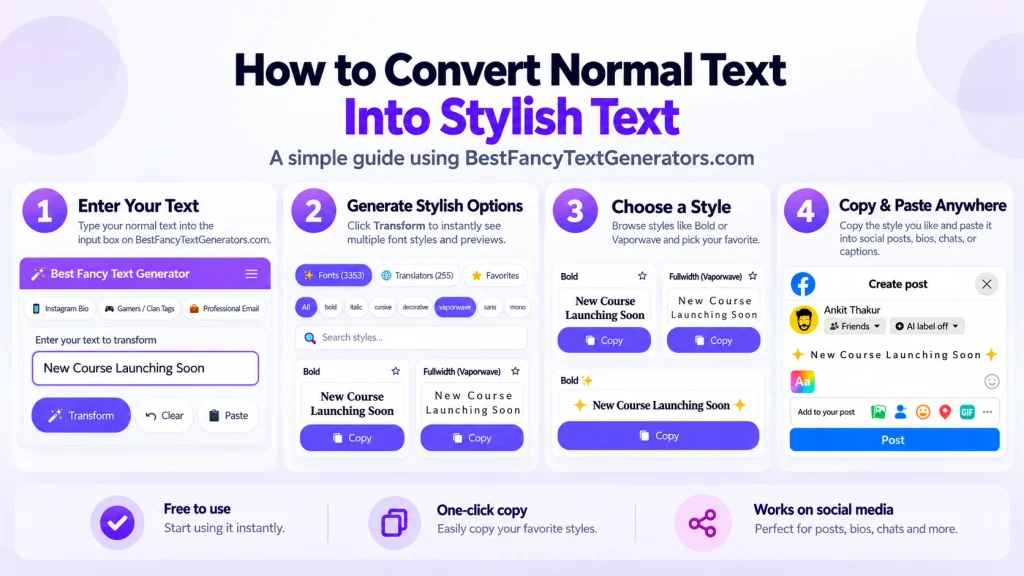
A fancy text generator takes the normal text you enter and creates alternative versions using different Unicode characters.
For example, if you type: Ankit Digital
you might get:
𝐀𝐧𝐤𝐢𝐭 𝐃𝐢𝐠𝐢𝐭𝐚𝐥
𝓐𝓷𝓴𝓲𝓽 𝓓𝓲𝓰𝓲𝓽𝓪𝓵
𝔸𝕟𝕜𝕚𝕥 𝔻𝕚𝕘𝕚𝕥𝕒𝕝
Then you choose whichever style fits what you’re trying to create.
The useful part is that you’re still working with text rather than an image.
That means you can copy the result and try it in places such as:
- Instagram,
- WhatsApp,
- Facebook,
- Discord,
- TikTok,
- usernames,
- gaming profiles.
But one thing is important:
The generator preview isn’t always the final result.
A style may look perfect inside the generator but appear slightly different after you paste it somewhere else.
That’s why we started asking two questions when looking at styles:
Does this look good?
and:
Does this actually work?
How to Generate Fancy Text Online?
The process is simple.
1. Type your text

Open a Fancy Text Generator and enter whatever you want to style.
It could be:
- your name,
- a username,
- an Instagram bio line,
- a gaming name,
- a short quote,
- a WhatsApp status.
For example:
Ankit Digital
2. Browse different styles

You’ll usually see several versions of the same text.
Some may be:
- bold,
- script,
- decorative,
- monospace,
- gothic,
- minimal.
Don’t assume the most complicated one is automatically the best.
3. Look at your actual text
This matters.
A style might look great when demonstrated with:
Hello
but not look nearly as good with your actual name.
That’s why showing your own text in real time became important while we were building the tool.
4. Copy the style
Found something you like?
Copy it.
5. Paste it where you want to use it
If it’s for Instagram, test it on Instagram.
If it’s for WhatsApp, test it there.
If it’s a gaming name, test it inside the actual game.
The final app is where you’ll know whether the style really works.
Try It Yourself
Enter your own name, username, or bio in our Fancy Text Generator.
Try 2–3 styles instead of automatically choosing the first one.
Then paste them into the app where you actually plan to use them.
The best style isn’t necessarily the fanciest.
It’s the one that:
looks good + displays properly + stays readable.
What Can You Use Fancy Text For?
Instagram Bios
Fancy text can work well for:
- your name,
- profession,
- one short phrase,
- a highlighted line.
You don’t need to make your entire bio fancy.
Sometimes one styled line is enough.
Gaming Usernames
Gaming is one place where more unusual styles can make sense.
A decorative username can help your name feel more personal.
Just remember that individual games may restrict which characters can be used.
WhatsApp Statuses
Fancy text can add personality to a short status without turning the text into an image.
Social Media Captions
You can use styled text to highlight a short word or phrase.
But if everything is fancy, nothing really stands out.
Personal Branding
A little styling can make a name or heading more distinctive.
For important information, though, readability should still come first.
What We Learned While Building 2,000+ Styles
When we first started exploring fancy text, the goal was mainly to find more interesting options.
We looked at what existing generators already offered and searched for styles and variations that were missing.
But that introduced another problem:
Not every fancy-looking character was actually useful.
Some styles looked interesting but didn’t render properly.
Others behaved inconsistently when pasted somewhere else.
Those weren’t worth keeping simply to make the collection look bigger.
So styles that didn’t work properly were filtered out. That process eventually helped the collection grow to 2,000+ styles, but the number wasn’t the real goal.
The more useful lesson was:
More styles aren’t automatically better. More useful styles are.
And once the collection became large, search, categories, and previews became important because thousands of choices aren’t helpful if users can’t find the right one quickly.
Why Some Fancy Text Doesn’t Work?
This is probably the most annoying part.
You find a style you love.
Copy it.
Paste it.
And suddenly:
□□□
Or one letter looks strange.
Or part of the text disappears.
This can happen when the destination device, font, or app can’t properly render one or more of the characters.
That doesn’t necessarily mean the text itself is broken.
It may simply mean that environment doesn’t have the right support to display it correctly.
What should you do?
Usually:
- Try another style.
- Choose something simpler.
- Paste it into the actual app before using it publicly.
- If the text is important, check it on another device as well.
Don’t spend ten minutes trying to force one broken style to work.
There are plenty of alternatives.
Screenshot suggestion: Add a real example here showing one style in the generator and the same text after being pasted into an app/device where a character changes or becomes a box.
How to Pick a Good Fancy Text Style?
Think about where you’re using it.
Gaming username
You can experiment more.
A decorative or unusual style may fit perfectly.
Instagram bio
I’d keep it stylish but readable.
Someone visiting your profile should be able to understand it quickly.
Business profile
Keep it simpler.
A little styling can highlight a name or short heading.
Making important information difficult to read usually works against you.
Just for fun
Experiment.
That’s part of the point.
The key is choosing the style for the situation rather than automatically choosing the one with the most decoration.
What Makes a Fancy Text Generator Useful?
A useful generator isn’t just the one claiming the biggest number of styles.
I’d look for:
Enough variety
Five styles probably isn’t much fun.
But raw quantity isn’t enough either.
Easy copying
You shouldn’t have to fight with the website just to copy your text.
Real-time preview
You should be able to see your own text in the style before copying it.
Categories
If there are thousands of options, organisation matters.
Search
Someone looking for a gaming style shouldn’t have to browse hundreds of unrelated options first.
Styles that actually work
This matters more than showing the biggest possible number on the homepage.
That thinking became central to BestFancyTextGenerators.com:
more useful choices + easier discovery.
Fancy Text vs Normal Text
| Feature | Normal Text | Fancy Text |
|---|---|---|
| Appearance | Simple | More decorative |
| Readability | Usually very high | Depends on the style |
| Copy & paste | Yes | Yes, when supported |
| Good for usernames | Yes | Can add personality |
| Good for long paragraphs | Yes | Usually not ideal |
| Cross-platform consistency | Generally reliable | Can vary by character/style |
| Best use | Everyday communication | Names, bios, usernames, highlights |
There’s nothing wrong with normal text.
Fancy text is just another option.
Use it when the visual difference actually adds something.
Is Fancy Text Safe?
Using Unicode-based fancy text normally doesn’t involve installing a font or downloading software.
You’re generally copying and pasting text characters.
But “safe” and “works everywhere” aren’t the same thing.
A perfectly valid Unicode character can still fail to display properly in a particular environment.
Also use common sense:
- don’t use fancy text to impersonate someone,
- don’t make important information intentionally misleading,
- check platform rules for usernames,
- don’t hide important information inside unreadable styles.
If the content matters, readability matters too.
Common Mistakes to Avoid
Making everything fancy
If your entire bio looks like a wall of unusual characters, people may stop reading.
Use styling selectively.
Choosing a style because it’s complicated
More decoration doesn’t automatically make it better.
Skipping the preview
Look at your actual text before copying it.
Assuming one style works everywhere
Test it after pasting.
Forgetting why you’re using it
If the goal is to make your name stand out, you probably don’t need to decorate every word around it.
Sometimes one small change is enough.
Frequently Asked Questions
How do I generate fancy text online?
Enter your normal text into a fancy text generator, compare the generated styles, choose one, copy it, and paste it where you want to use it.
Do I need to download a font?
Usually, no. Most online fancy text generators use Unicode characters rather than requiring you to install a font file.
Can I use fancy text on Instagram?
Many Unicode styles can be pasted into Instagram bios, names, and captions, but how individual characters display can vary. Always check the final result.
Can I use fancy text for gaming usernames?
Yes, if the game allows the characters you’re using. If the username is rejected or displays incorrectly, try a simpler style.
Why does fancy text look different after I paste it?
The destination app or device may use different fonts or rendering behavior, so some Unicode characters can look different or fail to display properly.
Is fancy text good for business profiles?
It can work for small things such as a name or short heading.
For contact details, descriptions, and other important information, normal readable text is usually better.
Does fancy text work everywhere?
No style can be guaranteed to look exactly the same everywhere.
If compatibility matters, choose a simpler style and test it where you’re going to use it.
Final Thoughts
Generating fancy text is easy:
Type → Choose → Copy → Paste
The harder part is choosing the right style.
And that’s probably the biggest lesson we learned while building the collection.
The fanciest style isn’t automatically the best one.
If it’s impossible to read or doesn’t work where you need it, it isn’t very useful.
Sometimes: 𝐬𝐢𝐦𝐩𝐥𝐞 𝐛𝐨𝐥𝐝 𝐭𝐞𝐱𝐭
works better than something covered in symbols.
Fancy text is ultimately just another way to make your online text feel a little more personal.
So remember:
Different is good.
Readable is better.
Different + readable + usable is the style worth keeping.
Related Articles:
- How to Create Fancy Text Without Any App
- How Fancy Text Generators Work?
- Online Fancy Text Generator vs Mobile Apps – Which to Use?

Ankit Thakur is an SEO Specialist and WordPress Developer with 4+ years of experience. He has generated ₹60L+ in revenue through SEO, built 50+ websites, and helped businesses generate measurable leads through organic search and local SEO.