You find a fancy text style you really like.
You type your name, copy it, and paste it into Instagram, WhatsApp, TikTok, or somewhere else.
Then something goes wrong.
One letter looks normal. Another disappears. Sometimes you get those annoying little boxes:
□ □ □
And you’re probably thinking:
“I copied it properly. So why isn’t it working?”
Usually, the problem isn’t with the copy button.
Fancy text can behave differently depending on the characters being used, the app you’re pasting them into, the fonts available on the device, and how that device renders those characters.
The good news?
You usually don’t need to understand all the technical stuff to fix it.
In most cases: Copy again → Try another style → Paste it → Check it
Quick Fix: What to Do When Fancy Text Looks Broken
If your fancy text looks strange after pasting it, try this first:
- Copy the text directly from the generator again.
- Paste it into the app where you actually want to use it.
- Check for boxes, missing letters, or strange characters.
- If something looks wrong, try another style.
- If the problem continues, choose a simpler style.
- Check the final result before posting or saving it.
That’s usually enough.
You don’t have to keep fighting with one broken style when there are plenty of others to choose from.
Why Does Fancy Text Break When You Copy and Paste It?
This gets confusing because fancy text usually isn’t a normal font you’ve installed on your phone.
Most fancy text generators use different Unicode characters that visually resemble normal letters.
For example:
Normal: Hello
Fancy: 𝐇𝐞𝐥𝐥𝐨 or 𝓗𝓮𝓵𝓵𝓸
You can copy those characters and paste them into different apps without installing a new font.
But there’s one important difference:
Copying the text and displaying the text are two separate things.
Your generator gives you the Unicode characters.
The device or app receiving them still needs a suitable font and rendering support to display those characters properly.
If it can’t, you might see:
- a box,
- a blank space,
- a missing letter,
- or a character that looks slightly different.
Why Do Some Fancy Letters Turn Into Boxes?
This is probably the most obvious copy-paste problem.
You copy:
𝓐𝓫𝓱𝓲𝓼𝓱𝓮𝓴
but after pasting, you get something like:
𝓐𝓫□𝓲𝓼𝓱𝓮𝓴
That usually means the system doesn’t have a suitable glyph available to display one of those characters.
In simple terms, the device is basically saying:
“I know there’s supposed to be a character here, but I don’t know how to draw it properly.”
The text itself hasn’t necessarily disappeared.
It just isn’t being rendered properly in that environment.
Why Does It Work on My Phone but Not on Another Phone?
Because the two devices may not have the exact same fonts, operating-system support, or rendering behavior.
Your phone might display:
𝓐𝓫𝓱𝓲𝓼𝓱𝓮𝓴
while someone else’s device shows:
□ □ □ □ □
The underlying text may still be the same.
The difference is how each device displays it.
So don’t assume:
“It works on my phone, so it must work everywhere.”
If the text is important, check it on the platform where it will actually be used.
Why Does Fancy Text Work in One App but Not Another?
The same issue can happen between apps.
Maybe a style works perfectly in WhatsApp but looks strange in Instagram.
Or it looks fine in a browser but one letter changes when you paste it into a game.
That’s because the final appearance can depend on:
- the characters used,
- your device,
- your operating system,
- available fonts,
- the app,
- and how that app renders text.
You don’t need to understand every technical layer.
The practical rule is simple:
The preview isn’t the final test. The pasted result is.
7 Common Fancy Text Copy-Paste Problems
1. You See Boxes Instead of Letters
If you see □ or similar symbols, the destination may not be able to display that character properly.
What to do:
Try another style.
2. One Letter Looks Normal
Most of the text looks fancy, but one letter suddenly looks plain.
That can happen when the characters used in a style don’t all render equally well.
What to do:
Try a simpler style.
3. Some Characters Disappear
Some Unicode characters interact with surrounding characters differently from normal visible letters.
A complicated combination may not behave the way you expected.
What to do:
Avoid overly complicated combinations if you’re already having problems.
4. It Looks Fine in the Preview but Not After Pasting
The generator shows:
𝓗𝓮𝓵𝓵𝓸
but the app displays it slightly differently.
What to do:
Always check the copied text in the actual app before using it publicly.
5. It Works on One Device but Not Another
One phone displays the style correctly while another doesn’t.
What to do:
If the text matters, check it on another device as well.
6. The Style Is Too Complicated
Some styles use more unusual characters or combinations.
They can look great in a preview but be less reliable elsewhere.
What to do:
Start with a simpler style.
7. The Text Works but Is Hard to Read
This isn’t technically a copy-paste error, but it’s still a usability problem.
A fancy name isn’t very useful if nobody can understand it.
What to do:
Use decorative styles where they make sense and keep important information readable.
The Easiest Way to Test a Fancy Text Style
You don’t need a complicated testing process.

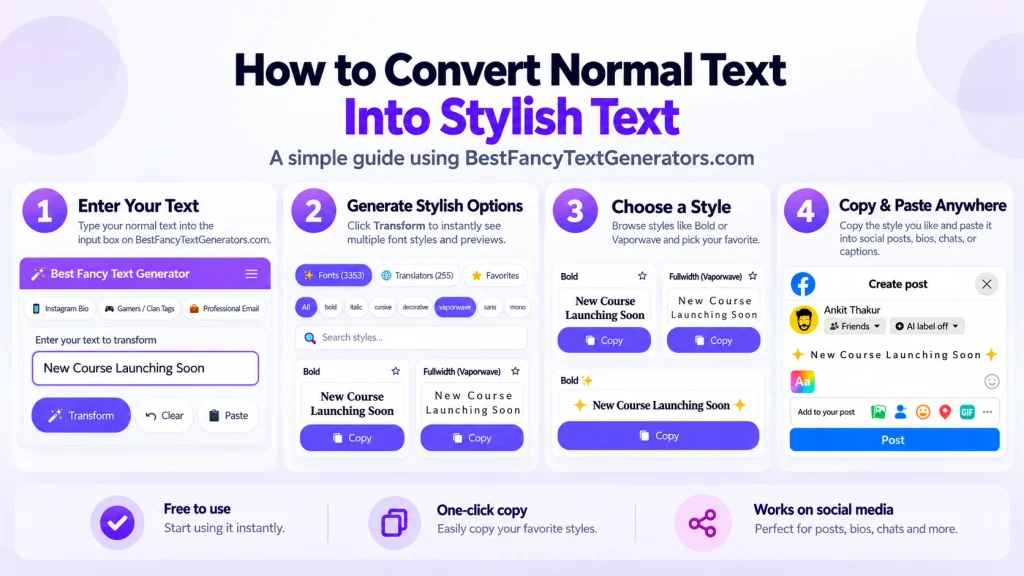
Step 1: Type your text
For example:
Abhishek
Step 2: Try a few styles

Don’t automatically choose the first one.
Compare a few options.
Step 3: Copy the style
Use the copy button from the generator.
Step 4: Paste it where you actually want to use it
If it’s for Instagram, test it in Instagram.
If it’s for WhatsApp, test it in WhatsApp.
If it’s for a gaming username, test it inside the game.
Step 5: Check the result
Look for:
- missing letters,
- boxes,
- strange symbols,
- plain-looking letters,
- characters that changed appearance.
If everything looks fine, you’re done.
If not, choose another style.
Try It Yourself
Use our Fancy Text Generator and test 2–3 different styles in the app where you actually plan to use them.
The goal isn’t to find the most complicated style.
It’s to find one that looks good and works properly.
Don’t Keep Fighting With a Broken Style
This sounds obvious, but people do it all the time.
You find one style you really like.
It has one broken character.
Then you spend five minutes trying to figure out why that one character refuses to work.
I’d usually just change the style.
That’s one of the lessons we learned while working on BestFancyTextGenerators.com:
More styles are useful only when people can actually use them.
Why This Problem Became Important to Us?
The project didn’t start with Unicode or rendering problems.
It started with something much simpler: We wanted our names to look different.
That led us to search existing fancy text generators.
But after looking through several of them, we noticed that many kept showing very similar styles.
So we started looking for different variations instead of simply repeating the same popular options.
Then another issue appeared: Some fancy-looking characters didn’t work properly everywhere.
That changed how we thought about the collection.
It wasn’t enough for a style to look unusual.
It also needed to be useful after someone copied and pasted it.
The collection eventually grew to 2,000+ styles, but the underlying idea stayed simple:
Give people more useful choices, not just more random characters.
What Kind of Fancy Text Should You Choose?
If compatibility matters, start with simpler styles.
For example:
- Bold: 𝐇𝐞𝐥𝐥𝐨
- Italic: 𝑯𝒆𝒍𝒍𝒐
- Script: 𝓗𝓮𝓵𝓵𝓸
- Monospace: 𝙷𝚎𝚕𝚕𝚘
That doesn’t guarantee every style will render identically on every device.
It just gives you a more practical starting point than choosing an extremely complicated combination.
If you’re creating something purely decorative, like a gaming username, you can experiment more.
Just test it before settling on it.
Do You Need to Install a Fancy Font?
Usually, no.
Most online fancy text generators aren’t simply giving you a font file to install.
They’re generating different Unicode characters that you can copy and paste.
Unicode defines the characters.
Fonts provide the visual shapes used to display those characters.
That’s why you can often paste fancy text directly into:
- Instagram,
- WhatsApp,
- Facebook,
- TikTok,
- Discord,
- gaming profiles,
- usernames.
But it’s also why the final appearance can depend on the software and device displaying it.
Can Fancy Text Look Exactly the Same Everywhere?
Not always.
And it’s better not to promise that it will.
You can choose simpler, more widely supported styles, but you don’t control:
- someone else’s phone,
- their operating system,
- their installed fonts,
- or the app they’re using.
So the practical goal isn’t: “Find a style that can never look different anywhere.”
It’s: “Find a style that works well where I actually want to use it.”
That’s much more realistic.
A Simple Rule We Follow
When choosing a fancy style, ask yourself four things:
Does it look good?
Can I copy it?
Can I paste it?
Can people actually read it?
If the answer to all four is yes, you’ve probably found a useful style.
If one of them is no, try another one.
Frequently Asked Questions
Why is fancy text showing as boxes?
Usually because the device, font, or app doesn’t have a suitable way to display one or more of the Unicode characters used in that style.
Why does the same fancy text work on one phone but not another?
Different devices, operating systems, fonts, and apps can render characters differently.
Is the text actually broken?
Not necessarily. The Unicode character may still be present even if the device doesn’t have the right glyph or rendering support to display it properly.
Can installing a font fix fancy text?
Sometimes font support matters, but installing a random font isn’t a universal solution, especially inside apps that control their own text rendering.
Which fancy text should I use?
If compatibility matters, start with something simple and test it in the app where you’re going to use it.
Why does the text look fine in the generator but not after I paste it?
Because the generator and the destination app may use different fonts or rendering systems.
Final Takeaway
Fancy text copy-paste problems usually aren’t as complicated as they seem.
If your text looks broken:
- copy it again,
- try another style,
- choose a simpler option,
- check for boxes or missing characters,
- and test it in the actual app.
The bigger lesson is that the fanciest-looking style isn’t always the most useful one.
That’s something we learned while building BestFancyTextGenerators.com.
The project started with a simple idea:
make text look different.
But after working with thousands of styles, the more useful principle became:
make text look different without making it harder to use.
So the experience stays simple:
Type → Choose → Copy → Paste
You bring the words.
We give you more ways to make them yours.
Related Articles:
- How to Copy and Paste Stylish Text Anywhere
- Why Is Stylish Text Showing as Boxes?
- Why Unicode Fonts Are Not Supported Everywhere
- How to Make Fancy Text Compatible Across Devices

Ankit Thakur is an SEO Specialist and WordPress Developer with 4+ years of experience. He has generated ₹60L+ in revenue through SEO, built 50+ websites, and helped businesses generate measurable leads through organic search and local SEO.