Plain text is fine.
Most of the time, you type something and send it. Done.
But then you open Instagram, WhatsApp, Discord, or a gaming profile and see someone’s name written like:
𝓐𝓷𝓴𝓲𝓽
or
𝐀𝐧𝐤𝐢𝐭
or something completely different.
And you’re like: “Okay, how did they do that?”
That’s basically stylish text.
You may also hear people call it fancy text, stylish fonts, or fancy fonts, but there’s one important thing to understand:
You usually aren’t installing a new font.
Most fancy text generators use different Unicode characters that resemble styled versions of normal letters.
So instead of installing anything, you can usually:
Type → Choose → Copy → Paste
That simple idea is also where BestFancyTextGenerators.com started.
We originally just wanted our names and text to look different online. But when we started searching for fancy text generators, we kept running into websites that offered many of the same styles.
That led to a simple question:
If everyone is choosing from the same few styles, how are you actually supposed to look different?
That question eventually became the starting point for the tool. The brand story documents the same journey: searching for a fancy text generator, noticing repetitive options in top results, then looking for styles that were missing.
So, What Is Stylish Text?
Stylish text is normal text represented using different Unicode characters.
You don’t usually need to:
- download a font,
- install an app,
- upload a font file,
- or learn any design software.
For example:
| Style | Example |
|---|---|
| Normal | Hello World |
| Script-like | 𝓗𝓮𝓵𝓵𝓸 𝓦𝓸𝓻𝓵𝓭 |
| Bold | 𝐇𝐞𝐥𝐥𝐨 𝐖𝐨𝐫𝐥𝐝 |
| Full-width | Hello World |
So if someone puts something like 𝓗𝓮𝓵𝓵𝓸 in their Instagram bio, they haven’t necessarily installed a secret Instagram font.
They’re using different characters that visually resemble styled letters.
That’s why you can often copy them from one place and paste them somewhere else.

Why Can’t I Just Change the Font on Instagram?
This is where stylish text becomes useful.
Apps such as Instagram don’t normally give you a full font selector for profile fields such as your name or bio.
You can’t simply open the profile editor and choose:
“Make my name Gothic.”
So fancy text works around that limitation by using existing Unicode characters that already look different.
You copy those characters and paste them into the field you want to style.
That’s basically the trick.
The same general idea applies to many:
- social media bios,
- profile names,
- status fields,
- gaming usernames,
- captions,
- short messages,
- and other text fields that accept those characters.
How Does a Fancy Text Generator Work?
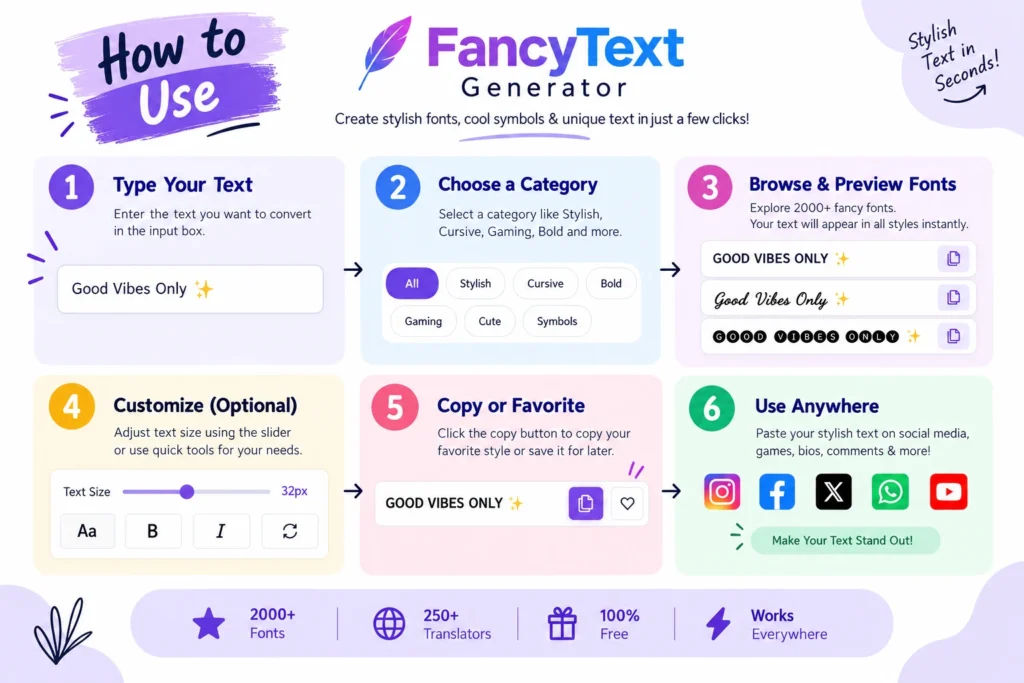
You don’t need to understand all the technical stuff to use one.
You type something like:
Ankit Digital
and a generator can return variations such as:
- 𝓐𝓷𝓴𝓲𝓽 𝓓𝓲𝓰𝓲𝓽𝓪𝓵
- 𝐀𝐧𝐤𝐢𝐭 𝐃𝐢𝐠𝐢𝐭𝐚𝐥
- 𝔄𝔫𝔨𝔦𝔱 𝔇𝔦𝔤𝔦𝔱𝔞𝔩
- Ankit Digital
You choose one, copy it, and paste it.
That’s it.
The technical side stays in the background, which is exactly how we wanted the product experience to work.
Why Does Some Stylish Text Break?
This is something worth knowing before going crazy with fancy text.
Not every style works perfectly everywhere.
You may create something that looks great inside a generator and then paste it somewhere else and see:
□ □ □ □
or characters that look slightly different.
That doesn’t automatically mean you copied it incorrectly.
Different apps, operating systems, browsers, devices, and text fields may not display every Unicode character in exactly the same way.
We actually ran into this problem while building our own collection.
At first, the instinct was: “This character looks cool, add it.”
But that turned out to be a bad way to build the collection.
A style that looks interesting isn’t necessarily useful if people can’t copy it, read it, or use it properly after pasting.
So we started filtering out styles that didn’t render or function as expected rather than including random characters just to make the total number bigger.
How We Check Styles?
When reviewing styles for the collection, the practical question is not just: “Does this look fancy?”
It is: “Can someone actually use this?”
We look at things such as:
- whether the text renders properly,
- whether the letters remain understandable,
- whether the result can actually be copied,
- whether the style looks obviously broken,
- and whether it is useful enough to keep in the collection.
The final test is still the platform where you plan to use it.
Copy it. Paste it. Check it.
If it looks broken, use a simpler option.
Where Can You Use Stylish Text?
You can use stylish text anywhere the relevant characters are accepted.
Common examples include:
People often use stylish text for:
- names,
- bios,
- captions,
- short profile lines,
- and sometimes comments.
Profile areas are a natural place to use it because that’s where people often want a bit more personality.
You may be able to use supported stylish characters in:
- status text,
- profile names,
- short messages,
- and other text fields.
TikTok, Facebook and X
Fancy text can also appear in bios, posts, profile information, names, and other fields where those characters are supported.
Gaming and Discord
Gaming is one of the most common use cases.
People experiment with fancy text for things such as:
- usernames,
- display names,
- clan names,
- profile names,
- Discord names,
- Free Fire names,
- BGMI names,
- PUBG names,
- and similar identity-based fields.
Just remember that some games have stricter username rules than normal social platforms.
YouTube and Other Profiles
Stylish text can also be used in places such as:
- channel names,
- profile descriptions,
- short bios,
- decorative headings,
- and other supported text fields.
The important part is not to use it everywhere just because you can.
A little styling usually looks better than turning every sentence into decorative characters.
How to Copy and Paste Stylish Text Anywhere?
This is the easy part.
You don’t need Photoshop.
You don’t need to install a font.
You don’t need to create an account just to change a few letters.

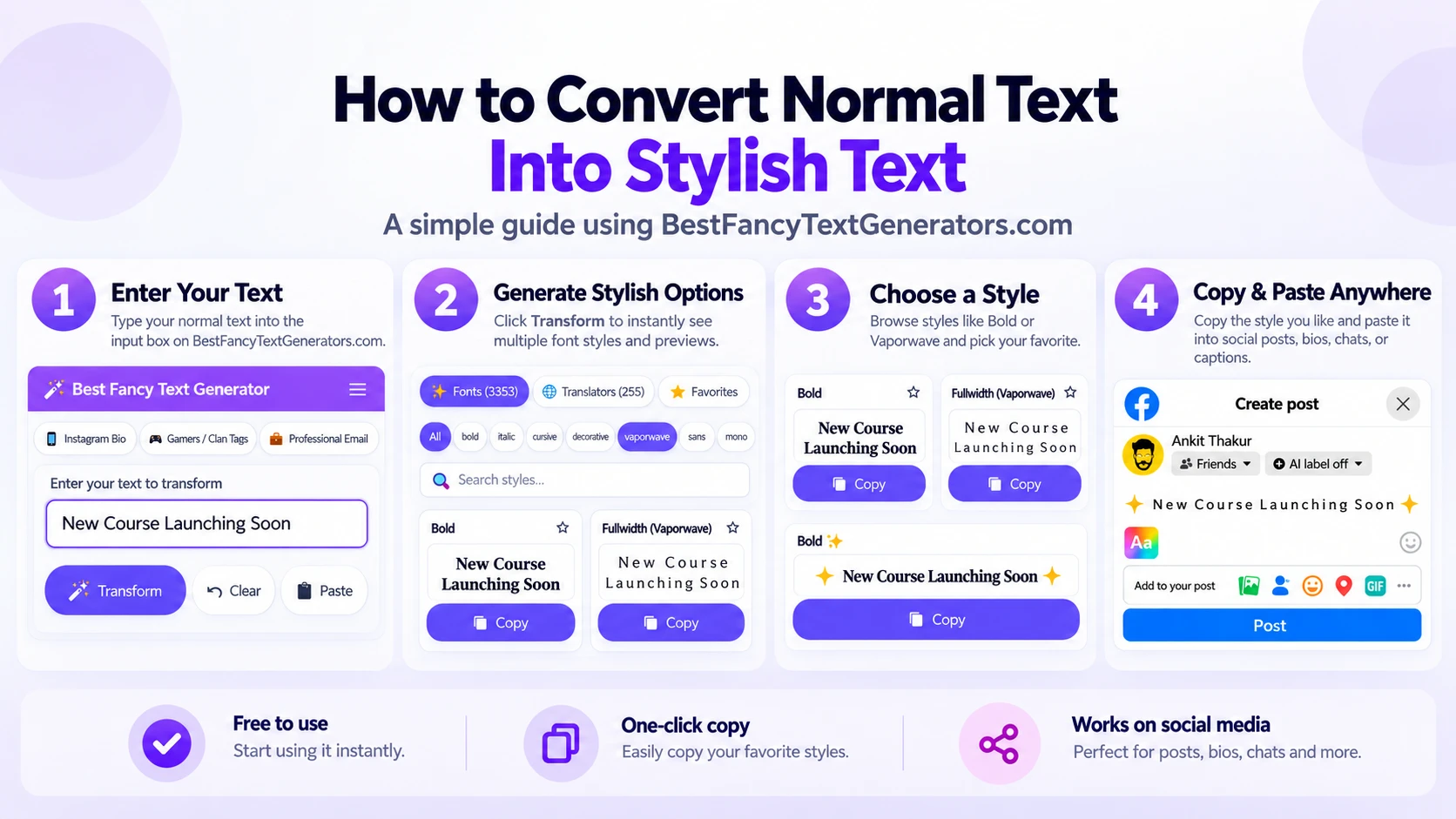
1. Type Your Text
Start with whatever you want to style.
For example:
Ankit Digital
It could be:
- your name,
- username,
- gaming name,
- Instagram bio line,
- caption,
- WhatsApp status,
- or something else.
2. Generate Different Styles
Put the text into a fancy text generator.
You’ll get different versions.
Some may be:
- bold,
- script-like,
- gothic,
- aesthetic,
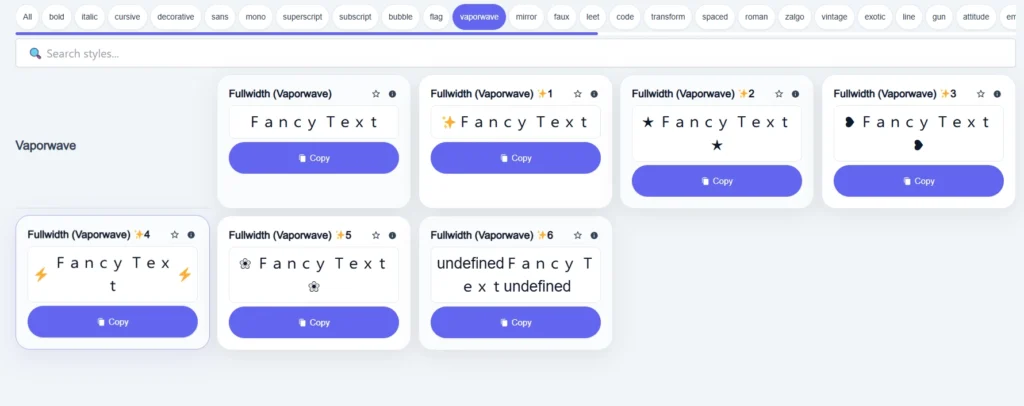
- full-width,
- decorative,
- minimal,
- or slightly weird.
And honestly, some will probably make you think:
“Who is actually going to use this?” 😂
That’s normal.
The whole point is having options.
3. Pick One You Can Actually Read
Don’t choose something just because it has the most symbols.
Ask:
Can I read this without staring at it for ten seconds?
If yes, good.
If it looks cool but nobody can understand the word anymore, maybe skip it.
4. Copy It
Use the copy button or select the result and copy it normally.
5. Paste It
Go to the platform where you want to use it.
For example:
Instagram → Edit Profile → Bio
Paste your text.
Then check it before saving.
That’s the entire process:
Type → Choose → Copy → Paste
Why We Built More Than 2,000 Styles?
When we first started researching fancy text generators, something became pretty obvious.
A lot of sites looked different on the outside, but once we started looking at the actual styles, many of the options felt repetitive.
You’d open one website.
Then another.
Then another.
And many of the same kinds of styles kept appearing.
So instead of simply making another small generator, we started looking at:
- what styles already existed,
- what variations were missing,
- which styles actually worked,
- and which ones looked interesting but were not useful enough to keep.
That process eventually grew the collection to 2,000+ styles.
But then we created a completely new problem.
2,000+ styles is a lot.
Imagine scrolling through thousands of options just because you want one Gothic username.
No thanks.
That’s when the challenge changed from: “How do we give people more styles?”
to:
“How do we give people more styles without making the tool annoying to use?”
So the collection was organised using things such as:
- categories,
- different use cases,
- search,
- and real-time previews.
The goal wasn’t just: “We have lots of styles.”
It became: “We have lots of styles, but you should still be able to find one quickly.”
Don’t Pick a Style Just Because It Looks Crazy
This is probably one of the easiest mistakes to make.
You see a style with loads of symbols and decorative characters and think: “Yep. This is definitely the coolest one.”
Then you paste it into your profile and realise nobody can read your name.
There’s a difference between:
different
and
unreadable.
For a gaming username, a more decorative style may work.
For something like a business profile or an Instagram bio, I’d usually keep it simpler.
For example, you probably don’t need your whole bio to look like:
𝓣𝓱𝓲𝓼 𝓲𝓼 𝓶𝔂 𝓮𝓷𝓽𝓲𝓻𝓮 𝓫𝓲𝓸 𝓪𝓷𝓭 𝓷𝓸𝔀 𝓷𝓸 𝓸𝓷𝓮 𝓬𝓪𝓷 𝓻𝓮𝓪𝓭 𝓲𝓽
One styled name or one short line is often enough.
Fancy Text and Accessibility
Looking different is useful only if people can still understand what you’re trying to say.
Highly stylized Unicode text may be harder for some people to read, and heavily decorative characters may not work consistently with every device or assistive technology.
So for important information such as:
- contact details,
- business names,
- instructions,
- important announcements,
- accessibility-related information,
- or long paragraphs,
plain text is usually the safer choice.
Think of fancy text as decoration, not something that has to replace every normal letter on your profile.
For example:
Good:
Ankit
𝓓𝓲𝓰𝓲𝓽𝓪𝓵 𝓒𝓻𝓮𝓪𝓽𝓸𝓻
Better than making your entire 150-character bio heavily decorative.
A Few Things We Learned While Building the Collection
One interesting thing about this project is that the problem kept changing.
At first: “There aren’t enough different styles.”
So we searched for more.
Then the collection crossed 2,000+ styles.
Suddenly: “Okay… now how do people find the right one?”
That led to categories and search.
Then:
“Does every style actually work?”
That led to filtering out poorly rendering options.
Then came speed.
Someone searching for a fancy text generator probably doesn’t want to sit around waiting for a complicated tool to load.
They usually want to:
Open → Type → Choose → Copy → Leave
That’s why website performance became part of the product itself.
That distinction matters.
The goal is to keep the experience fast, not make an exaggerated claim that every page load on every network will always happen in exactly two seconds.
What If My Stylish Text Doesn’t Work?
Try these steps.
Try a Simpler Style
If a heavily decorative style shows boxes or strange characters, try:
- basic bold,
- script,
- serif-like Unicode,
- or another simpler variation.
Test It Where You’ll Actually Use It
A generator preview is helpful.
But the final test is:
“How does this look on the actual platform?”
Paste it into the real profile, game, post, or app before deciding.
Try Another Style
Different styles use different characters.
One variation may fail while another works completely fine.
Check Username Rules
Gaming platforms and apps may have restrictions on:
- certain characters,
- username length,
- spaces,
- symbols,
- or unsupported text.
A style working in a bio doesn’t automatically mean it will work as a username.
Is Stylish Text Safe?
Fancy text itself is text.
You aren’t installing software simply because you copied a Unicode-style word from a generator.
There isn’t a font program running on your phone when you paste:
𝓗𝓮𝓵𝓵𝓸
The more relevant things to watch are:
- whether the characters display correctly,
- whether the text remains readable,
- and whether the platform accepts those characters.
And obviously, fancy text shouldn’t be used to make spammy, misleading, or intentionally confusing content.
A Quick Example
Let’s say your name is:
- Ankit
- Normal: Ankit
- Bold: 𝐀𝐧𝐤𝐢𝐭
- Script: 𝓐𝓷𝓴𝓲𝓽
- Gothic: 𝔄𝔫𝔨𝔦𝔱
- Full-width: Ankit
Your name hasn’t changed.
You haven’t installed a new font.
You’re simply displaying the letters using different Unicode characters.
That’s basically the idea behind stylish text.
Why BestFancyTextGenerators.com Exists?
The website didn’t start from some huge business plan.
It started with something much simpler:
“I want my name to look different.”
That teenage motivation is part of the original brand story.
The idea was that online identity often comes down to small things:
- your username,
- your bio,
- your gaming name,
- your profile,
- even the way your name looks on the screen.
We searched for a tool and found plenty of fancy text generators.
But many of the options started to feel repetitive.
So instead of building another copy, we started looking at:
What already exists?
What’s missing?
What actually works?
What looks cool but becomes useless after pasting?
That eventually led to:
2,000+ styles → filtering → categories → search → previews → performance
But underneath all of those product decisions, the reason stayed the same:
People like finding small ways to make something feel more like theirs.
The brand story puts it simply:
“You bring the words. We give you more ways to make them yours.”
Frequently Asked Questions
How do I copy stylish text?
Type your text into a fancy text generator, choose a style you like, copy it, and paste it where you want to use it.
Do I need to download a font?
No. Most fancy text generators use Unicode characters, so you normally don’t need to install a font just to copy and paste the result.
Can I use stylish text on Instagram?
You can generally use supported characters in places such as bios, profile names, captions, and other fields that accept them. Always check the final result after pasting.
Can I use stylish text on WhatsApp?
Supported characters can usually be pasted into text and profile-related areas where WhatsApp accepts them.
Can I use stylish text for gaming usernames?
Yes, but username restrictions vary by game or platform. A style that works in a normal message may not necessarily be allowed inside a username field.
Why does my stylish text show boxes?
The characters in that style may not be properly supported on your device or platform.
Try another style with simpler characters.
Why does the text look different after I paste it?
Different platforms, operating systems, and devices may render certain Unicode characters differently.
Always test the final text where you intend to use it.
Is fancy text actually a font?
Usually, no.
What people casually call “fancy fonts” online are often Unicode characters rather than downloadable font files.
Should I use the fanciest style?
Probably not.
I’d normally choose the style that is:
different enough to stand out + simple enough to read.
The goal isn’t to make someone spend five minutes decoding your username.
The Simple Version
If you came here because you just want stylish text, remember this:
- Type your text.
- Try a few different styles.
- Pick one that still looks readable.
- Copy it.
- Paste it where you want to use it.
- Check that it displays correctly.
That’s it.
You don’t need to understand Unicode.
You don’t need design software.
You don’t need to install a font.
And you definitely don’t need to turn every single word into fancy text.
Sometimes one different-looking name or one styled line is enough.
Type → Choose → Copy → Paste
Related Articles:
- How to Fix Copy-Paste Issues with Fancy Fonts
- Fancy Text Generator vs Copy-Paste Symbol Tools
- Why Is Stylish Text Showing as Boxes?

Ankit Thakur is an SEO Specialist and WordPress Developer with 4+ years of experience. He has generated ₹60L+ in revenue through SEO, built 50+ websites, and helped businesses generate measurable leads through organic search and local SEO.