Have you ever seen someone’s Instagram bio with really cool letters, tiny hearts, stars, or arrows and wondered how they made it?
Maybe their name looked like 𝓐𝓵𝓮𝔁 instead of Alex.
Or their bio had something like: ★ Dream Big ♡
And then you search online and find two different kinds of websites: fancy text generators and copy-paste symbol tools.
At first, they seem pretty much the same.
Both give you cool-looking characters. Both let you copy and paste them. And neither usually requires you to install a new font.
But what’s actually the difference between a fancy text generator and a symbol tool?
It’s pretty simple.
A fancy text generator usually changes the letters in your words into different-looking Unicode characters.
A copy-paste symbol tool mainly helps you find individual characters like ★, ♡, →, or ✓ so you can add them wherever you want.
Both can use Unicode, and some tools offer both features.
The main difference is what you’re trying to do: change how your words look or add something decorative around them.
Fancy Text Generator vs Symbol Tool: A Quick Comparison
Let’s say you want to make the words “Dream Big” look more interesting.
Here’s what each option does.
| What you’re using | Example | What changes |
|---|---|---|
| Normal text | Dream Big | Nothing |
| Fancy text generator | 𝓓𝓻𝓮𝓪𝓶 𝓑𝓲𝓰 | The letters look different |
| Symbol tool | ★ Dream Big ★ | Symbols are added |
| Both together | ✨ 𝓓𝓻𝓮𝓪𝓶 𝓑𝓲𝓰 ✨ | Styled letters and decorations |
See the difference?
With a fancy text generator, you’re mainly changing how the words appear.
With a symbol tool, you’re picking extra characters to decorate the text.
And when you combine them, you get a little of both.
Honestly, there’s no rule saying you have to use only one.
What Does a Fancy Text Generator Actually Do?
Let’s say your name is Alex.
You could just write:
Alex
Nothing wrong with that.
But maybe you’re making a gaming profile or updating your Instagram bio, and you want your name to stand out a little.
So you open a fancy text generator and type Alex.
You might get results like:
𝓐𝓵𝓮𝔁
𝔄𝔩𝔢𝔵
Alex
𝐀𝐥𝐞𝐱
These aren’t necessarily new fonts that you’re installing.
Most copy-and-paste fancy text generators use Unicode characters that already have their own character identities.
For example, the regular letter A and the mathematical bold character 𝐀 are different Unicode characters, even though they look similar.
The generator replaces ordinary letters with characters that resemble a particular visual style.
Then you copy the result and paste it somewhere else.
That’s basically the whole process.
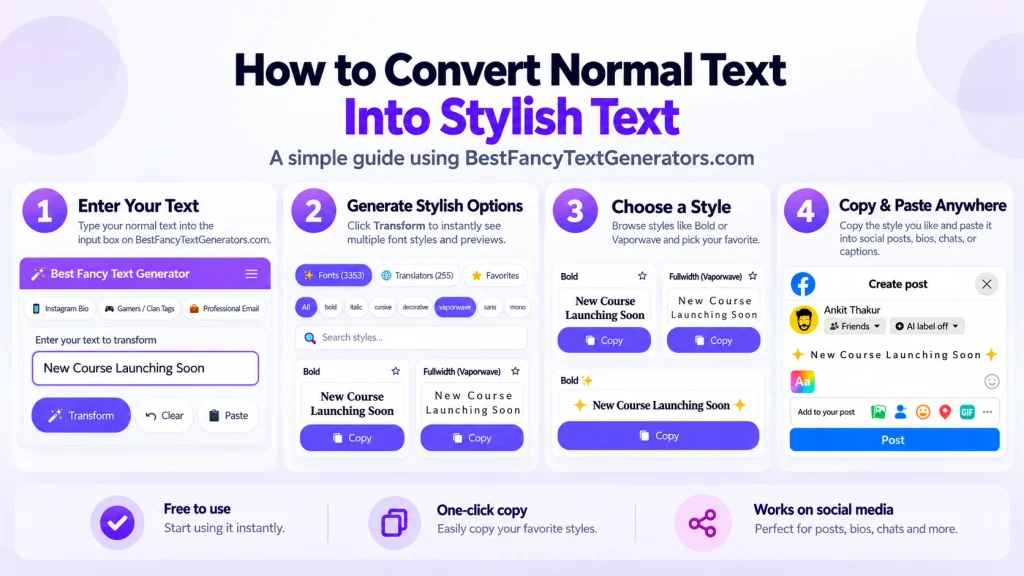
Type → Choose → Copy → Paste
And that’s one of the reasons these tools are so easy to use.
You don’t need Photoshop, a design application, or a downloaded font file just to make your username look different.
What Does a Copy-Paste Symbol Tool Do?
A symbol tool works a little differently.
Instead of changing every letter in your name, it gives you individual symbols that you can copy.
For example:
| Symbol | Common use |
|---|---|
| ★ | Stars and decoration |
| ♡ | Hearts and aesthetic bios |
| → | Arrows and directions |
| ✓ | Checkmarks and lists |
| ◆ | Decorative separators |
| ✦ | Stylish headings |
| ∞ | Infinity symbol |
Let’s say your Instagram bio currently says:
Creating My Own Story
You could add a star:
★ Creating My Own Story
Or a heart:
Creating My Own Story ♡
Or use an arrow to separate two ideas:
Dreamer → Creator
You haven’t transformed the letters themselves.
You’ve just added a character to make the text look a little different.
That’s what symbol tools are especially useful for.
Some also let you search for symbols by category, such as hearts, arrows, stars, or decorative shapes.
And some fancy text generators include symbol collections too, so the two types of tools can overlap.
Are Fancy Text and Symbols Both Unicode?
Yes, many fancy text styles and copy-paste symbols use Unicode.
But they use it in different ways.
Unicode is a standard that gives characters unique identifiers so computers and other devices can represent text consistently.
That includes ordinary letters, numbers, symbols, characters from different writing systems, and emoji.
For example:
- A is a regular Latin letter.
- 𝐀 is a mathematical bold capital A.
- ★ is a star character.
- ♡ is a white heart character.
- → is a rightwards arrow.
These are all different characters.
A fancy text generator might automatically replace the regular letters in your name with alternative Unicode characters.
A symbol tool usually lets you choose characters individually.
One thing worth knowing: Unicode defines the characters, but it doesn’t guarantee they’ll look exactly the same on every screen.
The font, operating system, browser, and app can affect how characters appear.
You can read more about the standard on the official Unicode Consortium website.
Are Symbols and Emojis the Same Thing?
Not exactly, although they can overlap.
You’ve probably used emojis like: ❤️ 😂 🚀 🔥 😎
And you’ve probably seen symbols like: ♡ ★ → ✦ ✓
Both can be represented using Unicode, but emojis are often displayed as colourful pictures, while many traditional symbols are displayed as text-like characters.
For example:
♡ is a heart symbol.
❤️ is a heart displayed in emoji style on many devices.
They have a similar meaning, but they don’t always look the same.
Another interesting example is the star.
★ is a text symbol.
⭐ is commonly displayed as an emoji.
So if you’re going for a simple black-and-white aesthetic, you might prefer text symbols.
If you want something colourful and expressive, emojis can work better.
But remember, some characters have both text and emoji presentation options, and the way they appear can depend on the platform.
Which One Should You Use for Instagram Bios?
Honestly, both can work.
It depends on what kind of bio you’re making.
Let’s say your Instagram bio is:
Just a girl chasing dreams
You could make part of it fancy:
𝓙𝓾𝓼𝓽 𝓪 𝓰𝓲𝓻𝓵 chasing dreams
Or keep the letters normal and add symbols:
✦ Just a girl chasing dreams ♡
Or combine both:
♡ 𝓒𝓱𝓪𝓼𝓲𝓷𝓰 𝓓𝓻𝓮𝓪𝓶𝓼 ✦
All three give a different feel.
Personally, I’d avoid turning every single word into a complicated style.
If someone opens your profile, they should still be able to understand what you’ve written.
And there’s another reason to keep things readable.
Some fancy Unicode characters may not work like ordinary letters in search, copying, or screen-reader pronunciation.
So if you’re trying to help people find your profile by name, using normal letters for important searchable information can be a better choice.
Which One Is Better for Gaming Usernames?
This one’s a little tricky.
Fancy text can look really cool in a gaming username.
For example:
ShadowKing
could become:
𝕾𝖍𝖆𝖉𝖔𝖜𝕶𝖎𝖓𝖌
Or you could keep the regular name and add symbols:
★ ShadowKing ★
And if the game supports both, you might combine them.
But here’s the catch.
Not every game allows every Unicode character in usernames.
Some games only accept certain letters, numbers, or approved symbols.
Others have character limits or restrictions on special characters.
So even if a name looks perfect inside the generator, the game might not accept it.
The easiest way to check is to copy your preferred style and try it in the game’s username field before saving it.
If it gets rejected, try a simpler option.
How to Combine Fancy Text and Symbols Without Making Everything Messy
This is where you can actually have some fun.
Let’s use the name:
Dream Chaser
First, turn it into fancy text:
𝓓𝓻𝓮𝓪𝓶 𝓒𝓱𝓪𝓼𝓮𝓻
Now add a star:
★ 𝓓𝓻𝓮𝓪𝓶 𝓒𝓱𝓪𝓼𝓮𝓻
Or try two small symbols:
✦ 𝓓𝓻𝓮𝓪𝓶 𝓒𝓱𝓪𝓼𝓮𝓻 ♡
Looks pretty nice.
But now imagine adding everything:
★ → ♡ ◆ ✦ 🚀 𝓓𝓻𝓮𝓪𝓶 𝓒𝓱𝓪𝓼𝓮𝓻 🔥 ✨ ✓
Okay, maybe that’s a bit much.
There’s nothing technically wrong with combining lots of symbols, but too many can make your text harder to read.
A couple of well-chosen characters usually look better than adding every cool symbol you can find.
Why We Started Building Our Own Fancy Text Generator?
When I first got interested in fancy text, I wasn’t thinking about Unicode standards or how different characters were encoded.
I just wanted my name to look different.
You know when someone has a really cool Instagram bio or gaming username, and suddenly your own name looks boring?
That was pretty much where the idea started.
So I searched Google for fancy text generators.
And there were loads of websites.
But after opening a bunch of them, I started noticing something.
Many had similar designs, similar layouts, and almost the same text styles.
It felt strange.
If people are using fancy text to look different, why are so many generators offering the same choices?
So instead of building another website with the usual collection, we started researching what styles were already available and what other variations we could create.
That’s when we got more interested in how Unicode characters and combinations actually worked.
But finding more styles wasn’t enough.
Some looked great at first but didn’t display properly in certain situations.
Others weren’t particularly useful once you tried copying and using them.
So we started filtering those styles instead of keeping everything just to make the collection look bigger.
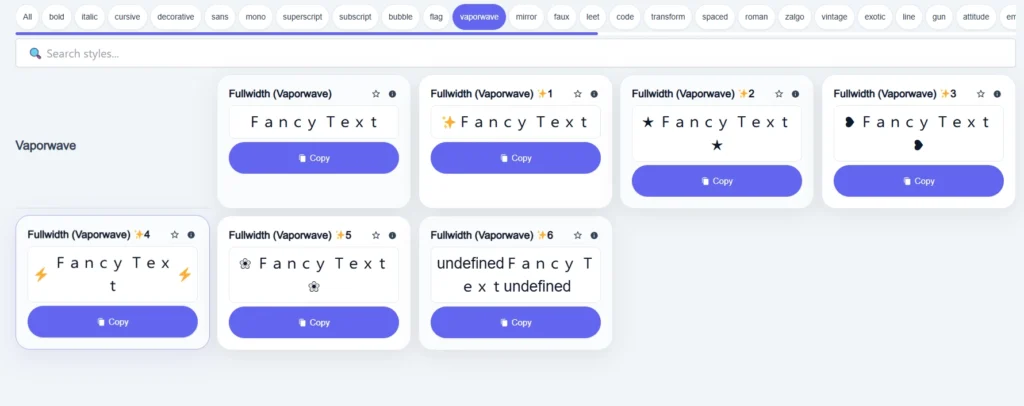
Eventually, the collection behind Best Fancy Text Generators grew to more than 2,000+ styles.
Which sounds great.
Until you realise that someone looking for one cute Instagram font probably doesn’t want to scroll through thousands of options.
That’s why we organised the collection into categories and added search and real-time previews.
The goal became pretty simple.
Give people more ways to make their text different, but make those styles easy to find and use.
And that experience also helped us understand something important.
Sometimes you need a completely different text style.
Sometimes you just need one little star or heart.
More decoration isn’t always better. The right decoration is better.
What If Fancy Text or Symbols Don’t Work After Pasting?
This happens sometimes.
You find a style that looks perfect in a generator.
You copy it.
Then you paste it into another app and suddenly something looks different.
Maybe the characters appear as empty boxes.
Maybe some letters don’t line up correctly.
Or maybe the app won’t accept the text at all.
There are a few possible reasons.
1. The device doesn’t support the characters
Some Unicode characters need particular font support to display correctly.
If a device can’t display a character, it might show a missing-character symbol instead.
2. The app has its own character restrictions
A game or website might reject certain characters even though your device can display them.
That doesn’t mean the characters are broken.
It may simply mean the platform doesn’t allow them in that field.
3. Combining characters can render differently
Some decorative styles use extra marks attached to ordinary letters.
Those combinations can look slightly different depending on the text-rendering system.
4. Emojis may look different across platforms
An emoji on one phone may have a different design on another phone.
That’s normal.
The Unicode character may be the same, but the platform can use its own artwork.
What should you do?
Try a simpler style or a different symbol.
And if the text is important, use normal letters for the part that needs to be clear.
A cool-looking name isn’t much use if nobody can read it.
Are Fancy Text and Symbols Bad for Accessibility?
Not automatically.
But heavily stylised Unicode text can create accessibility problems.
For example, some screen readers may announce mathematical styled letters by their special character names instead of reading them like ordinary words.
That can make a long sentence pretty annoying to listen to.
And decorative symbols can also become confusing when you use too many of them.
Imagine listening to a screen reader announce five random symbols before it even gets to the actual message.
Probably not the best experience.
So I’d use fancy text mostly for small decorative parts, like a username or short profile heading.
For instructions, important messages, professional content, or long paragraphs, normal text is usually easier for everyone.
Fancy Text Generator or Symbol Tool: Which Is Better?
Neither is automatically better.
They just help with different things.
Here’s how I’d choose:
| If you want to… | Use |
|---|---|
| Change how your whole name looks | Fancy text generator |
| Make a sentence look stylish | Fancy text generator |
| Add a heart to your bio | Symbol tool |
| Find stars, arrows, or checkmarks | Symbol tool |
| Decorate an Instagram bio | Both |
| Create a gaming username | Fancy text, symbols, or both if supported |
| Make a simple heading stand out | A symbol or a little fancy text |
| Keep important text easy to read | Normal text |
If you’re not sure, start with normal text.
Then ask yourself:
Do I want to change the letters?
Or do I just want to add something around them?
That usually makes the decision pretty easy.
Frequently Asked Questions
Is a fancy text generator the same as a symbol generator?
Not exactly. A fancy text generator usually transforms text automatically, while a symbol generator or symbol tool mainly helps you find and copy individual characters. Some websites provide both features.
Are fancy fonts and copy-paste symbols both Unicode?
Many are. Copy-and-paste fancy text often uses Unicode characters, and symbols such as ★, ♡, and → are also Unicode characters.
Can I use fancy text and symbols together?
Yes. You can generate styled text and then add hearts, stars, arrows, or other decorative characters around it.
Do I need to install fonts to use fancy text?
Usually not. Unicode-based fancy text can be copied and pasted without downloading font files, although how the characters appear depends on the fonts and rendering support available on the device.
Can I use copy-paste symbols on my phone?
Yes. You can usually copy symbols from a website and paste them into apps on your phone, provided the app supports those characters in the relevant text field.
Why do some fancy letters or symbols show empty boxes?
This often happens because the device or app doesn’t have suitable font support for a character. Try a simpler style or a more commonly supported symbol.
Are fancy text styles searchable on Instagram?
Not always in the same way as ordinary letters. Many stylised characters have different Unicode identities from normal Latin letters, so search and matching behaviour may vary. Keeping important searchable names in regular text is generally safer.
Final Thoughts: Fancy Text Changes Your Words, Symbols Decorate Them
So, what’s the actual difference between fancy text generators and copy-paste symbol tools?
A fancy text generator usually transforms your letters into different-looking characters.
A symbol tool helps you find individual characters to add to your text.
And since both can use Unicode, there’s nothing stopping you from combining them.
You could make your username fancy.
Add a tiny heart.
Maybe a star.
And you’re done.
You don’t need to decorate every single letter or add twenty different symbols just because they’re available.
That’s actually one of the things we learned while building our own generator.
At first, we thought giving people more styles was the whole challenge.
Then we had thousands of options and realised something else.
More choices only help when people can actually find and use what they want.
The same goes for decorating text.
Sometimes a completely different style looks amazing.
Sometimes one little ♡ is enough.
The point isn’t to make your text as complicated as possible.
It’s to make it feel like yours.
And if it looks cool, works where you want to paste it, and people can still read it?
That’s a pretty good result.
Related Articles:
- How to Copy and Paste Stylish Text Anywhere
- Fancy Text Generator vs Font Generator – What’s the Difference?
- Fancy Text Generator vs Unicode Converter – Which is Better

Ankit Thakur is an SEO Specialist and WordPress Developer with 4+ years of experience. He has generated ₹60L+ in revenue through SEO, built 50+ websites, and helped businesses generate measurable leads through organic search and local SEO.