Have you ever searched for a fancy font for your Instagram bio and ended up on a website that lets you type your name and copy a bunch of cool-looking letters?
Maybe you wanted something like:
𝓐𝓷𝓴𝓲𝓽
Or:
𝕬𝖓𝖐𝖎𝖙
And then you noticed something weird.
Some websites call themselves fancy text generators. Others call themselves font generators.
But both seem to do exactly the same thing.
So what’s the difference?
I used to think they were pretty much the same too.
And here’s the interesting part: sometimes they actually are the same kind of tool.
A lot of websites marketed as font generators are really Unicode fancy text generators. They turn ordinary letters into different-looking characters that you can copy and paste.
But actual font-creation tools work differently. They let you create or edit font software that controls how text is displayed.
So the important difference isn’t always what the website calls itself.
It’s what the tool actually creates.
Fancy Text Generator vs Font Generator: Quick Comparison
Let’s make this super simple.
Imagine you type:
Your Name
A fancy text generator might give you:
- 𝐘𝐨𝐮𝐫 𝐍𝐚𝐦𝐞
- 𝒀𝒐𝒖𝒓 𝑵𝒂𝒎𝒆
- 𝔜𝔬𝔲𝔯 𝔑𝔞𝔪𝔢
You can copy one of those styles and paste it into a supported app.
Now imagine opening a design tool, typing “Your Name”, and changing the font to something like a bold or handwritten typeface.
The words are still made from the same ordinary letters. The software is just drawing them using a different font.
And if you’re using an actual font-creation tool, you may be able to design those letter shapes yourself and export them as a font file.
Here’s the difference.
| Feature | Fancy Text Generator | Actual Font Creation Tool |
|---|---|---|
| Main purpose | Create copyable decorative text | Create or edit font software |
| What you get | Unicode characters or decorated text | A font file or font project |
| Typical output | 𝐘𝐨𝐮𝐫 𝐍𝐚𝐦𝐞 | TTF, OTF or other supported font formats |
| Installation needed? | Usually not | Depends on how the font is used |
| Can you copy the result? | Yes, as characters | You can copy text using a font, but its appearance may not transfer |
| Best for | Instagram bios, usernames and short captions | Typography, branding, websites and design projects |
| Technical knowledge needed | Usually very little | Often more, especially when creating fonts |
And one important detail:
A website called a “font generator” might still belong in the first column.
That’s why the output matters more than the name.
What Is a Fancy Text Generator?
A fancy text generator is a tool that takes ordinary text and turns it into different-looking styles.
For example, you type:
Hello
And get:
- 𝐇𝐞𝐥𝐥𝐨
- 𝑯𝒆𝒍𝒍𝒐
- 𝓗𝓮𝓵𝓵𝓸
- 𝕳𝖊𝖑𝖑𝖔
Pretty cool, right?
Most copy-and-paste fancy text generators do this by replacing ordinary letters with other Unicode characters.
Let’s take the letter A.
There’s the normal letter:
A
And there are other Unicode characters that look like styled versions of it:
𝐀 𝑨 𝒜 𝔄 𝔸
Those characters have different Unicode identities.
So the generator isn’t necessarily changing the font installed on your phone.
It’s changing the actual characters in your text.
Why does that matter?
Because you can copy the result.
If you copy 𝐇𝐞𝐥𝐥𝐨 and paste it into an app that supports those characters, the styled characters go with it.
You usually don’t need to install a separate font file.
That’s what makes fancy text generators useful for names, bios and short pieces of text.
You can try this with a fancy text generator, choose a style, and copy the result.

What Is a Font Generator?
This one’s a little confusing because the term font generator is used for different things online.
Not every website using that name creates a real font.
There are generally two kinds of tools worth separating.
1. Online font generators that create Unicode text
You’ve probably seen websites where you type your name and get a collection of fancy-looking versions.
They may call the results:
- Cool fonts.
- Instagram fonts.
- Stylish fonts.
- Gaming fonts.
- Fancy fonts.
But if you’re simply copying the generated characters, the website is probably offering Unicode text transformations rather than a downloadable font.
For example:
Normal: Alex
Generated: 𝓐𝓵𝓮𝔁
You copy the second version and paste it into your profile.
No font file needed.
That’s essentially the same kind of experience as a Unicode fancy text generator.
2. Tools that create actual font files
Now imagine you want to design your own typeface.
Not just make your Instagram name look cool.
You want to decide how every letter should look.
Maybe the letter A should have a different shape. Maybe the lowercase g should look unusual. Maybe you’re creating a handwritten typeface for a design project.
That’s where actual font-creation software comes in.
Tools such as FontForge and BirdFont are made for designing and editing fonts.
Depending on the software and workflow, you can draw or edit glyphs, work on spacing, and export font files.
A glyph is basically the visual shape used to represent a character.
So instead of getting one styled version of your name, you’re creating a font that software can use to display text.
And yes, that’s a much bigger job than changing an Instagram username.
What Are TTF, OTF and WOFF Fonts?
If you’ve ever downloaded a font, you’ve probably seen file names ending with something like .ttf or .otf.
Those extensions tell you what kind of font file you’re dealing with.
Here’s the simple version.
| Format | What it is | Common use |
|---|---|---|
| TTF | TrueType font format | Desktop apps and various design workflows |
| OTF | OpenType font format | Typography, design software and many other applications |
| WOFF | Web Open Font Format | Delivering fonts to web browsers |
| WOFF2 | A more compact web font format | Modern websites |
The format doesn’t decide whether a font is free or commercially licensed.
That’s a separate issue.
For example, a paid font and a free font could both come as OTF files.
And not every font requires manual installation.
Some design applications provide access to fonts through their own libraries, while websites can load fonts directly for visitors.
If you’re interested in how web fonts work, the MDN web fonts guide explains how fonts can be loaded using CSS.
What Happens When You Copy Fancy Text vs Text Using a Real Font?
This is probably the easiest way to understand the technical difference.
Let’s say you type:
HELLO
Example 1: Using a fancy text generator
The tool changes the text into:
𝐇𝐄𝐋𝐋𝐎
Now copy it.
If you paste those characters somewhere else, you’re pasting different Unicode characters from the original HELLO.
Their appearance can still depend on the receiving app and its fonts, but the character identities are preserved when they’re copied successfully.
Example 2: Applying a font in a design editor
Now imagine typing HELLO into a design application.
You change the font from one typeface to another.
Maybe it looks handwritten.
Maybe it looks bold and futuristic.
But the underlying letters are still H, E, L, L and O.
The application is displaying them using a different font.
If you copy that text into an ordinary plain-text field, the characters usually remain HELLO.
The chosen font appearance might not transfer.
However, some applications support rich-text formatting, so copying between compatible applications can preserve font formatting.
That’s the key difference: Unicode fancy text often changes the characters, while applying a font changes how the existing characters are rendered.
Which One Should You Use?
You don’t need to learn font design just to make your username look different.
And you probably shouldn’t rely on a fancy text generator to build an entire professional typeface.
They solve different problems.
| What you want to do | Better starting point |
|---|---|
| Make an Instagram name look different | Fancy text generator |
| Create a gaming username | Fancy text generator |
| Decorate a WhatsApp status | Fancy text generator |
| Style a short social media caption | Fancy text generator |
| Choose typography for a company logo | Licensed fonts and design tools |
| Design a website’s typography | Real fonts |
| Create a new typeface | Font-creation software |
| Build a professional brand identity | Typography and design tools |
| Create a custom downloadable font file | Font-creation software |
These aren’t absolute rules.
For example, you can create artwork using Unicode characters, and you can use real fonts in social media graphics.
But if your main goal is quick copy-and-paste styling, Unicode fancy text is usually much easier.
Why We Built Our Own Fancy Text Generator
When I first got interested in fancy text, I wasn’t thinking about TTF files, typography or how Unicode characters were encoded.
I just wanted my name to look different.
You know when someone has a really cool Instagram bio or gaming username, and suddenly your own name looks boring?
That was basically the starting point.
So I searched Google for fancy text generators.
And there were loads of websites.
But after opening several of them, I kept noticing something.
Many had similar layouts.
And a lot of them offered the same popular text styles.
Which felt strange.
If people were using these tools to stand out, why were so many generators giving them the same choices?
That’s what got us interested in building Best Fancy Text Generators.
We started looking into existing Unicode styles and searching for variations that weren’t being offered as often.
But not every style we found was actually useful.
Some characters didn’t display properly in the situations we checked, while others were difficult to read or use.
So we focused on filtering styles rather than collecting everything just to make the number bigger.
Eventually, the collection grew to more than 2,000+ styles.
Then we discovered another problem.
Imagine opening a website just to make your Instagram name look cute, and suddenly you have thousands of options to scroll through.
Not exactly fun.
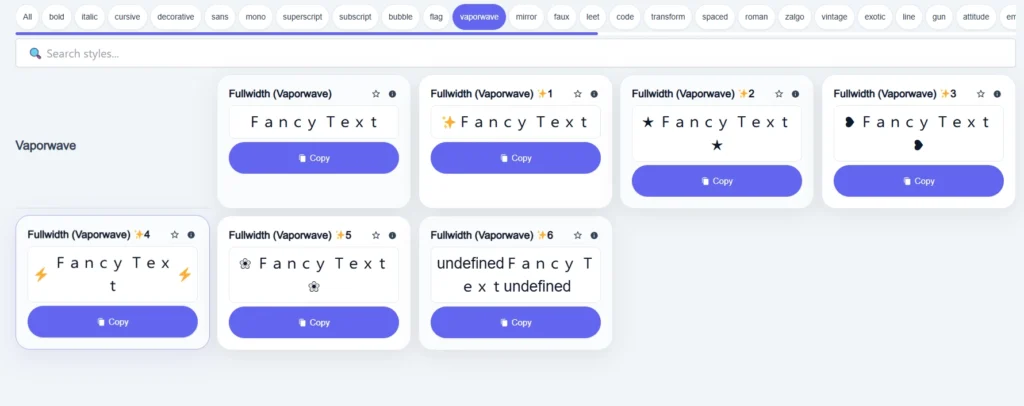
That’s why we added categories, search and real-time previews.
We wanted the experience to stay simple:
Type → Preview → Choose → Copy → Paste
And that whole process taught us something about the difference between fonts and fancy text.
We weren’t trying to design an entirely new typeface.
We were trying to help people find useful Unicode text styles they could copy and use.
Those are two pretty different goals.
Why Fancy Text Doesn’t Always Look the Same Everywhere?
Have you ever copied a fancy username that looked perfect in a generator, only to find that it looked slightly different in another app?
That can happen.
And it’s usually related to Unicode support, fonts or the way the application handles text.
Different devices can display characters differently
Unicode gives characters standard identities, but it doesn’t force every device to draw them in exactly the same way.
Your phone, computer and browser may use different fonts or text-rendering systems.
So the characters can look slightly different.
Some characters appear as empty boxes
If the device or application doesn’t have suitable font support, it may show an empty box or another missing-character symbol.
Some games don’t accept fancy Unicode names
A game might restrict its username field to particular characters.
That means a fancy name can look fine in the generator but still be rejected by the game.
Fancy text can affect readability and accessibility
This is another important difference.
Some Unicode letters that look like bold or cursive versions of normal text can be announced differently by screen readers.
They may also behave differently in searches and text matching.
So if you’re writing a long message, important instructions or something people need to find easily, ordinary text is usually the better choice.
You can learn more about Unicode from the Unicode Consortium.
Are Fancy Text Generators Free? What About Real Fonts?
Most people using a fancy text generator just want to type something and copy the result.
Many browser-based Unicode generators offer that for free.
Best Fancy Text Generators currently describes its main tool as free to use without signing up.
However, individual websites can have different features, limits or pricing.
Real fonts are a different situation.
Some font files are free for commercial and personal use under open-source licenses.
Others are paid.
And some are free for personal use but require additional permission for business projects.
For example, the fonts available through Google Fonts are offered under open-source licenses that permit commercial use, subject to the relevant license conditions.
If you’re using an actual font in a logo, website, product or client project, check its license.
Copying Unicode fancy text isn’t the same as downloading or licensing font software. But that doesn’t mean every use of any design is automatically free from other legal restrictions.
Common Mistakes People Make About Fancy Text and Fonts
Thinking every font generator creates a font file
A lot of websites use the term “font generator” for Unicode copy-and-paste text.
Check what the tool actually outputs.
Thinking you need to install a font for fancy text
Usually, you don’t.
Unicode fancy text can be copied directly into supported apps.
Thinking real-font text can’t be copied
You can copy text that’s displayed using a real font.
What may not transfer is the selected visual formatting.
Assuming fancy text works everywhere
Different apps and games may restrict characters, and some devices may display them differently.
Using decorative Unicode text for everything
Fancy text can look great in a short username.
An entire paragraph in decorative letters?
Probably not the best reading experience.
Frequently Asked Questions
Is a fancy text generator the same as a font generator?
Sometimes.
Many websites called font generators are actually Unicode fancy text generators.
However, professional font-creation tools can produce real font software, such as TTF or OTF files.
Do fancy text generators create real fonts?
Most copy-and-paste fancy text generators don’t create font files.
They usually transform ordinary letters into other Unicode characters.
Can I copy text written with a real font?
Yes.
You can copy ordinary text even when it’s displayed using a particular font.
However, the font formatting may not transfer when you paste it into an application that only accepts plain text.
What’s the difference between a font and a Unicode character?
A Unicode character has a standard identity, such as the letter A.
A font provides the visual glyphs used to display characters.
Fancy text generators often substitute one Unicode character for another to create a different-looking result.
Do I need to install fancy text fonts?
Not usually.
If the generator produces Unicode text, you can generally copy the characters directly without installing font files.
Can I use fancy text for my business?
You can use Unicode characters in many business contexts, but that doesn’t automatically settle every copyright, trademark or design-right issue.
For logos and professional typography, appropriately licensed fonts and design tools are usually more suitable.
Which is better for Instagram bios?
If you want quick copy-and-paste styling, a Unicode fancy text generator is usually the easier option.
Just check that the characters display correctly and don’t make important information difficult to read or search.
What if I want to create my own font?
You’ll need a tool designed for font creation or editing.
Software such as FontForge can help you design glyphs and export font files.
That’s different from generating decorative Unicode text for a username.
Final Thoughts: Fancy Text and Fonts Aren’t the Same Thing
So, what’s the actual difference between a fancy text generator and a font generator?
It depends on what the tool produces.
Some websites use both names for basically the same Unicode text generator.
But a real font-creation tool can create or edit font software that controls how text is displayed.
If you just want your Instagram bio, gaming username or WhatsApp status to look different, you probably don’t need to worry about creating a font.
You just need a style you like.
And that’s actually where our whole idea started.
We wanted our names to look different.
We found that many existing generators offered similar styles.
So we started researching more Unicode variations, filtering unusable options, and eventually building a collection with categories, search and previews.
But we never wanted to turn a five-second task into something complicated.
Sometimes all you want is to type your name, find something cool and copy it.
Fancy text is great for quickly changing the characters you use. Real fonts are what you use when you need control over typography.
And now that you know the difference, choosing the right tool becomes a lot easier.
Related Articles:
- Fancy Text Generator vs Unicode Converter – Which is Better
- Fancy Text Generator vs Copy-Paste Symbol Tools
- Fancy Text Generator vs Graphic Design Tools
- What is Fancy Text?

Ankit Thakur is an SEO Specialist and WordPress Developer with 4+ years of experience. He has generated ₹60L+ in revenue through SEO, built 50+ websites, and helped businesses generate measurable leads through organic search and local SEO.