Have you ever opened someone’s Instagram profile and wondered how they made their bio look so cool?
Maybe their name has fancy letters, a tiny heart, or some cute symbols that make the whole thing look different.
And then you look at your own bio.
Just normal text.
Nothing wrong with it, but sometimes you want something a little more interesting.
The good thing is, you don’t need to be a designer or download a bunch of fonts to make fancy text.
You can use a fancy text generator, copy a style you like, and add symbols or emojis wherever they fit.
For example:
Normal: Dream Big
Fancy: 𝓓𝓻𝓮𝓪𝓶 𝓑𝓲𝓰
With symbols: ★ 𝓓𝓻𝓮𝓪𝓶 𝓑𝓲𝓰 ★
With emojis: ✨ 𝓓𝓻𝓮𝓪𝓶 𝓑𝓲𝓰 🚀
That’s basically what we’re going to do.
And don’t worry, it’s actually pretty easy.
How to Create Fancy Text With Symbols and Emojis?
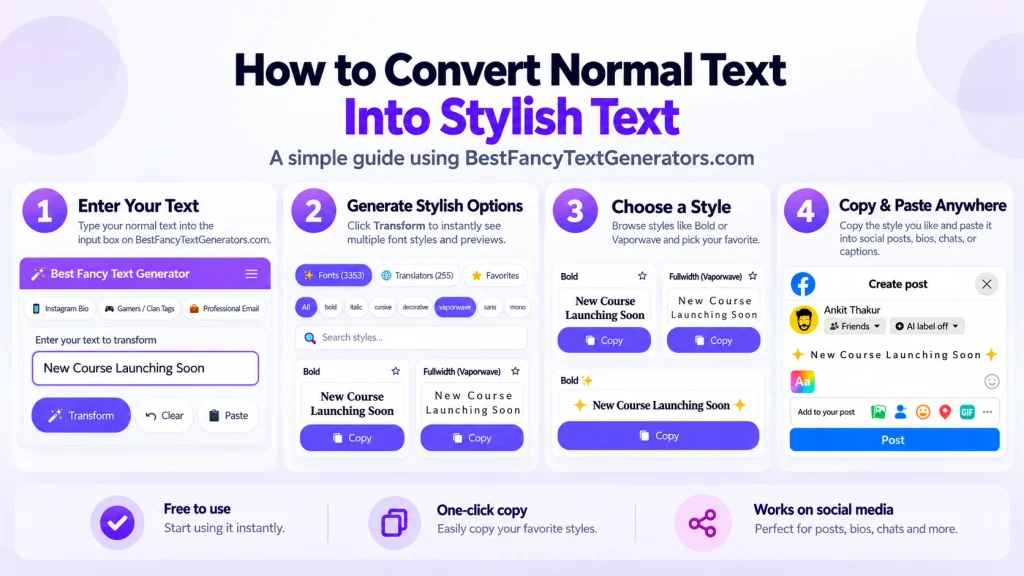
Let’s use a simple example.
Say you want to make this line look better: Grow Your Brand Fast
Here’s how I’d do it.
Step 1: Write the text you want to style

Start with your normal text.
It could be your name, Instagram bio, gaming username, WhatsApp status, or anything else.
For this example: Grow Your Brand Fast
Don’t worry about symbols or emojis yet.
First, figure out what you actually want to say.
Step 2: Use a fancy text generator

Open Best Fancy Text Generators and type your text into the input box.
You’ll see different styles based on the text you entered.
For example:
- 𝐆𝐫𝐨𝐰 𝐘𝐨𝐮𝐫 𝐁𝐫𝐚𝐧𝐝 𝐅𝐚𝐬𝐭
- 𝑮𝒓𝒐𝒘 𝒀𝒐𝒖𝒓 𝑩𝒓𝒂𝒏𝒅 𝑭𝒂𝒔𝒕
- 𝔊𝔯𝔬𝔴 𝔜𝔬𝔲𝔯 𝔅𝔯𝔞𝔫𝔡 𝔉𝔞𝔰𝔱
Choose one that looks good and is still easy to read.
Personally, I wouldn’t pick the most complicated style just because it looks different.
Sometimes the simpler ones actually look better.
Step 3: Copy the style you like
Once you find a style, use its copy option.
Now you have the fancy version of your text ready to paste.
For example:
𝐆𝐫𝐨𝐰 𝐘𝐨𝐮𝐫 𝐁𝐫𝐚𝐧𝐝 𝐅𝐚𝐬𝐭
That’s already enough if all you wanted was a different-looking line.
But if you want to decorate it a little more, keep going.
Step 4: Add a symbol
Symbols are great when you want to highlight something without changing everything.
You could add a star: ★ 𝐆𝐫𝐨𝐰 𝐘𝐨𝐮𝐫 𝐁𝐫𝐚𝐧𝐝 𝐅𝐚𝐬𝐭
Or an arrow: → 𝐆𝐫𝐨𝐰 𝐘𝐨𝐮𝐫 𝐁𝐫𝐚𝐧𝐝 𝐅𝐚𝐬𝐭
Or a simple decorative character: ✦ 𝐆𝐫𝐨𝐰 𝐘𝐨𝐮𝐫 𝐁𝐫𝐚𝐧𝐝 𝐅𝐚𝐬𝐭
You can copy these symbols individually and paste them before or after your text.
You don’t need five symbols on every line.
Just choose something that actually fits.
Step 5: Add an emoji if you want
Now let’s add a little personality.
For a line about growth, a rocket emoji might work: 🚀 𝐆𝐫𝐨𝐰 𝐘𝐨𝐮𝐫 𝐁𝐫𝐚𝐧𝐝 𝐅𝐚𝐬𝐭
If you’re talking about an idea, you could try:💡 𝐍𝐞𝐰 𝐈𝐝𝐞𝐚
Or if it’s something exciting:🔥 𝐍𝐞𝐰 𝐔𝐩𝐝𝐚𝐭𝐞
The emoji should match the message.
You don’t have to put a rocket on everything.
Step 6: Paste it where you want to use it
Open Instagram, WhatsApp, Discord, or whichever app you’re using.
Paste your styled text into the appropriate field.
Before saving it, check how it looks.
Some apps and devices display Unicode characters differently, and certain fields may not accept every character.
If the text looks strange or gets rejected, try another style.

How to Make Fancy Text on Your Phone?
You don’t need a computer for this.
You can do the same thing on an Android phone or iPhone.
Let’s say you’re updating your Instagram bio.
Open your browser and visit a fancy text generator.
Type your name or bio, find a style you like, and tap the copy option.
Then open Instagram, go to Edit Profile, and paste the text into the field you want to change.
If you want emojis, you can add them using your phone’s emoji keyboard.
For stars, arrows, hearts, or other symbols, you can copy them from a symbol tool or another source that displays the character.
For example:
- Normal: Living My Story
- Styled: 𝓛𝓲𝓿𝓲𝓷𝓰 𝓜𝔂 𝓢𝓽𝓸𝓻𝔂
- With a symbol: ♡ 𝓛𝓲𝓿𝓲𝓷𝓰 𝓜𝔂 𝓢𝓽𝓸𝓻𝔂
- With emojis: ✨ 𝓛𝓲𝓿𝓲𝓷𝓰 𝓜𝔂 𝓢𝓽𝓸𝓻𝔂 ♡
That’s it.
You don’t normally need to install a special font or keyboard app just to copy Unicode fancy text.
Fancy Text, Symbols and Emojis: What’s the Difference?
They can look similar when you’re using them together, but they’re not exactly the same.
Here’s a quick comparison.
| Type | Example | What it does |
|---|---|---|
| Normal text | Dream Big | Regular letters |
| Fancy text | 𝓓𝓻𝓮𝓪𝓶 𝓑𝓲𝓰 | Changes the look of letters |
| Symbols | ★ Dream Big ★ | Adds decorative characters |
| Emojis | 🚀 Dream Big ✨ | Adds expressive characters or images |
| Combined | ✨ 𝓓𝓻𝓮𝓪𝓶 𝓑𝓲𝓰 ★ | Mixes different styles |
Most copy-and-paste fancy text generators use Unicode characters rather than installing new font files.
For example, the normal letter A and the mathematical bold character 𝐀 are different Unicode characters.
Similarly, symbols like ★ and → are Unicode characters.
Emojis are also represented using Unicode, although many appear as colourful images depending on the device or platform.
So when you combine fancy letters, symbols and emojis, you’re often mixing different kinds of Unicode characters.
You can learn more about this from the official Unicode Consortium.
Fancy Text Ideas You Can Copy and Try
Sometimes it’s easier to understand what looks good when you can actually see a few examples.
Here are some you can experiment with.
Cute and aesthetic text
- ♡ 𝓛𝓸𝓿𝓮 𝓨𝓸𝓾𝓻𝓼𝓮𝓵𝓯 ♡
- ✦ 𝓓𝓻𝓮𝓪𝓶 𝓑𝓲𝓰 ✦
- ✨ 𝓙𝓾𝓼𝓽 𝓥𝓲𝓫𝓮𝓼 ✨
These can work nicely in personal bios or short captions.
Motivational text
🚀 𝐊𝐞𝐞𝐩 𝐆𝐨𝐢𝐧𝐠
★ 𝐍𝐞𝐯𝐞𝐫 𝐆𝐢𝐯𝐞 𝐔𝐩
→ 𝐎𝐧𝐞 𝐒𝐭𝐞𝐩 𝐀𝐭 𝐀 𝐓𝐢𝐦𝐞
You don’t need to style every single word in a long quote.
A short line is usually enough.
Gaming-style text
★ 𝕾𝖍𝖆𝖉𝖔𝖜 ★
⚡ 𝐆𝐚𝐦𝐞𝐫 𝐌𝐨𝐝𝐞
◆ 𝕯𝖆𝖗𝖐 𝕶𝖎𝖓𝖌 ◆
These might look cool, but remember that some games don’t accept all Unicode characters in usernames.
Test your name in the actual game before choosing it.
Social media headings
📌 𝐍𝐞𝐰 𝐔𝐩𝐝𝐚𝐭𝐞
💡 𝐐𝐮𝐢𝐜𝐤 𝐓𝐢𝐩
✓ 𝐓𝐡𝐢𝐧𝐠𝐬 𝐓𝐨 𝐑𝐞𝐦𝐞𝐦𝐛𝐞𝐫
These work best when the styled text stays short and readable.
Useful Symbols and Emojis for Fancy Text
You don’t need hundreds of decorations to make a line look interesting.
A few simple ones can do the job.
| Character | Example use |
|---|---|
| ★ | ★ My Favourite Things |
| ♡ | Dreamer ♡ |
| → | → Read More |
| ✓ | ✓ Task Complete |
| ◆ | ◆ New Collection |
| ✦ | ✦ Just Me ✦ |
| 🚀 | 🚀 Moving Forward |
| 💡 | 💡 New Idea |
| 🔥 | 🔥 Big News |
| 📌 | 📌 Important |
You can copy a symbol, combine it with generated text, and see how it looks.
My only advice?
Don’t add everything just because it’s available.
A simple heart or star can look nicer than a whole line full of random characters.
Where Can You Use Fancy Text With Emojis and Symbols?
There are plenty of places where decorated text can work.
But the style you choose should match where you’re using it.
Instagram bios and captions
Instagram is probably one of the most common places people experiment with fancy text.
For example:
✨ 𝓒𝓱𝓪𝓼𝓲𝓷𝓰 𝓓𝓻𝓮𝓪𝓶𝓼
♡ Creating My Own Story
Or something simple:
🚀 𝐃𝐚𝐢𝐥𝐲 𝐈𝐝𝐞𝐚𝐬
Just remember that stylised Unicode letters may not behave exactly like ordinary letters in search.
If you want people to find your account easily, using normal text for important searchable information can be a good idea.
WhatsApp statuses
Fancy text can make a short WhatsApp status look more personal.
For example:
💡 𝐒𝐭𝐚𝐲 𝐅𝐨𝐜𝐮𝐬𝐞𝐝
Or:
♡ 𝓖𝓸𝓸𝓭 𝓥𝓲𝓫𝓮𝓼
Since WhatsApp is often used for everyday messages, I’d avoid making important conversations difficult to read.
Gaming usernames
This is where you can try more unusual styles.
But some games restrict special characters, symbols, or the total number of characters allowed.
A name that copies successfully from a generator might still be rejected by the game.
If that happens, try a simpler variation.
YouTube and other social platforms
You can use short styled headings, symbols, or emojis in appropriate profile and content fields.
For example:
🔥 𝐖𝐚𝐭𝐜𝐡 𝐍𝐞𝐱𝐭
→ New Video
Just check how the text appears after publishing.
LinkedIn and professional content
I’d be more careful here.
A simple symbol or emoji can help organise a post, but heavily decorated Unicode text can make professional content harder to read.
For example:
💡 Key Learning
is usually easier to understand than a whole paragraph written in decorative characters.
Sometimes normal text is actually the better design choice.
What Building Our Own Fancy Text Generator Taught Us?
When I first got interested in fancy text, I wasn’t thinking about Unicode or different character combinations.
I just wanted my name to look different online.
You know when someone has a really cool Instagram bio or gaming name and suddenly your own profile looks kind of boring?
That was basically the starting point.
So I searched Google for fancy text generators.
There were plenty of websites.
But after opening several of them, I kept noticing the same thing.
Similar designs.
Similar layouts.
And a lot of the same fancy text styles.
If everyone is using fancy text to look different, why are so many generators offering almost identical options?
That question eventually led us to start building Best Fancy Text Generators.
We researched what styles were already available and looked for Unicode characters and variations that weren’t being offered as often.
But finding more styles wasn’t the only problem.
Some combinations looked interesting but didn’t render properly or weren’t useful when copied.
So we started filtering out styles that didn’t work the way we wanted.
Eventually, the collection grew to 2,000+ styles.
Which sounded great at first.
Until we realised something.
Imagine opening a generator just to make your Instagram name look cute, and suddenly you’ve got thousands of options to scroll through.
Not exactly fun.
That’s why we started organising the collection into categories and added search and real-time previews.
The idea was to help people find the style they actually wanted without making everything complicated.
And while working on the styles, we learned something that’s useful when combining fancy text with symbols and emojis too.
Just because something looks different doesn’t automatically mean it looks better.
Sometimes a simple Unicode style works perfectly.
Sometimes adding a tiny heart makes it look nicer.
And sometimes you’ve already added enough.
Why Fancy Text Sometimes Looks Different After You Paste It?
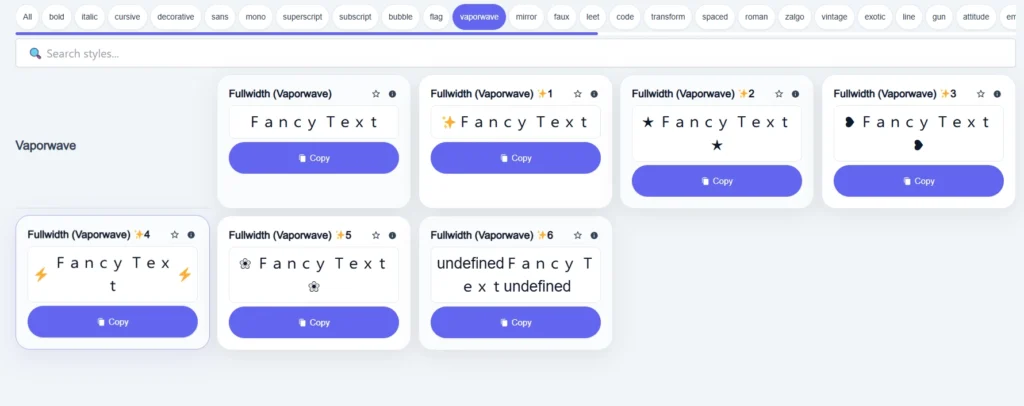
Have you ever copied a fancy style that looked perfect in the generator, but after pasting it somewhere else, it looked strange?
It happens.
And it doesn’t always mean the generator is broken.
Fancy Unicode characters rely on the fonts and text-rendering support available on the device or application displaying them.
So a style might appear differently on another phone, browser, or app.
Some characters may appear as boxes
If a device doesn’t support a particular character, it might show a missing-character symbol instead.
Try a simpler style.
Some symbols or emojis may look different
An emoji on an iPhone may look different from the same emoji on another platform.
That’s normal because different platforms can use different artwork to display emoji characters.
Some apps may reject fancy characters
Games, websites, and apps can restrict which characters are allowed in certain text fields.
So even if you can copy a fancy username, that doesn’t guarantee every game will accept it.
Fancy text can be harder to read with screen readers
This is another reason not to style every word.
Some Unicode characters that look like decorative letters may be announced differently by screen readers.
That can make a full paragraph of fancy text confusing for people using assistive technology.
For important information, instructions, and long messages, ordinary text is usually the safer choice for readability.
Common Mistakes When Using Fancy Text With Emojis
It’s easy to get carried away once you start finding cool styles.
I’ve definitely seen bios where there’s so much happening that you don’t even know what to look at.
Here are a few things I’d avoid.
Making every word fancy
A single styled word can stand out more than an entire paragraph written in unusual characters.
Adding too many emojis
Compare these:
🔥🚀💯✨😎🔥🚀 Big Update 💡📌
And:
🚀 Big Update
The second version is much easier to read.
Using symbols that don’t match
If you’re writing something serious, random hearts, stars, and fire emojis might not fit.
Choose characters that actually suit the message.
Not checking the final result
Before saving your bio or username, look at it in the actual app.
Something that looks great in a generator might look different after pasting.
Frequently Asked Questions
How do I make fancy text with emojis?
Type your words into a fancy text generator, choose a Unicode style, copy the result, and add emojis using your device’s emoji keyboard.
Can I add symbols to fancy text?
Yes. You can copy stars, hearts, arrows, and other Unicode symbols and place them before, after, or between your styled words.
Can I create fancy text with emojis on an iPhone or Android phone?
Yes. Open a browser-based fancy text generator, copy your preferred style, then paste it into an app and add emojis from your phone’s keyboard.
Do I need to download fonts to create fancy text?
Usually not. Copy-and-paste fancy text generators generally use Unicode characters, so you can copy styled text without installing font files.
Why isn’t my fancy text working on Instagram or in a game?
The platform might restrict certain characters, or your device might not display every Unicode character correctly. Try a simpler style and check the platform’s character rules.
Can I use fancy text in an entire paragraph?
You can, but I wouldn’t recommend it for most situations.
Long passages of styled Unicode characters can be harder to read, search, and understand with assistive technology.
It’s often better to style a short phrase or heading.
Final Thoughts
Making fancy text with symbols and emojis is pretty easy once you know how it works.
Write your text.
Choose a style.
Add a symbol or emoji if it fits.
Then copy and paste it wherever you want to use it.
You don’t need to turn every letter into something unusual or decorate every line with stars and rockets.
And that’s actually one of the things we learned while building our own generator.
At first, we thought the challenge was finding more styles.
Then we had thousands of them and realised that people also needed an easy way to find the right one.
Because having loads of options doesn’t automatically make something useful.
The same goes for decorating text.
Sometimes one fancy word looks better than a whole sentence.
Sometimes a little ♡ is enough.
And sometimes normal text looks better than anything else.
The point isn’t to make your text as fancy as possible.
It’s to make something that looks like you, feels right, and is still easy for people to read.
And when you find that style?
Copy it, paste it, and you’re done.
Related Articles:
- Fancy Text Generator vs Copy-Paste Symbol Tools
- How to Create Fancy Text for Instagram Bio
- How to Create Fancy Text Without Losing Readability

Ankit Thakur is an SEO Specialist and WordPress Developer with 4+ years of experience. He has generated ₹60L+ in revenue through SEO, built 50+ websites, and helped businesses generate measurable leads through organic search and local SEO.