Your Instagram bio is one of the first things people notice when they open your profile.
And when you scroll through hundreds of profiles, a lot of them start looking pretty similar.
Normal name.
Normal text.
A few emojis.
Maybe a quote.
There’s nothing wrong with that.
But sometimes you just want your profile to feel a little more like you.
Maybe you want your name to stand out.
Maybe you want your profession to look cleaner.
Or maybe you saw someone else using a fancy Instagram bio and thought:
“Wait, how did they do that?”
That’s pretty close to how our interest in fancy text started too.
So if you want to create fancy text for your Instagram bio, here’s the easiest way to do it.
What Is Fancy Text for Instagram?
Most online fancy text generators don’t install a new font on your phone.
Instead, they usually replace normal letters with different-looking Unicode characters.
For example:
Normal: Digital Marketer
Fancy:
- 𝓓𝓲𝓰𝓲𝓽𝓪𝓵 𝓜𝓪𝓻𝓴𝓮𝓽𝓮𝓻
- or
- 𝐃𝐢𝐠𝐢𝐭𝐚𝐥 𝐌𝐚𝐫𝐤𝐞𝐭𝐞𝐫
- or
- Digital Marketer
It can look like you changed the font, but what you’re usually doing is copying different text characters and pasting them into Instagram.
That’s why you don’t normally need to install a font file or extra app.
How to Create Fancy Text for Instagram Bio?
The easiest process is:
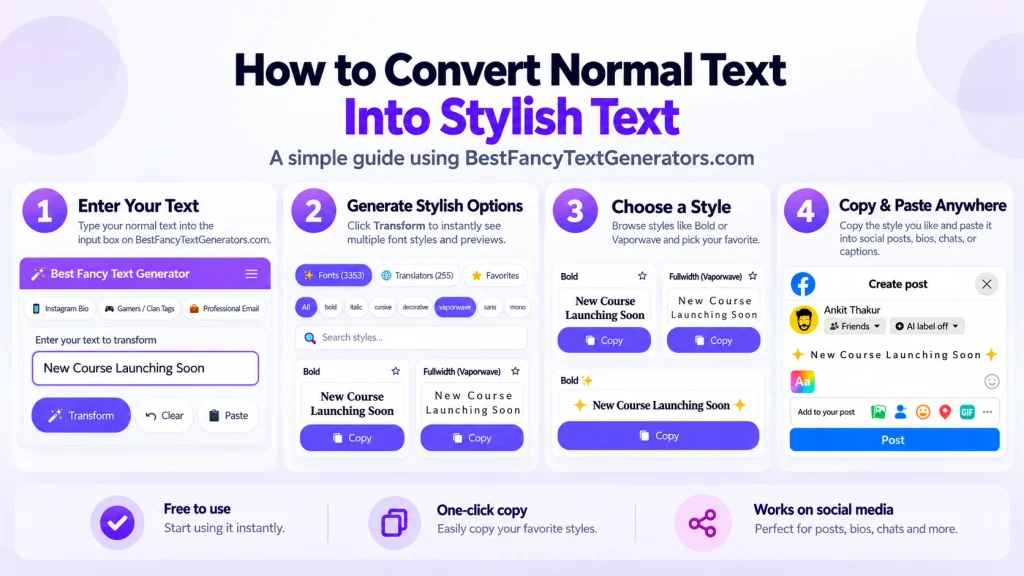
Write → Generate → Choose → Copy → Paste
1. Write your bio first
Before looking at styles, decide what you actually want to say.
For example:
Digital Marketer | Helping Brands Grow
or
Content Creator
Travel • Fashion • Lifestyle
Get the message right first.
Make it fancy later.
2. Put your text into a fancy text generator

Enter your name, profession, bio line, or any short text into a Fancy Text Generator.
For example:
Digital Marketer
can become:
𝓓𝓲𝓰𝓲𝓽𝓪𝓵 𝓜𝓪𝓻𝓴𝓮𝓽𝓮𝓻
𝐃𝐢𝐠𝐢𝐭𝐚𝐥 𝐌𝐚𝐫𝐤𝐞𝐭𝐞𝐫
𝔇𝔦𝔤𝔦𝔱𝔞𝔩 𝔐𝔞𝔯𝔨𝔢𝔱𝔢𝔯
𝑫𝒊𝒈𝒊𝒕𝒂𝒍 𝑴𝒂𝒓𝒌𝒆𝒕𝒆𝒓
Then compare the options and see which one actually suits your profile.
3. Don’t just pick the craziest style
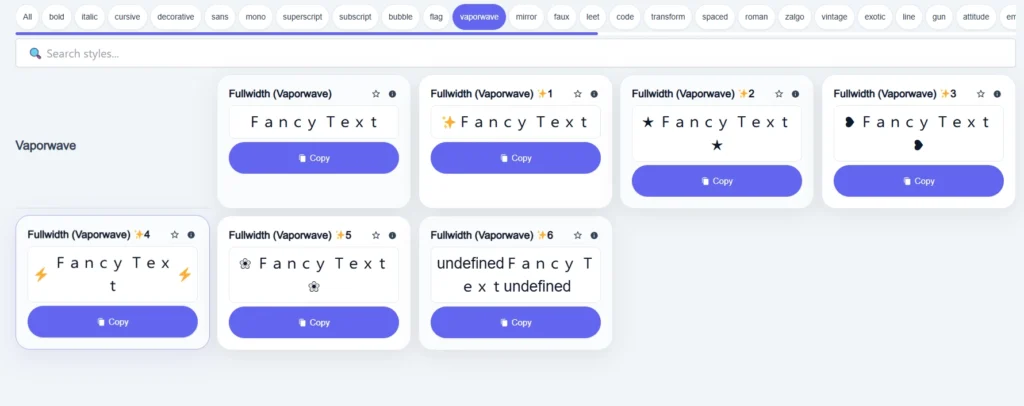
This is one of the things we learned while building our own text-style collection.
At first, it’s easy to think:
More complicated = better.
Not really.
Some styles look cool for a few seconds but become difficult to read when you actually use them in a profile.
So before choosing a style, ask: “Can someone read this quickly?”
If yes, you’re probably making a good choice.
4. Copy the style you like
Found one that works?
Copy it.
No extra software.
No font installation.
No complicated setup.
5. Paste it into your Instagram bio
Open Instagram and go to:
Profile → Edit Profile → Bio
Paste the text and check how it looks on the actual profile.
That part matters.
A style that looks great inside a generator may appear slightly different once it is pasted elsewhere.
Where Should You Use Fancy Text in Your Bio?
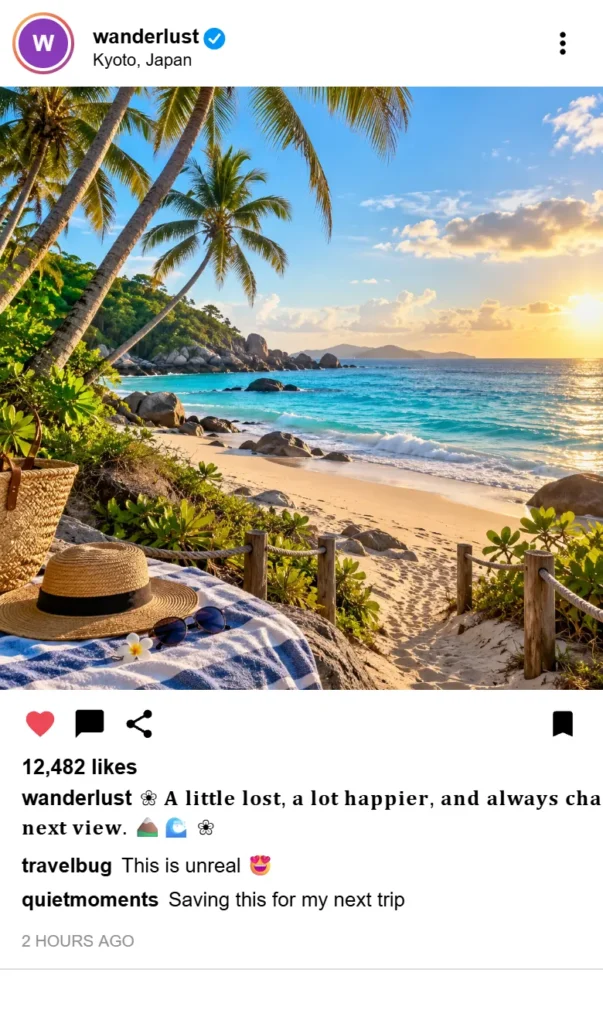
You don’t need to make your entire bio fancy.
Actually, I wouldn’t.
If every line uses a different decorative style, the profile can start looking messy very quickly.
A better approach is to use fancy text as a highlight.
Your name
𝓐𝓫𝓱𝓲𝓼𝓱𝓮𝓴
Then keep the rest normal.
Your profession
𝐃𝐢𝐠𝐢𝐭𝐚𝐥 𝐌𝐚𝐫𝐤𝐞𝐭𝐞𝐫
Helping brands grow 📈
Creator profile
𝓒𝓸𝓷𝓽𝓮𝓷𝓽 𝓒𝓻𝓮𝓪𝓽𝓸𝓻
Travel | Food | Lifestyle
The basic idea is simple:
Use fancy text to draw attention, not to decorate every single word.
What Makes a Good Fancy Text Style for Instagram?
A good style should do three things:
- look different,
- still be readable,
- fit the type of profile you have.
If you’re running a personal or creator profile, you can usually experiment more.
If you’re using Instagram for business, readability becomes more important because people need to understand:
- who you are,
- what you do,
- what you offer,
- how to contact you.
If decorative text makes that harder, it’s working against you.
Why Fancy Text Sometimes Looks Different After Pasting?
This is one of the more annoying parts of using fancy text.
Some characters can display slightly differently depending on:
- the device,
- the operating system,
- the app,
- the font support available on that device.
In some cases, a character may appear as a strange box or fail to render properly.
We ran into this while building our own collection too.
Not every fancy-looking character was worth keeping. Some looked interesting but didn’t work consistently enough to be useful, so those kinds of styles were filtered out.
That led to a simple product lesson: “Looks good” and “works well” are not the same thing.
So after pasting text into Instagram, actually check the final result.
If something looks broken:
- try another style,
- use something simpler,
- avoid forcing unusual characters just because they look different.
Instagram Bio Ideas With Fancy Text
Here are a few simple examples.
For a Digital Marketer
𝐃𝐢𝐠𝐢𝐭𝐚𝐥 𝐌𝐚𝐫𝐤𝐞𝐭𝐞𝐫
Helping brands grow 📈
Ads | Strategy | Growth
For a Content Creator
𝓒𝓸𝓷𝓽𝓮𝓷𝓽 𝓒𝓻𝓮𝓪𝓽𝓸𝓻
Making videos & memories 🎥
Travel • Food • Life
For a Student
𝑺𝒕𝒖𝒅𝒆𝒏𝒕
Books sometimes 📚
Friends always 😂
For a Personal Profile
𝓙𝓾𝓼𝓽 𝓜𝓮
Music 🎧 | Travel ✈️ | Late nights 🌙
Notice something?
Not every word is fancy.
That’s intentional.
The styled part gets attention while the normal text keeps the bio easy to understand.
Common Mistakes to Avoid
Making everything fancy
This is probably the biggest mistake.
If your name, bio, quote, profession, emojis and every other line use different styles, your profile can become harder to read.
One or two styled elements are usually enough.
Choosing a style just because it looks unusual
Some styles look cool for a few seconds and then become annoying.
If someone needs to zoom in just to understand your name, choose another one.
Not checking after you paste
Don’t assume a style will look exactly the same everywhere.
Check your actual Instagram profile after pasting.
Using fancy text for important information
If your bio contains information people really need to understand, such as:
- your business name,
- your profession,
- contact details,
- important CTA text,
readability matters more than decoration.
Fancy text should help your profile.
It shouldn’t make people work harder.
Can Fancy Text Get You More Followers?
Not by itself.
Changing:
Digital Marketer
into:
𝐃𝐢𝐠𝐢𝐭𝐚𝐥 𝐌𝐚𝐫𝐤𝐞𝐭𝐞𝐫
is not suddenly going to make thousands of people follow you.
Your content still matters.
Your profile positioning still matters.
Your photos, videos and captions still matter.
Fancy text is just a small visual detail that can make certain parts of your profile feel a little more personal.
Think of it as presentation, not a growth hack.
What We Learned While Building 2,000+ Styles?
When we first started exploring fancy text generators, we expected different websites to offer very different collections.
But many of them were surprisingly similar.
The same popular styles kept appearing again and again.
So instead of building another generator with the same limited collection, we started looking at:
- what styles were already common,
- what seemed to be missing,
- what variations could be created,
- which styles actually worked properly.
That process eventually produced a collection of 2,000+ styles.
But that created a different problem.
If you give someone thousands of styles, how are they supposed to find one they actually like?
That’s why categories, search and previews became important.
So the real goal was never just: “Give people more fonts.”
It became: Give people more useful choices and make those choices easy to explore.
What Should You Look for in a Fancy Text Generator?
The number of styles matters, but it shouldn’t be the only thing you look at.
A useful generator should ideally make it easy to:
- type your own text,
- preview multiple styles,
- find different categories,
- search for a specific type of style,
- copy the result quickly,
- compare styles without unnecessary steps.
The experience should stay simple.
That was also one of the main ideas behind BestFancyTextGenerators.com: keep the technical complexity in the background and make the user journey as simple as possible.
Frequently Asked Questions
How do I make fancy text for my Instagram bio?
Type your normal bio text into a fancy text generator, choose a style you like, copy it, and paste it into your Instagram bio.
Do I need to install a font?
Usually, no. Most online fancy text generators use Unicode characters that can be copied and pasted directly.
Can I use fancy text in my Instagram name?
In many cases, yes. You can try using fancy text in profile text fields, but Instagram may restrict certain characters or how they display.
Why does my fancy text look different after I paste it?
Different apps, devices and operating systems can display Unicode characters differently. If a style looks strange, try a simpler one.
Can fancy text increase Instagram followers?
Not by itself. Fancy text may change how parts of your profile look, but followers are driven by much more than decorative text.
How much fancy text should I use in my bio?
Usually, a small amount works better. Try styling your name, profession or one short phrase instead of your entire bio.
So, How Do You Make Fancy Text for Instagram?
It’s pretty simple.
- Write your bio.
- Open a fancy text generator.
- Enter the text you want to style.
- Compare different options.
- Pick one you can still read easily.
- Copy it.
- Paste it into Instagram.
- Check how it looks on your actual profile.
That’s it.
The goal isn’t to make your bio look as complicated as possible.
It’s to make one small part of your profile feel a little more like you.
Create Your Fancy Instagram Bio
If you want to try different styles, use our Fancy Text Generator.
Type your name or bio, compare the styles, choose the one you like, copy it and paste it into Instagram.
And if the first style doesn’t look right?
Try another one.
That’s part of the fun.
Related Articles:
- Fancy Text Not Working on Instagram or Facebook – Fixes
- How to Create Fancy Text Without Losing Readability
- How to Create Fancy Text Using Symbols & Emojis

Ankit Thakur is an SEO Specialist and WordPress Developer with 4+ years of experience. He has generated ₹60L+ in revenue through SEO, built 50+ websites, and helped businesses generate measurable leads through organic search and local SEO.