If you’ve ever tried making your Instagram name, gaming username, or bio look a little different, you’ve probably come across a fancy text generator.
You type your name, and suddenly you get stuff like:
- Your Name
- 𝒀𝒐𝒖𝒓 𝑵𝒂𝒎𝒆
- 𝕐𝕠𝕦𝕣 ℕ𝕒𝕞𝕖
- Your Name
Pretty simple, right?
But then there are tools like Canva, Photoshop and other design apps where you can do way more with text, pictures, colours and layouts.
So, are fancy text generators and graphic design tools basically the same thing?
Not really.
They’re made for two different situations.
If you just want your name or a few words to look different, a fancy text generator is usually enough.
If you’re making a poster, logo, Instagram post, ad, banner or anything where the whole design matters, you’ll need a design tool.
So, what does a fancy text generator actually do?
The easiest way to understand it is this:
A fancy text generator changes the characters in your text into different Unicode characters.
You don’t have to understand what Unicode means to use it.
For example:
A → 𝐀
A → 𝑨
A → 𝕬
They may look like different fonts, but you’re usually not installing a new font on your phone or computer.
You’re just getting a different version of the characters that you can copy and paste.
That’s why you can use fancy text for things like:
- Gaming usernames
- Instagram bios
- TikTok
- YouTube
- Discord
- Captions
- Your name
And honestly, that’s the main reason people use these tools.
They already have their text. They just want it to look a little more interesting.
What made us look into this in the first place?
The idea behind BestFancyTextGenerators.com actually started with something pretty normal.
We wanted to make text look different.
Especially when you’re a teenager, your username or profile can feel like a small part of your personality. You change your profile picture, add emojis, try different names and eventually start looking for stylish text.
That led to a simple Google search:
“Fancy Text Generator”
There were already loads of websites.
At first, that sounded great.
But after opening one website after another, something started to feel weird.
A lot of them looked similar.
And more importantly, the actual styles were often similar too.
You’d find a style on one website, open another one and see almost the same thing.
Then another.
Same again.
That made us wonder:
If everyone is using the same few styles, how are you actually supposed to make your name look different?
That became the bigger idea behind the website.
Fancy Text Generator vs Graphic Design Tools
This is where the two tools are actually very different.
A fancy text generator is mostly about changing the way your text characters look.
A graphic design tool lets you control almost everything around that text.
For example, in a design app you can choose:
- Font
- Text size
- Colour
- Spacing
- Position
- Background
- Images
- Shapes
- Alignment
You can move things around until the whole thing looks right.
With fancy text, you’re doing something much quicker.
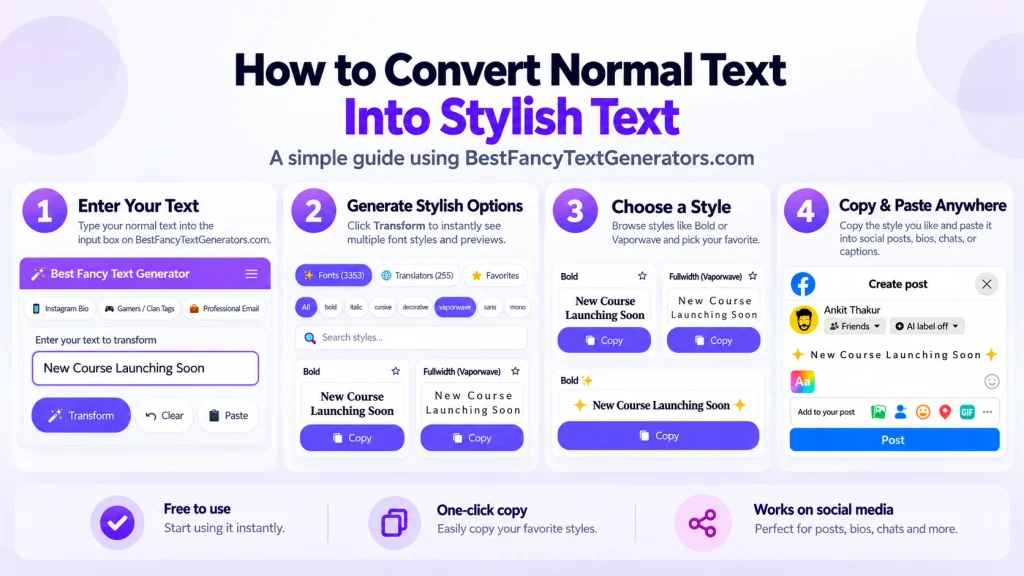
Type → Pick a style → Copy → Paste
That’s basically it.
And sometimes, that’s all you need.
Think about it like this
Imagine you want to write:
ABHISHEK
If you just want a different-looking version of your name, a fancy text generator makes sense.
You might get:
𝘼𝘽𝙃𝙄𝙎𝙃𝙀𝙆
or
𝔄𝔅ℌℑ𝔖ℌ𝔈𝔎
or
ABHISHEK
You can copy one and put it in your profile.
Done.
But imagine you want to make an Instagram post saying:
New Collection Available
with a product photo, background, colours, a logo and some buttons or shapes.
Now fancy text isn’t going to do the job.
You need a proper design tool.
Why Fancy Text Is So Quick
This is probably the biggest difference.
With a design tool, you normally have to actually make something.
You choose a font.
Change the size.
Move the text.
Pick colours.
Add images.
Fix the spacing.
Then save or export it.
With fancy text, most of that disappears.
You already have your words.
You just want a different version of them.
So you type them into the generator, look through the styles and copy the one you like.
That’s why fancy text works well for small things like usernames, bios and messages.
But There’s One Problem With Fancy Text
Not every fancy-looking style is actually useful.
We found this while working on the collection for BestFancyTextGenerators.com.
Some characters can look really cool in one place but not look right somewhere else.
Sometimes a character may not show properly.
Sometimes it can look different on another device or app.
And sometimes a style just looks broken.
So we didn’t want to simply throw every fancy-looking character we could find onto the website.
The question became:
“Can someone actually use this?”
If the answer was no, there wasn’t much point in adding it just to make the number bigger.
That became an important part of building the collection.
What About the 2,000+ Styles?
This is another thing that came out of the whole process.
We didn’t start by saying:
“Let’s make 2,000 styles.”
The original problem was that so many generators had the same limited options.
So we looked at what was already available, searched for styles and variations that were missing, and removed ones that didn’t work properly.
Eventually, the collection crossed 2,000+ styles.
But then we ran into a funny problem.
Having more choices sounds great…
until you actually have to find the one you want.
Imagine opening a page with thousands of styles and having to scroll through all of them.
That would be annoying.
Someone looking for a gaming name probably doesn’t want to go through hundreds of random styles.
Someone looking for a cute Instagram bio probably wants something completely different.
So having lots of styles wasn’t enough.
We also needed to make them easy to find.
That’s Why Categories and Search Matter
The styles were organised into different categories based on things like the style, look and what someone might want to use them for.
For example, you might be looking for:
Gaming
Gothic
Aesthetic
Cute
Stylish Name
Instead of looking through everything, you can get closer to the type of style you’re actually looking for.
There are basically two types of people who use the tool.
One person already knows what they want.
They search, find a style, copy it and leave.
The other person has no idea what they want.
They just want to look around and find something cool.
Both should be able to use the website without getting lost.
Where Graphic Design Tools Make More Sense
Fancy text is great for small bits of text.
But graphic design tools are made for much bigger things.
Use a design tool when you’re making:
- Logos
- Posters
- Social media posts
- Ads
- Banners
- Thumbnails
- Website designs
- Brand designs
For example, if you’re making a gaming YouTube thumbnail, you might want your username in fancy text.
But you’ll probably still need a design tool to put that username together with the background, image, colours and other stuff.
So you don’t really have to pick one.
You can use both.
A Simple Comparison
| If you want to… | Try this |
|---|---|
| Make your gaming username look different | Fancy text generator |
| Style your Instagram bio | Fancy text generator |
| Make a stylish name | Fancy text generator |
| Add some different-looking text to a message | Fancy text generator |
| Make a YouTube thumbnail | Graphic design tool |
| Create a logo | Graphic design tool |
| Design an Instagram post | Graphic design tool |
| Make an advertisement | Graphic design tool |
| Create a full brand design | Graphic design tool |
The easiest way to remember it:
Fancy text = change the text
Graphic design = build the whole visual
Fancy Text Doesn’t Need to Be Complicated
One thing we didn’t want to do with BestFancyTextGenerators.com was turn it into some complicated design app.
If someone searches for a fancy text generator, they probably don’t want to create an account first.
They don’t want to download software.
They don’t want to learn how Unicode works.
They just want to type something and see what it looks like.
That’s why the basic idea is:
Type → Choose → Copy → Paste
The complicated stuff can happen in the background.
The person using the tool shouldn’t have to worry about it.
Seeing Your Own Text Helps
Another thing that became important was the preview.
It’s one thing to see a random example of a style.
It’s another thing to see your own name in it.
Maybe a style looks amazing with one example but weird with your username.
So instead of:
Pick → Copy → Hope it looks good
the better experience is:
Type → Preview → Compare → Choose → Copy
That way, you can see what your actual text looks like before using it.
What About Speed?
Nobody visits a fancy text generator because they want to sit there for five minutes.
Usually, you have some text and you just want to change it.
That’s it.
So speed became an important part of building the website too.
The target was to keep the website loading in under two seconds.
The ideal journey is pretty much:
Open → Type → Explore → Choose → Copy → Leave
No long process.
No unnecessary steps.
Just get what you came for and go.
Can Fancy Text Replace a Design Tool?
No.
And it doesn’t need to.
They’re useful for different things.
If you want to style your gaming name, a fancy text generator is much easier.
If you’re creating a full gaming poster or YouTube thumbnail, use a design tool.
If you’re making a logo, use a design tool.
If you’re just trying to make your Instagram bio a little more interesting, fancy text is probably enough.
It’s not about one tool being better than the other.
It’s about what you’re actually trying to make.
One More Thing: Don’t Overdo It
Just because you can make every word fancy doesn’t mean you should.
Sometimes one stylish line looks better than turning the whole profile into a wall of symbols.
For example:
My Gaming Journey 🎮
can be enough.
You don’t have to make every single word look crazy.
The point is to make your profile feel like yours, not make it impossible for someone to read.
So, Which One Should You Use?
Here’s the simple answer.
Use a fancy text generator when you already have the words and just want them to look different.
Use a graphic design tool when you’re creating the whole visual around those words.
And honestly, you can use both together.
For example, you could create a fancy version of your gaming name first, copy it, and then put it into a thumbnail or poster you’re making in a design app.
So they’re not really competitors.
They’re just different tools for different jobs.
The Real Reason Fancy Text Exists
At the end of the day, this isn’t really about complicated technology.
It’s about something pretty simple.
People like being different.
Sometimes it’s your clothes.
Sometimes it’s your hairstyle.
Sometimes it’s your profile picture.
And sometimes it’s just the way your name looks on a screen.
That’s actually where the idea for BestFancyTextGenerators.com started.
We wanted something that gave people more choices than the same few styles we kept seeing everywhere.
So we looked at existing generators, searched for missing styles, checked which ones actually worked, and built the collection up to 2,000+ styles.
Then we had to figure out how to make thousands of choices easy to explore.
That’s where categories, search, previews and speed came in.
The technology behind it can get pretty complicated.
But using it shouldn’t be.
You bring the text.
You find a style.
You copy it.
And if you look at your name and think:
“Yeah, this actually looks cool.”
Then the tool has done its job.
Related Articles:
- Fancy Text Generator vs Copy-Paste Symbol Tools
- Fancy Text Generator vs Font Generator – What’s the Difference?
- Online Fancy Text Generator vs Mobile Apps – Which to Use?
- How to Generate Fancy Text for Branding & Logos

Ankit Thakur is an SEO Specialist and WordPress Developer with 4+ years of experience. He has generated ₹60L+ in revenue through SEO, built 50+ websites, and helped businesses generate measurable leads through organic search and local SEO.