You really don’t need to download an entire app just to make your text look cool.
Seriously.
If you’ve seen stylish Instagram bios, cool WhatsApp names, or gaming usernames and thought:
“Which font app are they using?”
Most of the time, it isn’t even a font app.
A lot of that text is made using Unicode characters that you can generate in your browser, copy, and paste wherever you want.
No font installation.
No extra keyboard.
No random app taking up space on your phone.
The whole process is basically:
Type → Choose → Copy → Paste
And you’re done.
Want to try it right away?
Open our Fancy Text Generator, type your text, preview different styles, copy the one you like, and paste it wherever you want.
What Is Fancy Text?
Fancy text is normal text displayed using different Unicode characters.
For example:
Normal: Hello World
Script : 𝓗𝓮𝓵𝓵𝓸 𝓦𝓸𝓻𝓵𝓭
Bold: 𝐇𝐞𝐥𝐥𝐨 𝐖𝐨𝐫𝐥𝐝
Fullwidth :Hello World
They look like different fonts.
But you’re usually not installing a new font on your phone.
You’re copying different characters that already have their own Unicode values.
That’s why you can generate the text on a website, copy it, and paste it into places like:
- Discord
- Telegram
- social media bios
- gaming usernames
- captions
- profile names
The platform doesn’t need to know that you installed some special font.
You’re just pasting text.
Why We Started Looking for Fancy Text in the First Place?
This whole project actually started with something pretty normal.
We wanted our own names and text to look different online.
That probably makes more sense if you’ve ever changed your profile picture five times in one evening because none of them felt right.
When you’re younger especially, there is this small urge to make your profile feel a little more like you.
Your username.
Your bio.
Your gaming name.
Your WhatsApp Status.
Even just the way your name looks on a screen.
That was basically where we started too. The original idea wasn’t to “build a business.” It started from wanting a more interesting way to display our own names and text online.
So we searched for: “Fancy Text Generator”
There were loads of websites.
At first that sounded great.
More websites should mean more styles, right?
Not really.
After opening one site, then another, then another, we started noticing something.
A lot of them felt surprisingly similar.
Same sort of styles.
Same types of symbols.
Same choices again and again.
The brand story describes this exact observation: top-ranking tools often looked different on the surface but provided similar or limited collections of text styles.
That eventually gave us a much more interesting question:
If people use fancy text because they want to look different, why are so many tools giving them the same choices?
And that’s where the idea started getting bigger.
How Fancy Text Works Without an App?
The technical explanation can get boring really quickly, so here’s the useful version.
You type: Ankit
A fancy text generator converts those normal letters into different Unicode characters that look like styled versions.
For example:
- 𝐀𝐧𝐤𝐢𝐭
- 𝒜𝓃𝓀𝒾𝓉
- Ankit
Nothing is being installed on your device.
The generator simply shows you different character combinations.
You choose the one you like.
Copy it.
Paste it.
That’s the part you actually need to know.
How to Create Fancy Text Without Downloading an App?
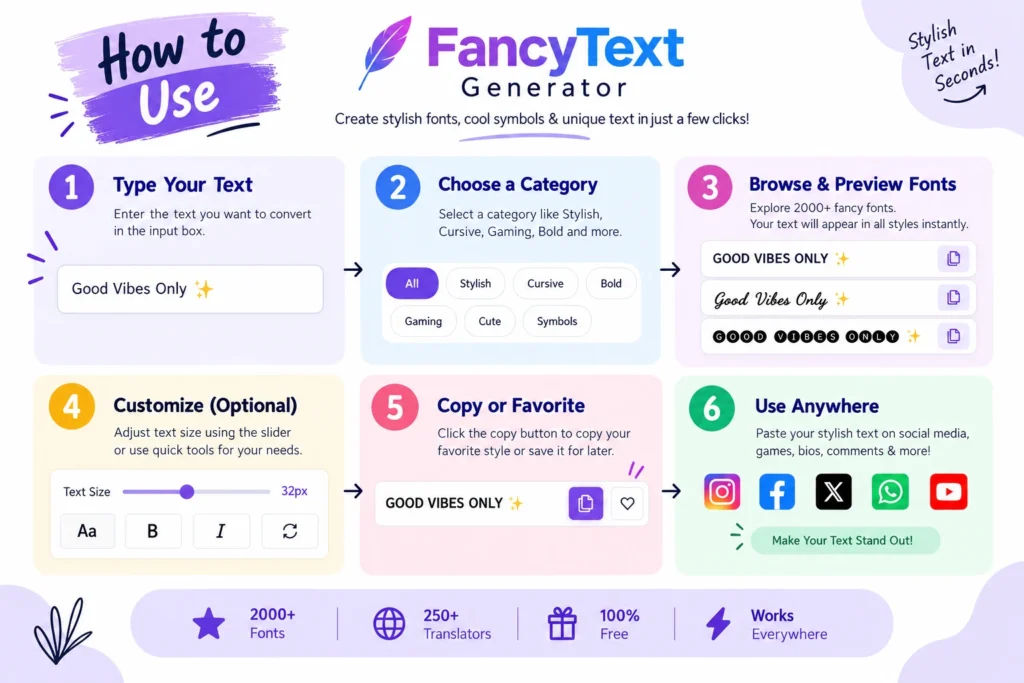
Step 1: Open a Browser-Based Fancy Text Generator
You don’t need to install anything.
Just open the generator in your browser.
Step 2: Type Your Text

Enter whatever you want to style.
For example:
My Name
or:
Happy Birthday
or:
Gaming King
Step 3: Preview the Available Styles

Different versions of your text should appear.
Don’t immediately choose the craziest-looking one.
Look at a few.
Ask yourself:
- Is it readable?
- Does every letter look right?
- Does it fit where I’m going to use it?
Step 4: Copy the Style You Like
Once you find one you actually like, copy it.
Step 5: Paste It Where You Want
You can try it in:
- Discord
- Telegram
- captions
- bios
- names
- gaming usernames
That’s it.
No download.
No keyboard setup.
No learning another app for something that should take 20 seconds.
Where Can You Use Fancy Text?
Instagram is probably one of the most obvious places.
You can use fancy text in things like:
- your name
- bio
- short captions
- highlighted words
Personally, I wouldn’t turn your entire bio into super-decorative text.
One or two styled lines usually look cleaner.
Fancy text can work for:
- names
- Status text
- messages
- group names
- birthday wishes
A normal:
Happy Birthday 🎂
works perfectly fine.
But sometimes:
𝓗𝓪𝓹𝓹𝔂 𝓑𝓲𝓻𝓽𝓱𝓭𝓪𝔂 🎂
just looks more fun.
Gaming Usernames
Gaming usernames were actually one of the places where this whole idea made sense to us.
Everyone wants a username that feels a little different.
You can try fancy text for:
- usernames
- clan names
- profile names
- short tags
But games can have their own character restrictions, so always test the final version first.
Discord, Telegram and Other Profiles
Same idea.
You can use fancy text for:
- names
- bios
- server nicknames
- short messages
- profile descriptions
Different platforms may handle some Unicode characters differently, so always check the text after pasting it.
App vs Browser Generator: What’s the Difference?
If you use fancy text every day, maybe a keyboard app makes sense for you.
But if you’re just changing a bio or username once in a while, downloading an entire app usually feels unnecessary.
| Feature | Fancy Text App | Browser Generator |
|---|---|---|
| Download required | Usually | No |
| Installation | Yes | No |
| Uses extra app storage | Yes | No extra app |
| Good for quick one-time use | Less convenient | Easy |
| Copy and paste | Yes | Yes |
| How you access it | Open app | Open website |
| Keyboard setup may be needed | Sometimes | No |
If you already use a fancy keyboard and like it, there’s nothing wrong with that.
But for occasional use, a browser tool is just simpler.
Why We Ended Up Building 2,000+ Styles?
When we first started comparing fancy text generators, the main problem seemed obvious:
There weren’t enough genuinely different options.
So we started checking what already existed.
Then we looked for styles and variations that weren’t commonly being shown.
But we also learned pretty quickly that simply finding more Unicode characters wasn’t enough.
Some looked cool but weren’t very useful.
Some could render badly.
Some combinations looked almost identical to styles we already had.
So the process became:
What already exists?
↓
What’s missing?
↓
Can we create or find more useful variations?
↓
Do they actually work?
That research eventually grew into a collection of more than 2,000 fancy text styles.
But then we created a completely different problem.
Nobody Wants to Scroll Through 2,000 Styles
Having 2,000+ styles sounds amazing.
Until you’re actually the person using them.
Imagine you only want to make:
Good Morning
look a little cooler.
Do you really want to scroll through 2,000 results?
Probably not.
That’s where we realised:
More styles aren’t automatically better.
The collection had solved the variety problem.
But now there was a choice problem.
The founder story describes exactly this shift: once the collection became large, simply showing everything wasn’t enough. Users needed categories, search, and easier discovery.
So we started organising styles by things like:
- appearance
- type
- use case
- style
- user intent
Then search became useful.
Then previews became important.
Because someone looking for a gothic gaming name shouldn’t have to scroll through hundreds of cute or handwriting-style options first.
Why Preview Matters More Than You’d Think
At first, showing a sample seems enough.
But let’s say the generator shows: Sample Text
in a particular style.
That doesn’t really tell you what:
Abhishek
or:
Night Hunter
is going to look like.
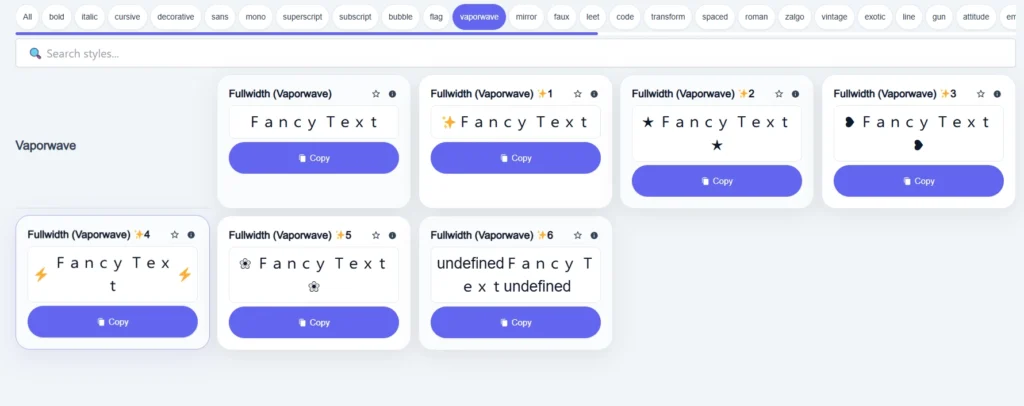
That’s why real-time previews became useful.
Instead of:
Pick → Copy → Hope
you get:
Type → Preview → Compare → Choose → Copy
That sounds like a tiny feature.
It isn’t.
When there are hundreds or thousands of choices, previewing your own text saves a lot of pointless clicking.
More Styles Aren’t Always Better
This is probably one of the biggest lessons we learned while building the collection.
A style can look insane in a screenshot.
That doesn’t mean it’s actually useful.
For example: ꧁༺𝓗𝓮𝓵𝓵𝓸༻꧂
might look great for a gaming username.
But imagine putting your entire Instagram bio like that.
Or worse, sending this to your teacher: ꧁༺𝓟𝓵𝓮𝓪𝓼𝓮 𝓬𝓱𝓮𝓬𝓴 𝓶𝔂 𝓪𝓼𝓼𝓲𝓰𝓷𝓶𝓮𝓷𝓽༻꧂
Maybe not.
The style should fit the situation.
For an Instagram name, readability probably matters more.
For gaming, maybe you want something more aggressive.
For a birthday message, decorative text can be fun.
There isn’t one best fancy-text style.
There’s just a style that fits what you’re trying to do.
Why Some Fancy Text Doesn’t Work Everywhere?
This confused us too when we first started exploring different styles.
A character can look completely fine in one environment and then appear differently somewhere else.
Sometimes you may even see: □
or missing-looking characters.
That’s because fancy text often relies on Unicode characters, and not every environment necessarily displays every character in exactly the same way.
This also became part of the filtering process behind our own collection.
That’s why we eventually started thinking about fancy text like this:
“Works” matters more than “looks.”
Fancy Text Looks Broken? Try This
Don’t overthink it.
1. Try another style
If one style is showing boxes or missing characters, pick something simpler.
2. Paste it into the actual platform
If you’re using the text on Instagram, preview it on Instagram.
If you’re creating a gaming username, test it inside the game.
The generator is useful for discovering styles.
The place where you’re actually going to use the text is the final test.
3. Choose readability over decoration
If the text technically works but takes five seconds to understand, it’s probably not the best option.
What Makes a Good Fancy Text Generator?
After building and using these tools, the things that matter are actually pretty simple.
It should be fast
You shouldn’t wait around just to style a few letters.
Results should appear while you type
You should be able to compare styles quickly.
Copying should be easy
One click is better than five.
There should be enough variety
Otherwise every generator starts feeling the same.
Finding the right style should be easy
This one became especially important after our own collection crossed 2,000 styles.
There’s no point giving someone thousands of choices if finding the right one becomes annoying.
That’s why the product eventually became more than just a large list.
It became:
2,000+ styles + categories + search + previews + usability
The founder story describes this as one of the main product lessons: more options only become useful when people can actually discover the right ones quickly.
Don’t Make Everything Fancy
This might sound strange coming from a website built around fancy text.
But seriously.
Don’t style everything.
This: 𝓘𝓯 𝔂𝓸𝓾 𝔀𝓻𝓲𝓽𝓮 𝓪𝓷 𝓮𝓷𝓽𝓲𝓻𝓮 𝓹𝓪𝓻𝓪𝓰𝓻𝓪𝓹𝓱 𝓵𝓲𝓴𝓮 𝓽𝓱𝓲𝓼…
might look interesting for two seconds.
Then somebody has to actually read it.
Fancy text works better for small things:
- names
- usernames
- bios
- short captions
- headings
- highlighted words
- group names
- short messages
Use it to make something stand out.
Don’t make everything stand out.
Is It Safe to Create Fancy Text Without an App?
A browser-based generator means you don’t need to install another keyboard or app simply to style your text.
You: Type → Generate → Copy → Leave
But the usual internet rule still applies.
Don’t type private information into an online tool if you wouldn’t normally share that information online.
Avoid entering things like:
- passwords
- OTPs
- private account information
- payment details
- confidential messages
For normal things such as names, usernames, captions, bios, and greetings, there’s usually no need to use sensitive information anyway.
Why We Wanted the Tool to Stay Simple
The funny thing is that the product became more complicated behind the scenes while the goal for the user stayed almost stupidly simple.
The project started with:
“I want my name to look different.”
Then:
We searched for tools.
They felt repetitive.
So we looked for missing styles.
Then we had 2,000+ styles.
Which created too many choices.
So we needed categories.
Then search.
Then previews.
Then filtering.
Then speed became important too.
The technical side kept growing.
But the user experience was never supposed to become complicated.
The founder story puts the intended journey simply as:
Type → Choose → Copy → Paste
Everything difficult should happen behind the scenes.
You shouldn’t need to know how Unicode works.
You shouldn’t need a tutorial every time you visit.
You should just find a style you like and use it.
Frequently Asked Questions
Can I create fancy text without downloading an app?
Yes.
You can use a browser-based fancy text generator, enter your text, choose a style, copy it, and paste it wherever you want.
Do I need a fancy keyboard?
No.
A fancy keyboard may be useful if you use styled text constantly, but it isn’t required for normal copy-and-paste use.
Can I use fancy text on Instagram?
You can try supported Unicode styles in places such as:
- names
- bios
- captions
Always preview the final result after pasting it.
Can I use fancy text on WhatsApp?
Yes, many Unicode text styles can be copied and pasted into WhatsApp.
Short messages, group names, Status text, and greetings usually make more sense than long decorative paragraphs.
Can I use fancy text for gaming usernames?
Sometimes.
It depends on which characters the particular game allows.
Always test the username inside the game before settling on it.
Why does my fancy text show boxes?
That usually means a character isn’t being displayed properly in the environment you’re using.
Try a simpler style.
Is fancy text actually a font?
Usually not in the normal sense of installing a font file.
Most fancy text generators create different Unicode characters that visually resemble styled letters.
Do I have to pay for a font app?
No.
If a browser generator gives you the result you need, you don’t need an app at all.
Final Thoughts
Creating fancy text really shouldn’t be complicated.
You shouldn’t need to download a random app just because you want your Instagram name to look different for five minutes.
Open a generator.
Type your text.
Look through a few styles.
Find one you actually like.
Copy it.
Paste it.
That’s basically the experience we wanted from the beginning.
The project itself became much bigger.
What started from wanting text to look a little different eventually became research into existing generators, finding missing styles, filtering styles that didn’t work properly, building a 2,000+ collection, and then creating search, categories, and previews so those choices didn’t become overwhelming.
But none of that should make the experience harder for the person using it.
You bring the words.
We give you more ways to make them yours.
Create Fancy Text Without Downloading Anything
Want to try it yourself?
Open our Fancy Text Generator, type whatever you want, preview the available styles, choose one you like, copy it, and paste it wherever you need it.
No app required.
Related Articles:
- How to Generate Fancy Text Online (Copy & Paste Guide)
- Online Fancy Text Generator vs Mobile Apps – Which to Use?
- How to Create Fancy Text Without Watermark or Restrictions

Ankit Thakur is an SEO Specialist and WordPress Developer with 4+ years of experience. He has generated ₹60L+ in revenue through SEO, built 50+ websites, and helped businesses generate measurable leads through organic search and local SEO.