WhatsApp messages all start looking the same after a while.
Same font. Same chat bubbles. Same everything.
And honestly, most of the time, that’s completely fine. Your “okay bro” or “where are you?” probably doesn’t need a dramatic font.
But sometimes you want something to look a little different.
Maybe it’s a birthday wish.
Maybe you’re changing your group name.
Maybe you’re writing a WhatsApp Status.
Or maybe you’re just bored of plain text.
That’s where fancy text comes in.
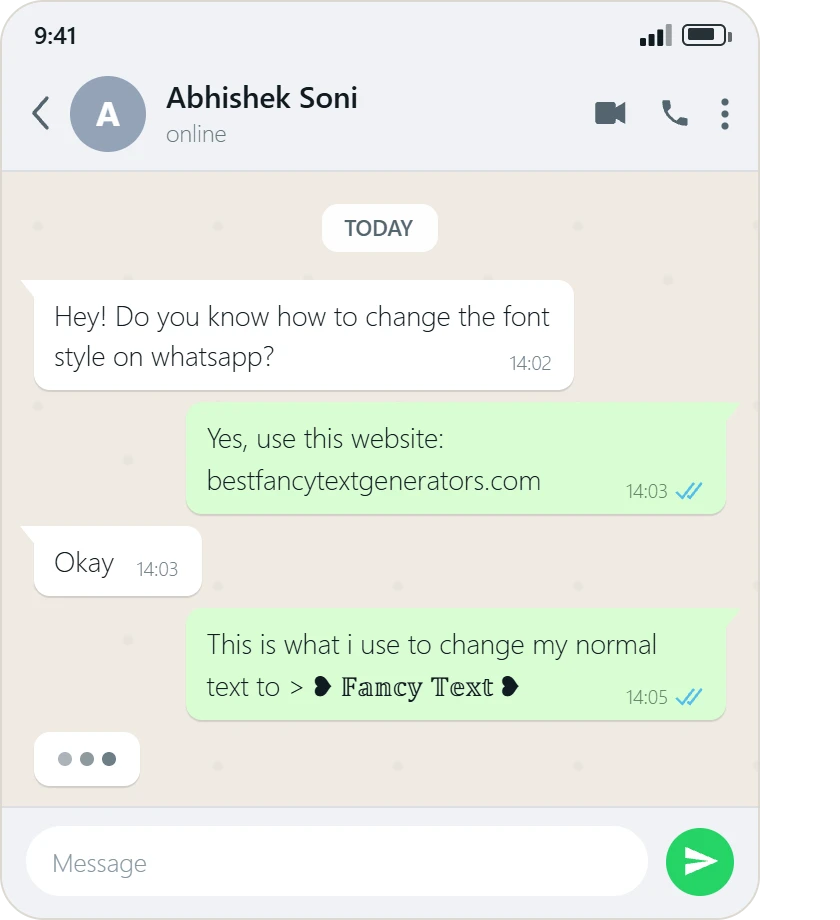
You don’t need to install another keyboard or download a random font app. You can generate fancy text in your browser, copy the style you like, and paste it directly into WhatsApp.
Basically:
Type → Choose → Copy → Paste
That’s it.
Try it yourself: Type your message into our Fancy Text Generator, preview the available styles, copy the one you like, and paste it into WhatsApp.
Wait, Are These Actually WhatsApp Fonts?
Not really.
This confused us at first too.
If you type:
Normal: Hello
You might generate:
Bold: 𝐇𝐞𝐥𝐥𝐨
Script: 𝓗𝓮𝓵𝓵𝓸
Fullwidth: Hello
It looks like the font has changed.
But WhatsApp hasn’t suddenly installed a new font.
What you’re usually seeing is Unicode characters that visually resemble different letter styles.
That distinction matters because these characters can often be copied and pasted like regular text.
So instead of:
installing font → applying font → sending message
the process becomes:
generate text → copy → paste
Much easier.
You don’t need to understand how Unicode works to use it.
You just need to know that some characters can look different while still behaving like text.
How to Generate Fancy Fonts for WhatsApp Messages?
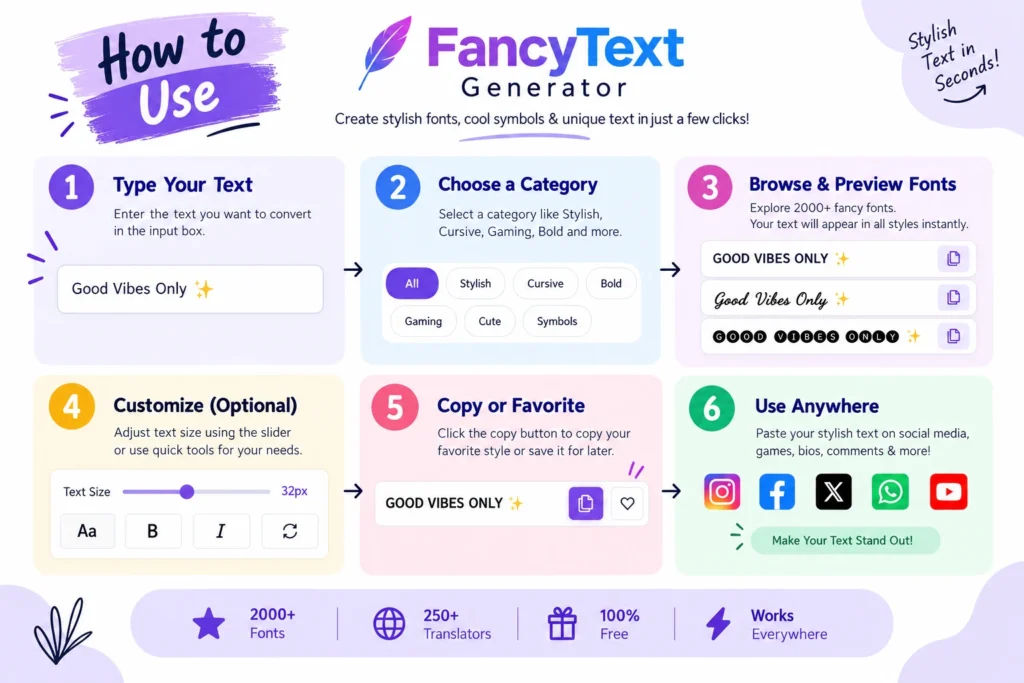
You really don’t need a complicated tutorial for this.
Step 1: Type Your Message

Open a fancy text generator and enter whatever you want to write.
For example:
Happy Birthday Rahul
Step 2: Look Through the Styles

The generator will show different versions of your text.
For example:
𝐇𝐚𝐩𝐩𝐲 𝐁𝐢𝐫𝐭𝐡𝐝𝐚𝐲 𝐑𝐚𝐡𝐮𝐥
or:
𝓗𝓪𝓹𝓹𝔂 𝓑𝓲𝓻𝓽𝓱𝓭𝓪𝔂 𝓡𝓪𝓱𝓾𝓵
or something completely different.
Step 3: Preview Before Copying
Don’t just choose the fanciest-looking style.
Look at your actual message.
Can you still read it easily?
Does every character display properly?
If yes, copy it.
Step 4: Paste It Into WhatsApp
Open WhatsApp.
Paste the text into your chat, Status, group name, or wherever you’re planning to use it.
Check it once before sending.
Done.
No new keyboard.
No font installation.
No ten-minute setup for something that should take ten seconds.
Why We Started Looking for Better Fancy Text in the First Place?
This whole project actually started with a pretty normal reason.
We wanted our names and text to look different online.
Especially when you’re younger, there is something strangely satisfying about making your username, bio, gaming name, or WhatsApp Status feel a little more like yours.
So we did what anybody else would do.
We searched for: “Fancy text generator.”
There were plenty of websites.
But after opening several of them, we kept noticing the same thing.
Different websites.
Different layouts.
But a lot of the same styles.
- Bold text.
- Script text.
- Decorative symbols.
Then another website.
Pretty much the same thing again.
The original product idea wasn’t simply:
“Let’s make another fancy text generator.”
It became:
“If people are using fancy text because they want to look different, why are most tools giving them such similar choices?”
That question eventually became the starting point for BestFancyTextGenerators.com.
Where Fancy Text Actually Looks Good on WhatsApp?
You can use fancy text in a lot of places.
That doesn’t mean you should use it everywhere.
Birthday Messages
Instead of: Happy Birthday! 🎂
you could write: 🎉 𝓗𝓪𝓹𝓹𝔂 𝓑𝓲𝓻𝓽𝓱𝓭𝓪𝔂! 🎂
That actually makes sense because the message is supposed to feel special.
WhatsApp Group Names
Instead of: College Friends
try: ✨ 𝐂𝐨𝐥𝐥𝐞𝐠𝐞 𝐅𝐫𝐢𝐞𝐧𝐝𝐬 ✨
WhatsApp Status
Short quotes, names, greetings, or one highlighted sentence can work well.
Names and Short Text
Fancy text works best when someone can understand it immediately.
What I wouldn’t recommend is turning an entire paragraph into decorative script.
It looks cool for about three seconds.
Then you actually have to read it.
Which Fancy Text Style Should You Use?
There isn’t really one “best font for WhatsApp.”
It depends on what you’re writing.
| Use | Better choice |
|---|---|
| Normal chat | Simple bold or clean styles |
| Birthday wish | Script or decorative |
| Group name | Bold text + a few symbols |
| WhatsApp Status | Short, readable decorative text |
| Professional message | Plain or very subtle styling |
| Gaming group | More experimental styles |
Something like: ꧁༺𝓗𝓮𝓵𝓵𝓸༻꧂
might look great in a gaming group.
But imagine sending your boss: ꧁༺𝓟𝓵𝓮𝓪𝓼𝓮 𝓬𝓱𝓮𝓬𝓴 𝓽𝓱𝓮 𝓻𝓮𝓹𝓸𝓻𝓽༻꧂
Yeah.
Maybe don’t.
Context matters more than choosing the fanciest style available.
Why Some Fancy Fonts Look Weird on WhatsApp?
This is one of the first annoying things you may notice.
You find a style that looks perfect inside a generator.
You copy it.
Paste it into WhatsApp.
And suddenly one letter looks different.
Or you see a square.
Or part of the text looks strange.
That’s because fancy text can use Unicode characters that may not be rendered identically in every environment.
We ran into this same problem while building our own collection.
Some characters looked interesting but weren’t useful enough in practice. Others could render incorrectly or look broken depending on where they were used.
That changed the way we thought about the tool.
The goal couldn’t simply be:
“Add as many fancy-looking characters as possible.”
The better rule became: Working styles are more useful than random styles.
What should you do if a style looks broken?
Don’t fight with it.
Try a simpler style.
If one character displays as a box or looks strange, choose another version of the text.
Seriously, don’t spend 15 minutes arguing with one fancy letter.
Do Fancy Fonts Work on Both Android and iPhone?
Fancy text is based on characters rather than a font file being installed inside WhatsApp.
However, the exact appearance can vary depending on the character, device, operating system, and available character support.
That’s why the safest habit is simple:
- Generate the text.
- Paste it into WhatsApp.
- Preview it.
- If something looks wrong, choose a simpler style.
For normal bold, script, and commonly used Unicode styles, the process is usually straightforward.
For heavily decorated or unusual characters, compatibility can be less predictable.

What We Learned While Building 2,000+ Styles
Our original problem was that a lot of generators seemed to give users very similar choices.
So we started looking at what already existed.
Then: What styles are already available?
Then: What’s missing?
Then: Are there other variations?
And most importantly: Do they actually work?
That process gradually built a collection of more than 2,000 fancy text styles.
But then we accidentally created another problem.
Too many choices.
Imagine opening a generator because you just want to make:
Good Morning
look different.
And then being shown thousands of options with no way to narrow them down.
You’d probably close the tab before reaching style number 100.
That’s when we realised:
More isn’t automatically better.
So the product gradually changed from:
lots of styles
into:
2,000+ styles + categories + search + preview
That was a much more useful way to think about it.
Why Real-Time Preview Matters
Another thing we learned while building the generator was that seeing a random example isn’t enough.
You don’t really care what:
Sample Text
looks like.
You care what:
your actual name
looks like.
So instead of: Pick → Copy → Hope
the better experience is: Type → Preview → Compare → Choose → Copy
It’s a small difference, but it makes choosing a style much easier.
Simple Usually Looks Better Anyway
When you first discover fancy text generators, it’s tempting to choose the wildest style on the page.
I get it.
Something with six symbols, decorative borders, script text, and probably a star somewhere.
But fancy text stands out because the text around it looks normal.
If everything is decorative, nothing feels special anymore.
For most people:
simple bold > unreadable decoration
especially inside regular WhatsApp conversations.
Use the more extreme styles where they actually fit:
- gaming groups
- fun group names
- birthday wishes
- short Status text
- profile-style text
For normal conversations, readability wins.
Do You Need a Font App for WhatsApp?
No.
You can use a custom keyboard or font app if you use fancy text constantly.
But if you’re only doing this occasionally, downloading another app usually isn’t necessary.
A browser-based generator is basically:
Open
↓
Type
↓
Choose
↓
Copy
↓
Paste
↓
Close the tab
That’s enough for most people.
One of the core ideas behind the product was actually to keep this journey simple instead of making users create accounts, install fonts, download software, or learn complicated tools.
Don’t Make Every WhatsApp Message Fancy
This might actually be the most useful tip in the article.
Don’t overdo it.
Fancy text works because it breaks the visual pattern.
A birthday wish like: 🎉 𝓗𝓪𝓹𝓹𝔂 𝓑𝓲𝓻𝓽𝓱𝓭𝓪𝔂 🎂
stands out.
An entire paragraph like: 𝓗𝓮𝔂 𝓰𝓾𝔂𝓼 𝔀𝓱𝓪𝓽 𝓽𝓲𝓶𝓮 𝓪𝓻𝓮 𝔀𝓮 𝓶𝓮𝓮𝓽𝓲𝓷𝓰 𝓽𝓸𝓶𝓸𝓻𝓻𝓸𝔀…
mostly makes everybody work harder to read your message.
Use fancy text for:
- names
- group names
- birthdays
- greetings
- important words
- Status updates
- short quotes
Basically, use it where the styling actually adds something.
Can You Use Fancy Fonts in WhatsApp Status?
Yes, you can paste supported Unicode text into WhatsApp Status in the same way you paste it into a chat.
For example:
Normal
Weekend mode 😎
Fancy
𝓦𝓮𝓮𝓴𝓮𝓷𝓭 𝓶𝓸𝓭𝓮 😎
Again, preview the final version before posting.
Short text usually works better than long decorative paragraphs.
Can You Use Fancy Fonts in Your WhatsApp About?
You can also try supported Unicode text in short profile fields such as your WhatsApp About.
This is actually one of the places where fancy text makes more sense because the text is usually short.
For example:
Dream Big
could become: 𝓓𝓻𝓮𝓪𝓶 𝓑𝓲𝓰 or: 𝐃𝐫𝐞𝐚𝐦 𝐁𝐢𝐠
Just remember that readability still matters.
Is It Safe to Use Fancy Fonts on WhatsApp?
Fancy text itself is generally just text made from Unicode characters.
You’re creating the characters, copying them, and pasting them into WhatsApp.
You don’t need to provide your WhatsApp password or install a special font just to paste generated text.
But the same common-sense rule that applies to any website still applies here:
Don’t paste passwords, financial information, private messages, OTPs, or other sensitive information into an online tool unless you trust how that information is handled.
For things such as:
- names
- birthday wishes
- group names
- Status text
- quotes
- usernames
there usually isn’t any reason to enter sensitive information in the first place.
A Small Lesson We Didn’t Expect While Building the Tool
At first, the problem seemed simple:
People need more fancy text styles.
Then we built more.
And more.
Until we had 2,000+.
Then the problem became:
How is anybody supposed to find the right one?
That was probably one of the most useful lessons from the whole project.
The goal isn’t really to give people the biggest number possible.
It’s to give them useful choices and help them find those choices quickly.
And from the user’s side?
It should still feel ridiculously simple.
Type → Choose → Copy → Paste
All the complicated stuff can stay behind the scenes.
Frequently Asked Questions
How do I generate fancy fonts for WhatsApp messages?
Type your message into a fancy text generator, preview the available styles, choose one you like, copy it, and paste it into WhatsApp.
Can I copy and paste fancy fonts into WhatsApp?
Yes. Many fancy-text styles use Unicode characters that can be copied and pasted like normal text.
Always preview the final message because some uncommon characters may display differently.
Do I need a font app for WhatsApp?
No. If you only need fancy text occasionally, a browser-based generator is enough.
Why does my fancy text show boxes?
A particular Unicode character may not be rendered properly in the environment where you’re viewing it.
Try another, simpler style.
Can I use fancy text in WhatsApp Status?
You can paste supported Unicode text into WhatsApp Status.
Preview it before publishing to make sure it displays correctly.
Can I use fancy text in my WhatsApp About?
Yes, supported Unicode text can be useful for short names, quotes, or profile-style text.
Keep it readable.
Do fancy fonts work on Android and iPhone?
Many commonly used styles can work across devices, but some unusual characters may look different depending on available character support.
Preview your text on the device where you’re planning to use it.
What’s the best fancy font for WhatsApp?
There isn’t one best style.
For regular chats, simple and readable styles usually make more sense.
For birthdays, group names, gaming groups, or Status text, you can experiment with more decorative options.
Final Thoughts
Fancy fonts aren’t going to completely change the way you use WhatsApp.
And they don’t need to.
Sometimes you just want your name to look different.
Or make someone’s birthday message a little more fun.
Or create a group name that doesn’t look exactly like every other group.
That small idea—“I just want my text to look different”—is basically where our own project started.
What began as searching for better styles eventually turned into analysing existing generators, looking for missing variations, filtering styles that didn’t work properly, and building a collection of 2,000+ styles.
But the part that matters to you hasn’t really changed.
You bring the words.
Find a style that feels like yours.
Copy it.
Paste it into WhatsApp.
Done.
Try the Fancy Text Generator
Type your WhatsApp message, preview different styles, and copy the one you actually want to use.
Related Articles:
- How to Copy and Paste Stylish Text Anywhere
- How to Fix Copy-Paste Issues with Fancy Fonts
- How to Generate Fancy Text Online (Copy & Paste Guide)

Ankit Thakur is an SEO Specialist and WordPress Developer with 4+ years of experience. He has generated ₹60L+ in revenue through SEO, built 50+ websites, and helped businesses generate measurable leads through organic search and local SEO.