You make your name look cool with a fancy text generator.
You copy it.
You paste it into Instagram, WhatsApp, or somewhere else.
And instead of the text you wanted, you get: ▢ ▢ ▢
Yeah. That’s annoying.
You might even think the fancy text generator is broken.
But usually, that’s not what’s happening.
The problem is that your phone or the app you’re using doesn’t know how to properly show one or more of the characters in that fancy style.
And honestly, this is one of those things that sounds way more complicated than it actually is.
So, What Do Those Boxes Mean?
When you see a box instead of a fancy character, it basically means:
“I know there’s supposed to be a character here, but I don’t have what I need to show it properly.”
Unicode defines characters, while fonts provide the visual shapes used to display them. If the system doesn’t have a suitable way to render a character, it can show a missing-character box instead.
So the text hasn’t necessarily disappeared.
Your device just can’t display that particular character properly.
That’s why you might see:
- ▢
- □
- a strange symbol
- a missing letter
- or sometimes nothing useful at all
Fancy Text Isn’t Really a Font You Installed
This is probably the biggest thing people get confused about.
When you use a fancy text generator, you’re usually not downloading a new font and putting it on your phone.
Instead, the generator uses different Unicode characters to make your text look different.
For example:
Hello
can become:
𝐇𝐞𝐥𝐥𝐨
or:
𝓗𝓮𝓵𝓵𝓸
Your phone still has to figure out how to display those characters.
And that’s where things can go wrong.
Unicode itself doesn’t contain the actual visual design of every character. It defines the characters, while fonts and the rendering system handle how those characters appear on screen.
Why Does One Style Work and Another One Doesn’t?
This is where it gets interesting.
Not every fancy text style uses characters that are equally easy for every device or app to display.
A simple bold-looking style might work perfectly.
Then you try a really unusual decorative style and suddenly:
▢▢▢▢
That’s because the second style may contain characters that your particular device, font setup, or app can’t render properly.
So just because a style looks great inside a generator doesn’t mean it’ll look exactly the same everywhere.
We Ran Into This While Building Our Own Generator
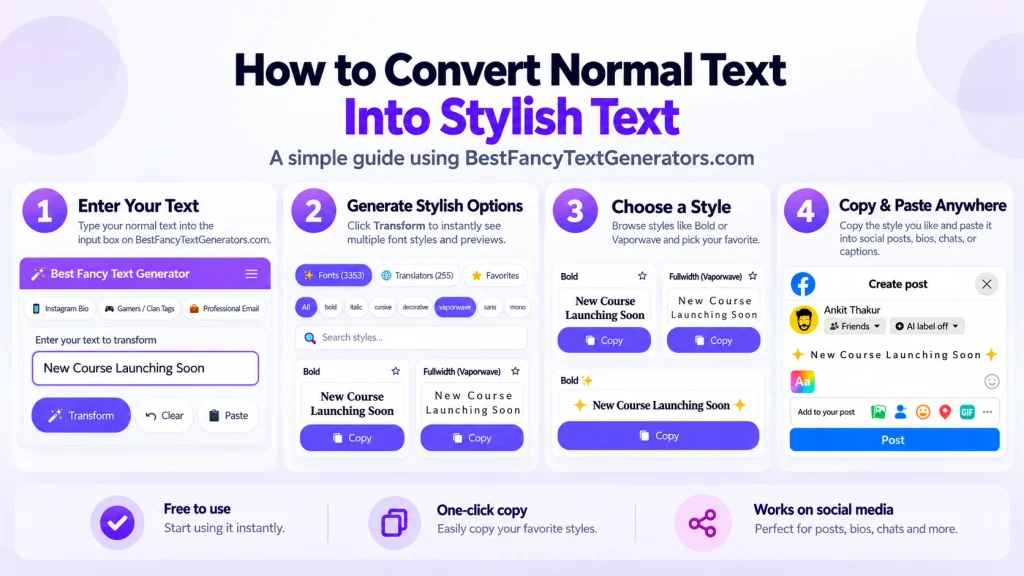
This was actually one of the problems we noticed while working on BestFancyTextGenerators.
The original idea wasn’t even about building the biggest collection of fancy text.
It started much more simply.
We wanted text that looked different.
So we searched for fancy text generators and started looking at what was already available.
A lot of them felt pretty similar.
The same kind of styles kept showing up, so we started looking for styles that were actually different.
Over time, the collection grew to 2,000+ styles.
Sounds great, right?
Until you have to find one style you actually like out of 2,000+.
Then we had another problem.
More styles didn’t automatically mean a better experience.
We had to organize them, add categories, make searching easier and make it easier to see what a style looked like before copying it.
And while going through all those styles, one thing became pretty obvious:
A style isn’t useful just because it looks cool. It also has to work when you actually use it.
That’s especially important with fancy text because a style can look perfect in one place and turn into boxes somewhere else.
What Actually Causes the Boxes?
There isn’t always one single reason.
Here are the common ones.
1. Your device can’t display that character
Every character needs something that can show its shape on screen.
If the system can’t find a suitable glyph for a character, it may show a missing-character symbol or box instead. Unicode specifically describes this kind of fallback behavior for characters that can’t be rendered.
That’s basically what you’re seeing.
2. The style uses unusual characters
Some fancy styles use characters that aren’t as commonly supported.
The more unusual the characters are, the more likely you are to find a place where they don’t display the way you expected.
This doesn’t mean unusual styles are always bad.
It just means they’re worth checking before you use them somewhere important.
3. Your phone and the other person’s phone aren’t identical
Your phone might display something perfectly.
Your friend’s phone might show boxes.
That can happen because different devices and software can have different font support and rendering behavior. Unicode’s own FAQ notes that operating-system and application support can affect whether newer or less-supported characters display correctly.
So don’t immediately blame the text.
Sometimes it’s simply a difference between the devices.
4. The app can matter too
You might create fancy text in your browser, copy it, and paste it into Instagram.
Now the text is being handled by another app.
Different apps can have different ways of handling text and characters.
So again, something working in the generator doesn’t guarantee that every app will display it exactly the same way.
5. Older devices can have more problems
Older operating systems may not support some newer Unicode characters as well as newer systems.
The Unicode Consortium also notes that older operating systems and applications can be a reason certain Unicode characters don’t display as expected.
This is one reason why something might work on a newer phone but not on an older one.
6. Sometimes the text gets changed along the way
Copying and pasting text through different apps can sometimes change how that text is handled.
If something looks fine in one place but weird after being passed through another app, try copying it directly from the original generator again.
7. The style is simply too complicated
This isn’t a strict technical rule, but it’s a useful practical one.
If a style is packed with unusual characters, there’s more chance that you’ll run into a compatibility problem somewhere.
So if you’re using fancy text for something important, you don’t always need the craziest-looking option.
Sometimes the simple one is better.
Which Fancy Text Styles Are Safer?
If you want something that is more likely to work across different places, start with simple styles.
For example:
𝐁𝐨𝐥𝐝
𝘐𝘵𝘢𝘭𝘪𝘤
𝙼𝚘𝚗𝚘𝚜𝚙𝚊𝚌𝚎
These kinds of styles are usually a better starting point than extremely complicated decorative text.
But don’t take this as a guarantee that every single device will display them perfectly.
There isn’t one style that works identically everywhere.
And Which Ones Should You Be Careful With?
I’d be more careful with:
- very decorative scripts
- unusual symbols
- styles that mix lots of different characters
- emoji-heavy text
- styles that already look strange outside the generator
Again, that doesn’t mean they’ll always fail.
Just test them first.
The Easiest Way to Find Out If a Style Works
You don’t need to understand Unicode to solve this.
Just test the actual text.
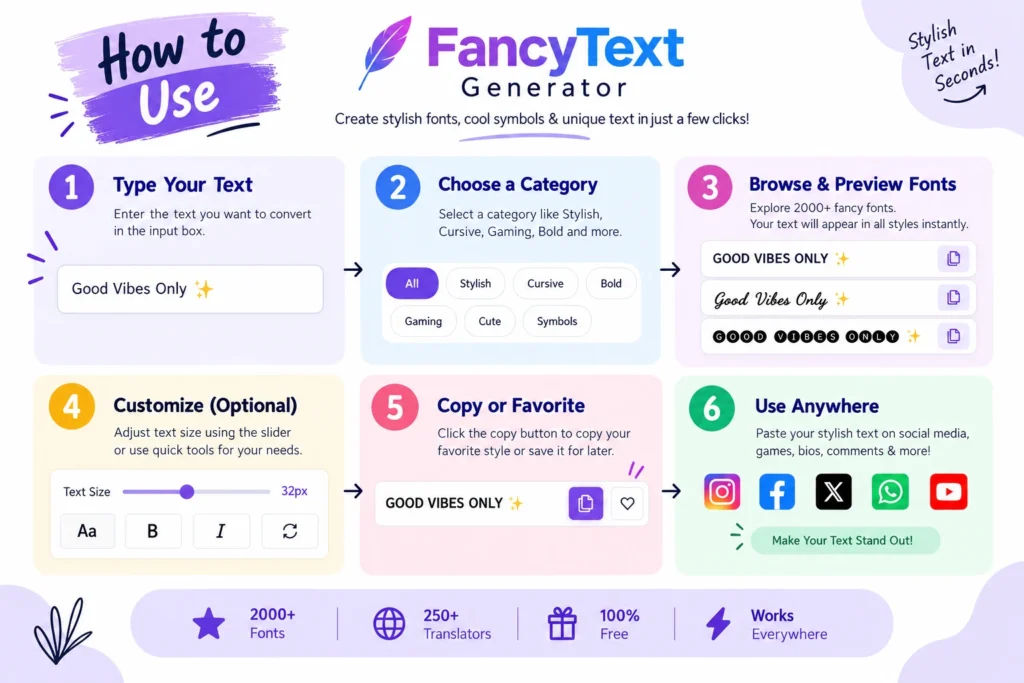
Step 1: Type your text
Enter your name, username, bio or whatever you’re working on.

Step 2: Pick a style
Choose the one you like.

Step 3: Copy it
Copy the generated text.
Step 4: Paste it where you actually want it
For example, paste it into your Instagram bio instead of only checking it inside the generator.
Step 5: Look at it on your phone
If it looks normal, great.
If you see: ▢ ▢ ▢ or missing characters, don’t keep fighting with that style.
Just try another one.
That’s usually much faster.
What If It Works on My Phone but My Friend Sees Boxes?
This is probably the most frustrating version.
You see:
𝓐𝓫𝓱𝓲𝓼𝓱𝓮𝓴
Your friend sees:
▢▢▢▢▢▢
It doesn’t necessarily mean you copied it incorrectly.
It can simply mean their device or the app they’re using doesn’t have the same support for those characters.
So if you’re using fancy text for something that lots of people need to read, like a business name or important message, readability should come before making it look super fancy.
What About Instagram, WhatsApp and Facebook?
If you’re using fancy text on social media, I’d keep it simple.
Fancy text can work nicely for usernames, bios and captions.
Just make sure your name or important information is still easy to read.
You can experiment more with statuses and messages, but it’s still worth checking the final result.
Same idea.
If a particular style turns into boxes, try another one instead of forcing it.
Gaming usernames
This is where you can have more fun.
If your whole goal is to make your username stand out, a more decorative style can make sense.
Just check that the game actually displays it properly before settling on it.
Can Installing a Font Fix the Problem?
Usually, not in the way you’re probably thinking.
Fancy text generators aren’t simply giving you a font file to install.
They’re generally creating text using Unicode characters.
So downloading a random font isn’t necessarily going to fix a fancy-text style that an app or device can’t display.
The Unicode Consortium also explains that Unicode data itself isn’t a software patch that automatically adds new font support to your device.
If a style isn’t displaying properly, trying another style is often the easier answer.
What We Recommend
If you just want your fancy text to work without dealing with a bunch of weird problems:
Keep it simple.
Try the style you like.
Copy it.
Paste it where you want it.
Check it.
If it works, use it.
If you get boxes, try another one.
You don’t need to spend an hour figuring out exactly which character caused the problem.
One Thing We Learned From Building a Big Collection
When you have a small number of styles, it’s easy to think:
“More styles = better.”
But after working with thousands of styles, we found that isn’t always true.
People don’t just want thousands of options.
They want to find one style that looks good and actually works for them.
That’s why having categories, search and previews became important.
And it’s also why we don’t think a fancy text generator should just throw every possible character combination at you.
A style needs to be useful, not just weird-looking.
Quick FAQ
Why is stylish text showing as boxes?
Usually because your device or app doesn’t have a suitable way to display one or more of the characters used in that style.
Why does the same stylish text work on one phone but not another?
Different devices, operating systems and apps can handle characters differently.
Is the text actually broken?
Not necessarily.
The character can exist in Unicode while your device still doesn’t have the right resources to display it properly.
Can I fix it by installing a font?
Sometimes font support can matter, but installing a font isn’t a universal fix, especially inside apps that control how text is displayed.
Which stylish text should I use?
If you’re worried about compatibility, start with a simple style and test it where you’re going to use it.
Why does my text look fine in the generator but not after I paste it?
Because the generator and the app you’re pasting into may handle the characters differently.
The Bottom Line
Seeing boxes doesn’t necessarily mean your fancy text is broken.
It usually means something in the device or app can’t properly display one or more of the characters you’re using.
And honestly, you don’t need to know all the technical details to fix it.
Try a simpler style.
Copy it again.
Paste it where you actually want to use it.
Check it on your phone.
If it still shows boxes, move on to another style.
There are thousands of ways to make text look different. You don’t need to force one that doesn’t work.
Looking different is fun. But looking different and actually being readable? That’s better.
Related Articles:
- Why Is My Fancy Text Not Showing Correctly?
- Why Unicode Fonts Are Not Supported Everywhere
- Why Some Fonts Dont Display on Mobile Devices
- How to Make Fancy Text Compatible Across Devices

Ankit Thakur is an SEO Specialist and WordPress Developer with 4+ years of experience. He has generated ₹60L+ in revenue through SEO, built 50+ websites, and helped businesses generate measurable leads through organic search and local SEO.