You found a fancy text style you really liked.
Maybe it was for your Instagram bio, WhatsApp status, or gaming username.
You copied it, pasted it somewhere else, and suddenly…
□□□□
Wait, what?
Some letters disappeared. A few symbols looked strange. Or the text didn’t look anything like it did in the generator.
Pretty annoying, especially when you spent time finding a style that looked perfect.
But here’s the thing: your fancy text generator isn’t necessarily broken.
Quick answer: Fancy text can look different after copying and pasting because it often uses Unicode characters that different devices, apps, and browsers may display or process differently. Missing font support can cause boxes, while app restrictions or text processing can cause characters to disappear or change.
The easiest fix is to copy the text directly from the generator, try a different style, and check how it looks in the app where you actually want to use it.
Now, here’s why this happens.
First, Fancy Text Isn’t Really a New Font
This is where things get a little confusing.
When you use a fancy text generator, you’re usually not downloading a new font or changing the font installed on your phone.
Instead, the generator uses different Unicode characters to make your normal text look different.
For example:
- Normal: Hello
- Bold: 𝐇𝐞𝐥𝐥𝐨
- Script: 𝓗𝓮𝓵𝓵𝓸
- Squared: 🅷🅴🅻🅻🅾
These look like different fonts, right?
But many of the letters are actually different characters.
The Unicode Standard gives characters their digital identities. Your device then uses fonts and text-rendering software to display them.
That’s why the same copied Unicode text can sometimes look different on another phone, computer, browser, or app.
The characters may still be there, even when your screen can’t display them properly.
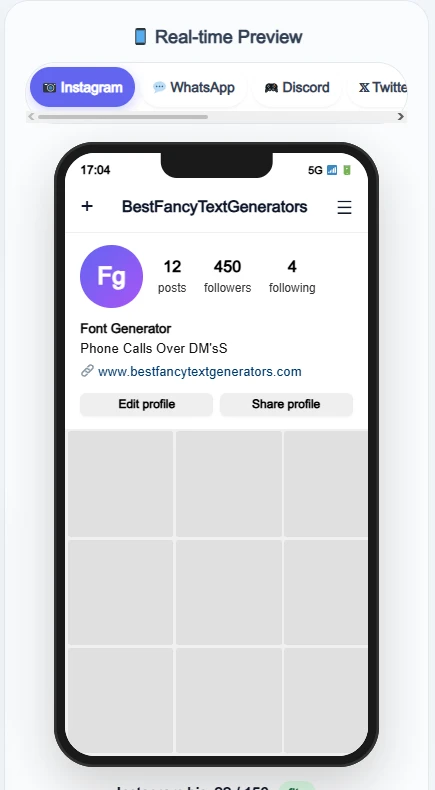
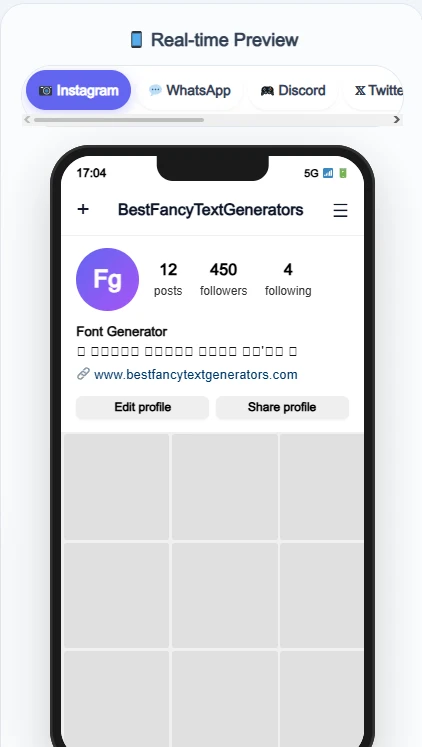
Why Does Fancy Text Change After You Paste It?
There isn’t just one reason.
Sometimes the character isn’t supported by the device.
Sometimes the app changes or rejects it.
And sometimes the style itself uses characters that don’t display well together.
Let’s look at the differences.
1. Your Device Can’t Display a Particular Unicode Character
Every Unicode character needs a visible shape to appear on your screen.
That shape is called a glyph.
Your phone uses fonts to display these glyphs.
But not every phone has fonts that support every Unicode character.
So when the device can’t find a suitable glyph, it might display a little box instead.
For example:
Expected: 𝓗𝓮𝓵𝓵𝓸
Possible unsupported display: □□□□□
This doesn’t necessarily mean the text was deleted.
The original characters may still exist, but the device can’t show them properly.
What to try: Use a different Unicode style or check whether the same text displays correctly on another device.
2. The App May Restrict Certain Characters
This is a different problem.
Some apps allow decorative Unicode characters in one text field but restrict them in another.
For example, an Instagram bio and an Instagram username don’t necessarily have the same character rules.
A style might display correctly in a bio but be rejected when you try to use it as your @username.
In that situation, changing your phone’s font won’t solve the problem.
The app may simply not allow those characters in that particular field.
What to try: Check whether the destination field supports the characters you’re using. If it doesn’t, use ordinary letters or another permitted style.
3. Some Apps May Change the Text During Copying or Pasting
Usually, copying Unicode text from one app to another should preserve the characters.
But some applications process text before displaying or saving it.
They may remove unsupported characters, convert certain characters, or apply text normalisation.
For example, some Unicode compatibility characters have corresponding ordinary-letter forms. Under certain normalisation processes, their appearance can change.
That means the text you paste might not always contain exactly the same characters you originally copied.
What to try: Copy the text directly from the generator and paste it into the destination app.
If it works, compare it with the version you transferred through other apps.
4. Decorative Marks Can Display Differently
Some fancy text styles use more than just alternative letters.
They may add combining marks, lines, or unusual symbols to ordinary characters.
For example:
Normal: Hello
Decorated: H̷e̷l̷l̷o̷
That second example uses additional marks to create the visual effect.
Depending on the app and device, the marks may overlap, shift, or display differently.
This doesn’t mean every decorative style will fail.
It just means the final appearance depends partly on how the system renders those character combinations.
What to try: Choose a style with fewer combining marks if your text looks messy or difficult to read.
5. The Style Doesn’t Support Every Character in Your Text
Here’s something that’s easy to miss.
You find a style that looks great with the word:
Hello
But when you enter your actual name, some letters look different.
Maybe your name includes a number, punctuation mark, or character that the style doesn’t have a suitable replacement for.
Not every fancy text style provides a complete set of matching characters.
So you might end up with a mixture of fancy and ordinary letters.
What to try: Preview your exact text before copying it. If some characters don’t match, choose another style or replace the problematic characters.
What Do Those Little Boxes Mean?
You’ve probably seen something like this before: □□□□
Or maybe only one character turns into a box while everything else looks fine.
These boxes are often called missing-glyph displays.
In simple terms, your device is saying:
“I have this character, but I don’t have a suitable way to draw it.”
There’s an important difference between seeing a box and seeing a missing letter.
If the character becomes a box, the underlying character may still be present.
If the character disappears completely, the app may have removed, rejected, or transformed it.
And if a fancy character turns into a normal-looking letter, some form of text conversion or normalisation may have occurred.
These problems can look similar at first, but they don’t always have the same cause.
How to Fix Fancy Text Copy-and-Paste Problems
You don’t need to become a Unicode expert to solve most of these problems.
Here’s a simple process.
Step 1: Generate Your Actual Text

Open a Fancy Text Generator and enter the exact text you want to style.
For example: Living My Best Life
Don’t choose a style based only on how the sample word looks.
Your actual text may contain different letters or symbols.
Step 2: Compare a Few Different Styles
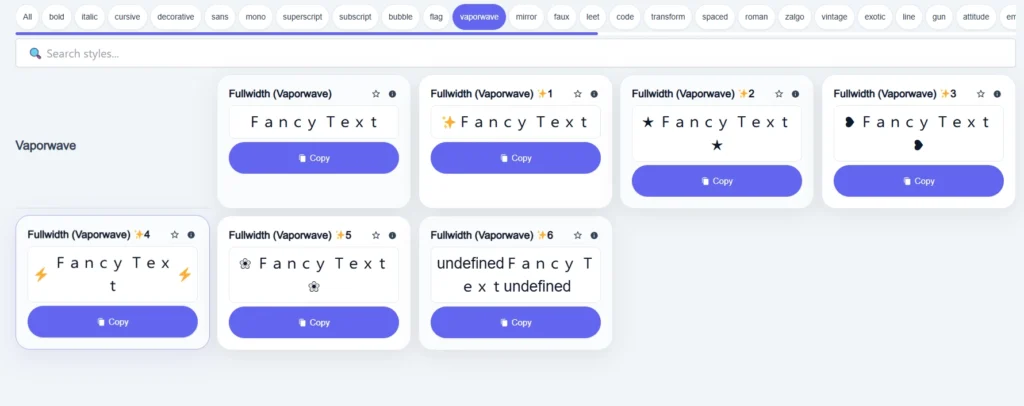
Try several variations.
For example:
- Normal: Hello World
- Bold: 𝐇𝐞𝐥𝐥𝐨 𝐖𝐨𝐫𝐥𝐝
- Script: 𝓗𝓮𝓵𝓵𝓸 𝓦𝓸𝓻𝓵𝓭
- Double-struck: ℍ𝕖𝕝𝕝𝕠 𝕎𝕠𝕣𝕝𝕕
You don’t necessarily need the most decorative option.
Choose something that looks good and remains readable.
Step 3: Check the Preview
Look at how your entire name, sentence, or caption appears inside the generator.
Are all the letters consistent?
Do any numbers look strange?
Are there symbols that don’t match the rest?
A preview helps you identify problems before copying.
But remember, a generator preview can’t guarantee how another app will display the same text.
Step 4: Copy the Text Directly
Choose your preferred style and copy it.
Then paste it directly into Instagram, WhatsApp, Facebook, your game, or wherever you want to use it.
Avoid moving the same text through several apps while troubleshooting.
That way, it’s easier to identify where the problem begins.
Step 5: Check the Pasted Result
Look at your text after pasting it.
Ask yourself:
- Are all the letters visible?
- Did any characters become boxes?
- Did the app remove anything?
- Is the text still readable?
- Does it look close to the original preview?
If everything looks right, you’re done.
Step 6: Try Another Style if Something Looks Wrong
If one style doesn’t work, don’t keep fighting with it.
Go back and try another option.
You might only need to change one problematic character.
Or you might find that a simpler style works better in your destination app.
The goal isn’t to use the fanciest possible text.
It’s to find a style that looks good where you actually need it.
Fancy Text Troubleshooting: Find Your Problem Quickly
Not sure what’s causing the issue?
This table can help.
| What Happens | Possible Reason | What You Can Try |
|---|---|---|
| Fancy text turns into boxes | Missing font glyph support | Try another Unicode style |
| Some letters disappear | App filtering or character restrictions | Check the destination field |
| Fancy text becomes normal letters | Text conversion or normalisation | Copy directly and compare the characters |
| Some letters stay normal | Incomplete character mapping in the style | Preview your exact text |
| Decorative marks overlap | Combining-character rendering | Choose a less decorated style |
| Text looks different on another phone | Different fonts or rendering systems | Compare devices |
| Text changes after passing through another app | The intermediate app may have transformed it | Copy directly from the generator |
These are possible explanations, not guaranteed diagnoses.
If you’re unsure, start with a short word and change one thing at a time.
That makes it easier to identify what is actually causing the problem.
What We Learned While Building BestFancyTextGenerators.com
This problem wasn’t just something we read about.
It became part of the development process while building our own fancy text collection.
The whole project started with a simple thought:
“I want my name to look different.”
So we searched for fancy text generators.
There were plenty of websites, but after looking through several of them, we noticed that many offered similar styles.
The same kinds of fancy letters kept appearing.
We wanted more variety.
So instead of building another generator with the same familiar options, we started exploring additional Unicode combinations and styles.
That’s when another problem appeared.
Not every fancy-looking character was actually useful.
Some styles looked interesting but didn’t render properly in certain environments.
Others behaved differently depending on where they were displayed.
So we started filtering out styles that didn’t work as expected rather than adding everything just to increase the number.
Eventually, the collection grew to 2,000+ fancy text styles.
But then we faced a different challenge.
How do you help someone find the right style without making them scroll through thousands of options?
That’s why we organised the collection into categories, introduced search, and added real-time previews.
The idea was to make the experience simple:
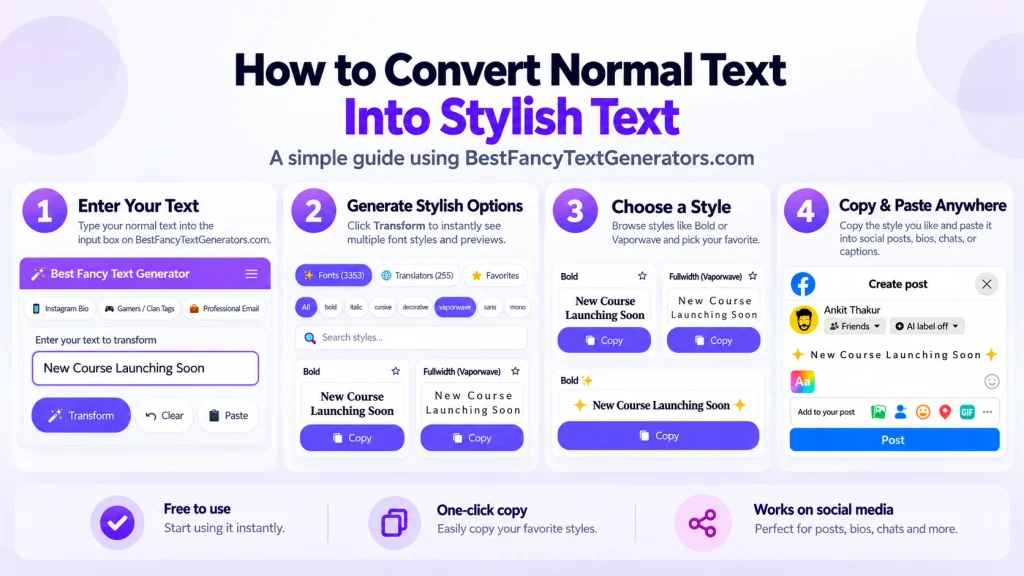
Type → Preview → Compare → Choose → Copy
You shouldn’t have to understand all the technical details behind Unicode just to make your name look a little different.
And the biggest lesson from building the collection was this:
A style isn’t useful just because it looks impressive. It also needs to work when someone actually uses it.
That’s why we recommend testing the final pasted result instead of relying only on the generator preview.
Does Fancy Text Look the Same on Every Device?
Not necessarily.
Different devices and operating systems can use different fonts and text-rendering systems.
That means the same Unicode character may look slightly different on an Android phone, iPhone, Windows computer, or another device.
Sometimes the difference is small.
Sometimes a character might not display at all.
Even two phones using the same operating system can have different font support depending on their software versions and configurations.
So if your text looks correct on your screen, that doesn’t automatically guarantee it will look exactly the same for everyone else.
For important text, try to keep the characters readable and avoid relying entirely on decorative styles.
Can Fancy Text Affect Accessibility?
Yes, sometimes.
Decorative Unicode letters may be announced differently by screen readers compared with ordinary text.
Some styles can also make words harder to recognise, search, or copy accurately.
That doesn’t mean you should never use fancy text.
But if you’re sharing important information, such as contact details, instructions, or business announcements, ordinary readable text is usually a better option.
You can still use fancy text for short decorative phrases.
Just make sure the message remains understandable.
Frequently Asked Questions
Why Does Fancy Text Change After Copying and Pasting?
Fancy text often uses Unicode characters that may display or be processed differently across devices, apps, and browsers. Missing glyph support, app restrictions, and text transformations are possible causes.
Why Does Fancy Text Show Boxes After Pasting?
Boxes often indicate that the device or app doesn’t have a suitable glyph for a particular Unicode character. Try another style or compare the same text on a different device.
Why Does Fancy Text Turn Back Into Normal Text?
Some applications may transform or normalise certain Unicode characters. If this happens, try copying directly from the generator and check whether the destination app processes the text.
Why Do Some Fancy Letters Disappear?
The app may reject or remove characters that aren’t allowed in a particular text field. It may also process the characters differently when saving or displaying them.
Can I Use Fancy Text on Instagram, WhatsApp, and Facebook?
You can use many Unicode-based styles in supported text fields, but compatibility varies. Some fields may restrict particular characters, and some devices may display them differently.
Which Fancy Text Style Works Everywhere?
There is no decorative Unicode style that can be guaranteed to display identically on every device and platform. Test the style where you actually plan to use it.
Do I Need to Install a Font to Use Fancy Text?
Usually not. Most online fancy text generators produce Unicode-based characters that you can copy and paste directly without installing a font.
Final Thoughts
Fancy text is supposed to make your name, bio, or caption look more interesting.
Not turn it into a bunch of mysterious boxes.
If a style looks different after pasting, the problem may involve your device, the app, or the particular Unicode characters being used.
The easiest place to start is simple.
Copy the original text again.
Try a different style.
Check the result where you want to use it.
And if one style doesn’t work, move on to another.
While building BestFancyTextGenerators.com, we learned that having thousands of styles wasn’t enough. Those styles also needed to be useful and easy to explore.
Because the best fancy text isn’t always the most complicated one.
It’s the one that looks good, stays readable, and works where you want to use it.
Related Articles:
- Why Is Stylish Text Showing as Boxes?
- Fancy Text Generator Not Working? Common Fixes
- Why Unicode Fonts Are Not Supported Everywhere
- How to Make Fancy Text Compatible Across Devices

Ankit Thakur is an SEO Specialist and WordPress Developer with 4+ years of experience. He has generated ₹60L+ in revenue through SEO, built 50+ websites, and helped businesses generate measurable leads through organic search and local SEO.