You found a really cool fancy text style.
You copied it, opened Instagram or WhatsApp, pasted it, and suddenly…
▢ ▢ ▢
Wait, what?
It looked perfectly fine in the fancy text generator. But now some letters are missing, a few symbols look strange, or the whole thing has turned into little boxes.
And the weirdest part? The same text might look completely normal on your friend’s phone.
So what’s going on?
The quick answer: Some fancy fonts don’t display properly on mobile devices because they use Unicode characters that your phone, browser, or app might not be able to show correctly. Different devices have different font support, so the same text can look different depending on where you open it.
Usually, you can fix this by choosing a simpler style, copying it directly from the generator, and checking how it looks in the app where you want to use it.
But there’s a little more to it.
First, Fancy Text Isn’t Actually a New Font
This is probably the most confusing part.
When you use a fancy text generator, you’re usually not changing the font installed on your phone.
Instead, the generator replaces normal letters with different Unicode characters that look like bold, italic, script, or other decorative styles.
For example:
- Normal text: Hello
- Bold style: 𝐇𝐞𝐥𝐥𝐨
- Italic style: 𝘏𝘦𝘭𝘭𝘰
- Script style: 𝓗𝓮𝓵𝓵𝓸
- Monospace style: 𝙷𝚎𝚕𝚕𝚘
They look like different fonts, right?
But many of these letters are actually different characters.
The Unicode Standard defines characters and how they are represented digitally. Your device then uses fonts and its text-rendering system to display them.
That’s where things can get a little messy.
A character may be supported by Unicode, but your phone might not have a suitable font to show it.
So instead of displaying the character properly, the device shows a little box or a replacement symbol.

Why Don’t Some Fancy Fonts Display on Mobile Devices?
There isn’t just one reason.
Sometimes the problem is your phone’s font support. Sometimes it’s the app. And sometimes the fancy text itself uses characters that don’t display well together.
Here are the most common reasons.
1. Your Phone Doesn’t Have the Right Glyph
Every character needs a visible shape to appear on your screen.
That visible shape is called a glyph.
When your phone encounters a Unicode character, its text-rendering system looks for a font that can display it.
If it can’t find a suitable glyph, you might see something like this: ▢ ▢ ▢
Or maybe just one letter becomes a box while the rest of your text looks normal.
This is often called a missing glyph or tofu display.
Think of it like your phone receiving a character it understands as data but doesn’t know how to draw on the screen.
What can you do?
Try another fancy text style that uses different characters. You can also check whether the same text appears correctly on another device.
If it does, the issue may be related to the fonts available on your phone.
2. Some Unicode Characters Have Less Font Support
Unicode includes a huge range of characters, but that doesn’t mean every device can display all of them.
Some characters are widely supported across modern devices.
Others may need particular fonts or newer system software.
Fancy text generators can use unusual symbols, decorative letters, and combinations of characters to create different effects.
And while those styles might look amazing in the generator, that doesn’t guarantee they’ll display the same way everywhere else.
Here’s something important:
A fancy character being part of Unicode doesn’t automatically mean every phone can display it.
That’s why switching to a different Unicode style can sometimes solve the problem immediately.
3. Android and iPhone Don’t Display Every Character the Same Way
Ever noticed how the same emoji can look different on Android and iPhone?
A similar thing can happen with fancy text.
Android, iOS, Windows, and other operating systems use different fonts and text-rendering systems.
Even two Android phones may have different font support depending on their software versions and manufacturers.
For example, imagine copying a decorative username from your laptop.
It looks perfectly fine.
Then you paste it into your phone, and one symbol doesn’t appear.
That doesn’t necessarily mean the text changed during copying.
It may simply mean your laptop has a suitable font that your phone doesn’t.
What can you do?
Open the same text on another device and compare the results.
If it works on one device but not another, the problem may be related to character rendering rather than the generator itself.
4. Some Apps Handle Unicode Text Differently
Your phone isn’t the only thing involved.
The app where you paste your fancy text matters too.
Instagram, WhatsApp, Facebook, browsers, and other apps may display or process certain characters differently.
There are actually two separate problems that people often confuse.
Problem A: The character doesn’t display correctly.
The text may still contain the original Unicode character, but the app or device cannot show it properly.
You might see a box or a replacement symbol.
Problem B: The app rejects or changes the character.
Some text fields have restrictions on which characters can be entered.
For example, an Instagram bio and Instagram username don’t necessarily allow the same characters.
If the app removes or rejects a character, installing another font won’t fix that particular restriction.
What can you do?
Try pasting the same text into a different permitted field or app.
If it works there, the original app or field may be restricting or processing the characters.
5. Decorative Styles Can Use Combining Characters
Some fancy text styles are more complicated than simple bold or italic letters.
They may use combining characters to add marks, lines, or other effects to normal letters.
For example:
Normal: Hello
Decorated: H̷e̷l̷l̷o̷
Notice the lines running through the letters?
Those effects involve additional Unicode marks.
Depending on the device and rendering system, the marks may overlap, shift, or appear differently from what you expected.
This doesn’t mean all decorative styles are incompatible.
It just means they have more visual elements that need to be rendered together.
If one of these styles looks messy on your phone, try a version with fewer decorative marks.
Why Does Fancy Text Work on My Laptop but Not My Phone?
Imagine this.
You open a fancy text generator on your laptop.
You type your name.
You find a cool style.
You copy it and send it to your phone.
And suddenly, one of the letters looks completely different.
The reason may be quite simple: your laptop and phone don’t have identical font support.
Your laptop might have a font that contains the character, while your phone doesn’t.
Software versions and rendering systems can also affect how text appears.
So the same Unicode character can look slightly different, or fail to display, without the underlying text changing.
If you want to check what’s happening, try this:
- Generate a short fancy text sample on your laptop.
- Copy the exact same text to your phone.
- Open it in a browser or another app.
- Compare how each device displays it.
- Try a different Unicode style if some characters appear incorrectly.
The key is to compare the same copied text, not separately generated versions.
That way, you’ll have a better idea of whether the difference comes from how the devices display the characters.

How to Fix Fancy Fonts That Aren’t Displaying on Your Phone?
Okay, enough technical stuff.
Here’s what you can actually do when fancy text looks broken.
Step 1: Try a Different Fancy Text Style
The easiest solution is often to change the style.
If a heavily decorated style isn’t displaying correctly, try a simpler option.
For example:
Normal: My Name
Bold: 𝐌𝐲 𝐍𝐚𝐦𝐞
Italic: 𝘔𝘺 𝘕𝘢𝘮𝘦
Monospace: 𝙼𝚢 𝙽𝚊𝚖𝚎
These are alternatives to test, not styles guaranteed to work on every device.
You can compare different options using our Fancy Text Generator.
Step 2: Preview Your Actual Text
Don’t choose a style just because the sample word looks good.
A style that looks great with “Hello” might look different when you use your actual name, including numbers or symbols.
Enter the exact text you want to style.
This helps you notice unusual characters before copying.
Just remember that a generator preview shows how the text appears in that environment. It can’t guarantee how every external app will display it.
Step 3: Copy the Text Directly From the Generator
If you’ve copied the same text through several apps, go back to the original generator.
Copy it again and paste it directly into your destination app.
Unicode characters normally survive copying between apps, but some applications may transform or remove certain characters.
Direct copying helps you rule out that possibility.
Step 4: Test the Text in Another App
If the text appears as boxes in one app, try viewing the same copied characters somewhere else.
For example, compare how the text looks in your phone’s browser and in the app where you want to use it.
If it displays correctly in one place but not another, the issue may be specific to the application or its text-rendering behaviour.
Step 5: Check Another Device
If possible, view the same text on another phone or computer.
This can help you identify whether the issue affects just one device.
You can also check whether your phone and apps are running current software versions, since updates sometimes improve character and font support.
Step 6: Replace the Problem Character
Sometimes most of your fancy text looks fine, except for one symbol.
In that case, you don’t need to change the whole sentence.
You can replace the unsupported character with a more familiar symbol or an ordinary letter.
It might look slightly less decorative, but it will usually be easier to read.
Fancy Text Display Problems: Quick Troubleshooting Guide
If you’re still confused, use this table to identify what might be happening.
| What you’re seeing | Possible reason | What to try |
|---|---|---|
| Letters appear as boxes | Missing glyph support | Try a different Unicode style |
| Text looks different on Android and iPhone | Different fonts or rendering systems | Compare the same text on both devices |
| A symbol appears on desktop but not mobile | Different character support | Try another symbol or style |
| Decorative marks overlap | Combining-character rendering | Use fewer decorative marks |
| Characters disappear after pasting | App processing or field restrictions | Try a different permitted field |
| Only one letter looks wrong | Unsupported or incorrectly mapped character | Replace that character |
| Text changes after passing through another app | An app may have transformed the text | Copy directly from the generator |
These are possible explanations, not guaranteed diagnoses.
The most useful approach is to change one thing at a time so you can identify where the problem starts.
What We Learned While Building BestFancyTextGenerators.com
We actually came across this problem while building our own fancy text collection.
The project started with something pretty normal.
We wanted our names and profiles to look a little different.
You know when you see someone’s Instagram bio or gaming username and think, “That looks cool. How did they do that?”
That was the original curiosity.
So we searched for fancy text generators.
There were plenty of websites, but after exploring several of them, we noticed that many offered very similar styles.
We’d find a style on one website, open another, and see something almost identical.
And we wanted more variety.
So instead of putting together another collection of the same commonly available styles, we started looking at what already existed and searching for other Unicode combinations.
That’s when we learned something important.
Not every fancy-looking character makes a useful fancy text style.
Some characters and combinations didn’t render as expected.
Others looked different depending on the environment where they were displayed.
So we started filtering styles that didn’t work properly instead of adding everything just to increase the count.
Over time, the collection grew to 2,000+ fancy text styles.
But that created another challenge.
How do you help someone find the right style without making them scroll through thousands of options?
That’s why we organised the collection into categories, introduced search, and added real-time previews.
Someone looking for a gaming username might want something completely different from someone creating an Instagram bio.
The tool needed to make both experiences simple.
Our goal became:
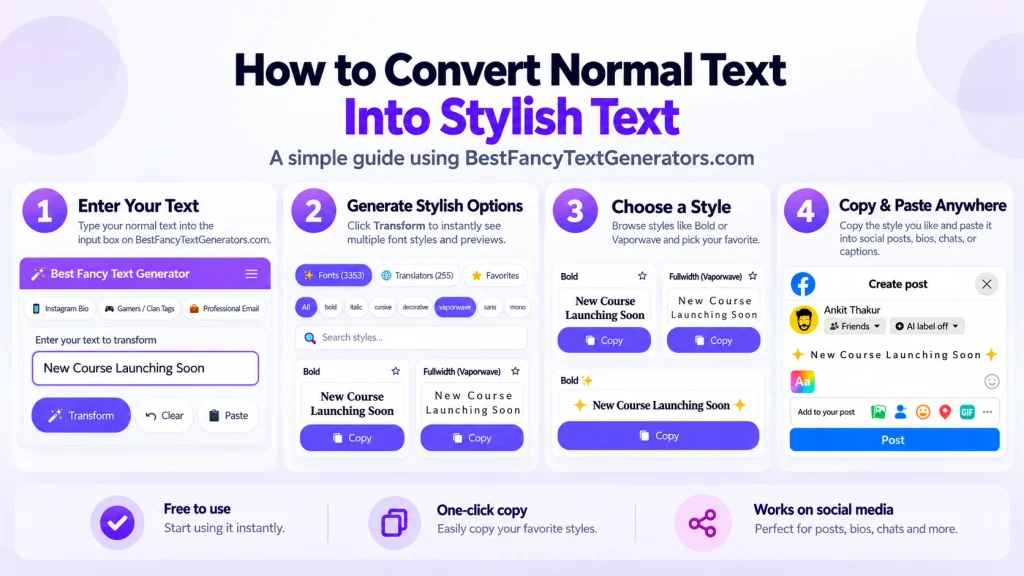
Type → Preview → Choose → Copy → Paste
And all of that came back to one simple lesson:
A style isn’t useful just because it looks cool in a generator. It also needs to work where someone wants to use it.
That’s why we recommend checking the final pasted text rather than relying only on how it looks in the preview.
We Compared Fancy Text Across Devices: What to Look For
You can learn a lot by comparing the same text across devices.
If you’re testing compatibility, use the same Unicode string on each device and record what you actually see.
Here’s a simple comparison format:
| Test | What to check |
|---|---|
| Android phone | Do all characters display? |
| iPhone | Does the same text appear correctly? |
| Desktop browser | Are any symbols missing? |
| Instagram or Facebook | Does the intended field accept the text? |
| Does the pasted text remain readable? |


Can Installing a New Font Fix Fancy Text Display Problems?
Sometimes, but not always.
If your phone is missing a glyph, having access to a compatible font can help the system display that character.
However, installing a font doesn’t automatically mean every application will use it.
And it won’t override an app’s restrictions on which Unicode characters can be entered.
For example, if a platform doesn’t allow certain characters in a username field, changing fonts won’t make those characters acceptable.
Also, installing a font on your phone won’t change what someone else’s device can display.
So for everyday fancy text use, choosing a style that displays correctly in your target app is usually easier than changing your device’s fonts.
What Fancy Text Styles Are Better for Mobile?
There’s no single fancy text style that works perfectly everywhere.
But there are a few practical things worth considering.
For an Instagram bio: Try readable styles that don’t rely too heavily on extra decorative marks.
For a WhatsApp status: You can experiment with different styles, but check that the result remains readable.
For a gaming username: Decorative symbols can be fun, but the game may have its own character restrictions.
For business or creator profiles: Keep important information easy to read.
And here’s something else worth remembering.
Fancy Unicode letters aren’t always as accessible as ordinary text.
Some screen readers may pronounce decorative characters differently, and certain text styles can make names or important information harder to search or copy accurately.
So if readability matters, using a little fancy text is often better than styling absolutely everything.
Frequently Asked Questions
Why does fancy text show as boxes on my Android phone?
This often happens when the phone’s available fonts don’t contain the glyphs needed to display certain Unicode characters. Try a different style or compare the same text on another device.
Why do some Unicode symbols work on iPhone but not Android?
Different operating systems and software versions can use different fonts and rendering systems. That means they may not display all Unicode characters in exactly the same way.
Why does fancy text work on my laptop but not on my phone?
Your laptop may have different font support from your phone. The same character can display correctly on one device and appear differently on another.
Are fancy fonts and Unicode characters the same thing?
Not exactly. A font determines how supported characters are drawn, while Unicode assigns identities to characters. Many fancy text generators use different Unicode characters to create the appearance of different fonts.
Can updating my phone fix missing Unicode characters?
It can sometimes help because software updates may include improved font support or rendering changes. But it isn’t guaranteed to fix every unsupported character.
Why does only one fancy letter appear as a box?
The particular Unicode character may not have a suitable glyph available on your device. Replacing that character or choosing another style may solve the problem.
Do simple fancy text styles always work better?
Not always. Compatibility depends on the specific characters, fonts and applications involved. Simpler styles are often a practical starting point because they’re easier to read and may involve fewer decorative marks.
Will installing a font make all fancy text work?
No. It may improve local character rendering in some circumstances, but it doesn’t guarantee compatibility with every app or with other people’s devices.
The Bottom Line
Fancy text is supposed to make your name, bio, or caption look a little more interesting.
Not turn it into a bunch of mysterious boxes.
If a style doesn’t display properly on your phone, there’s usually a reason involving the characters, fonts, device, or app.
And you don’t need to understand every Unicode technical detail to fix it.
Start with a simpler style.
Copy it directly.
Check the result in the app where you want to use it.
And if one style doesn’t work, try another.
That’s something we learned while building BestFancyTextGenerators.com too.
Having more styles is nice. Having styles that people can actually use is what matters.
So go ahead and experiment with different looks.
Just make sure your text still looks like you intended when it reaches someone else’s screen.
Related Articles:
- Why Unicode Fonts Are Not Supported Everywhere
- How to Make Fancy Text Compatible Across Devices
- Why Is Stylish Text Showing as Boxes?
- Why Fancy Text Looks Different on Different Platforms

Ankit Thakur is an SEO Specialist and WordPress Developer with 4+ years of experience. He has generated ₹60L+ in revenue through SEO, built 50+ websites, and helped businesses generate measurable leads through organic search and local SEO.