Have you ever seen someone’s Instagram name and thought, “Wait, how did they write it like that?”
You type your name normally, and suddenly it can look like this:
Your Name
becomes:
𝒀𝒐𝒖𝒓 𝑵𝒂𝒎𝒆
or:
𝕐𝕠𝕦𝕣 ℕ𝕒𝕞𝕖
or even:
Your Name
It looks like someone changed the font, but that’s not really what’s happening.
These are Unicode characters that look like different font styles.
And honestly, the reason people use them is pretty simple. Sometimes you just want your name, bio, username, or caption to look a little different.
That’s actually where the idea for BestFancyTextGenerators.com started too.
The original search was pretty normal: find a good fancy text generator. But after opening different websites, something started to feel a bit weird. A lot of them had almost the same styles. You’d find a style on one website, open another, and there it was again.
That raised a simple question:
If everyone is using the same few styles, how are you supposed to make your text look different?
So let’s start with the basics.
So, What Exactly Is Unicode Stylish Text?
The easiest way to understand it is this:
Unicode stylish text isn’t really a new font.
It’s text made using special Unicode characters that look different from normal letters.
For example:
Normal:
Build Your Personal Brand
Stylish:
𝐁𝐮𝐢𝐥𝐝 𝐘𝐨𝐮𝐫 𝐏𝐞𝐫𝐬𝐨𝐧𝐚𝐥 𝐁𝐫𝐚𝐧𝐝
The letters in the second version aren’t just normal letters made bold. They’re different Unicode characters that happen to look like bold letters.
That’s why you can usually copy them and paste them somewhere else without installing a font.
No font file.
No software.
No Photoshop.
Just copy and paste.
Why Do People Even Use It?
Mostly because it looks different.
That’s it.
Think about an Instagram profile. You already have your profile picture, username and bio. Maybe you use emojis too. Changing the way a few words look is just another small way to make the profile feel more like yours.
The same thing happens with gaming names, WhatsApp statuses and social media captions.
The founder story behind BestFancyTextGenerators.com actually started from this exact kind of thing—the simple desire to make a name or piece of text look different online.
It doesn’t mean fancy text is going to make you famous or suddenly get you thousands of followers.
It just gives you another way to play around with how your text looks.
And sometimes, that’s all you want.
How Does It Work?
This sounds more complicated than it actually is.
Unicode contains lots of different characters. Some of them look similar to normal letters but have different appearances.
For example, the letter A can appear in forms like:
A → 𝐀 → 𝑨 → 𝒜 → 𝔄 → 𝕬
A fancy text generator basically takes the text you type and changes the characters into matching Unicode characters.
So if you type:
Build Your Personal Brand
the generator can turn it into:
𝑩𝒖𝒊𝒍𝒅 𝒀𝒐𝒖𝒓 𝑷𝒆𝒓𝒔𝒐𝒏𝒂𝒍 𝑩𝒓𝒂𝒏𝒅
You don’t have to manually find every character.
The generator does that part for you.
The Problem We Found With Existing Fancy Text Generators
This is where the story gets a little more interesting.
When the project started, there were already plenty of fancy text generators online. So there wasn’t much point in simply making another one.
Different generators were opened and their styles were compared.
The surprising part?
A lot of them were giving almost the same choices.
The designs were similar.
The layouts were similar.
And even the actual text styles were often similar.
The same thing could be seen on social media too. The same fancy-looking names and styles kept appearing on Instagram, gaming profiles and other platforms.
It wasn’t necessarily because everyone loved those particular styles.
They just didn’t have many other choices.
That became the real problem we wanted to solve.
Instead of:
“Let’s make another fancy text generator.”
the idea became:
“Let’s see what’s already out there, find what’s missing, and build those options.”
So We Started Looking for More Styles
The first step was figuring out what other generators were already offering.
Then came the more interesting part: finding styles and variations that weren’t showing up everywhere.
Not every strange-looking Unicode character was useful, though.
Some looked great in one place but didn’t display properly somewhere else.
Some looked broken.
Some were technically interesting but weren’t something you’d actually want to copy and use.
So simply finding a character wasn’t enough.
It had to actually be useful.
That became one of the rules behind the collection: a style shouldn’t be included just because it looks fancy. It should work too.
After going through this process, the collection grew to 2,000+ fancy text styles.
And then, of course, we found another problem.
Okay, But How Do You Find One Style Out of 2,000+?
Having thousands of options sounds great until you actually have to find something.
Imagine opening a page with thousands of styles and just scrolling.
You’d probably give up.
Someone looking for a gaming name doesn’t want to look through hundreds of cute handwriting styles.
Someone looking for an aesthetic Instagram bio probably doesn’t want to go through every gaming style either.
So the styles had to be organised.
That’s why categories were added.
If you already know what kind of style you want, you can go straight toward it.
If you don’t know what you want yet, you can just browse and see what you like.
Search also becomes useful here.
You might type:
Gaming
or:
Gothic
or:
Cute
or:
Aesthetic
and start from there.
This was an important lesson from building the collection: more choices are useful only when people can actually find what they’re looking for.
We Also Wanted to See the Actual Text Before Copying It
Here’s another small thing that makes a difference.
Imagine you see a style that looks cool in the example, but you’re not sure how your own name will look in it.
That’s annoying.
So instead of only showing an example, the idea was to let users type their own text and see the result.
You can type something, look at the different versions, compare them, and then pick one.
It’s a much nicer experience than:
Pick → Copy → Hope it looks good
It’s more like:
Type → See it → Compare → Choose → Copy
The product source describes this real-time preview as a way for users to see their own text before deciding which style to copy.
How to Convert Text into Unicode Stylish Fonts?
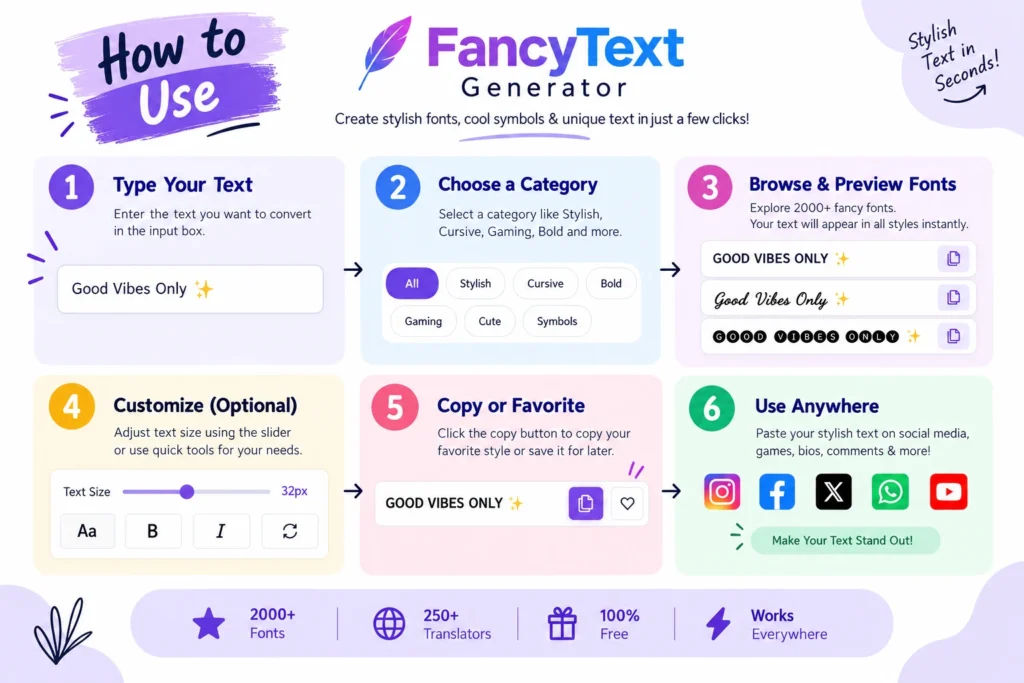
You really don’t need to make this complicated.
1. Start with your normal text
For example:
My New Gaming Name
2. Put it into a Fancy Text Generator

You’ll get different versions of the same text.
For example:
𝐌𝐲 𝐍𝐞𝐰 𝐆𝐚𝐦𝐢𝐧𝐠 𝐍𝐚𝐦𝐞
𝑴𝒚 𝑵𝒆𝒘 𝑮𝒂𝒎𝒊𝒏𝒈 𝑵𝒂𝒎𝒆
𝕄𝕪 ℕ𝕖𝕨 𝔾𝕒𝕞𝕚𝕟𝕘 ℕ𝕒𝕞𝕖
3. Try a few
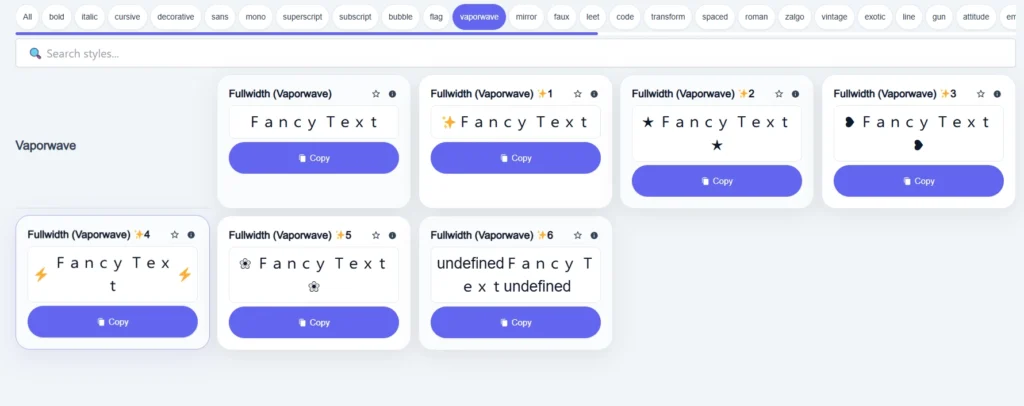
Don’t immediately pick the first one.
Try a few styles and see which one actually looks good with your text.
4. Check readability
This matters more than people think.
If you have to squint to understand the word, pick something simpler.
5. Copy and paste
Once you’ve found one you like, copy it and paste it wherever you want.
That’s basically the whole process.
Type → Choose → Copy → Paste
The product was designed around keeping this basic journey simple rather than making people create accounts, download software or learn complicated tools.
Where Can You Use Stylish Text?
There are quite a few places where people use it.
You can use it in places like bios and captions where Unicode characters are supported.
Gaming
Gaming usernames are one of the more obvious places to experiment with different styles.
You can use stylish characters in statuses, messages and other supported text areas.
YouTube
Stylish Unicode text can be useful in supported profile or text fields.
Discord, TikTok, Facebook, X and Telegram
These are also places where people use different Unicode characters for profiles, names, messages and other text.
The exact characters that work can vary by platform, though. So if something looks weird after you paste it, try another style.
Don’t Make Everything Fancy
This is probably the easiest mistake to make.
You find a cool style and suddenly you want to use it everywhere.
Don’t.
Something like this:
𝓣𝓱𝓲𝓼 𝓮𝓷𝓽𝓲𝓻𝓮 𝓼𝓮𝓷𝓽𝓮𝓷𝓬𝓮 𝓲𝓼 𝓱𝓪𝓻𝓭 𝓽𝓸 𝓻𝓮𝓪𝓭
might look interesting, but it’s not exactly easy to read.
Sometimes a simple style looks much better.
For example:
How to Grow 𝐎𝐧𝐥𝐢𝐧𝐞
Here, only one word is styled.
The rest stays normal.
That’s usually a better idea for bios, captions and other places where people actually need to read what you’re saying.
For a gaming username, you can probably experiment more because the whole point is often to make the name look unique.
So it depends on what you’re using it for.
A Few Things to Keep in Mind
Unicode stylish text is useful, but it isn’t perfect.
Some characters may look different on different devices.
Some may not display correctly.
Some screen readers can also have trouble with complicated Unicode characters.
So before using a fancy style somewhere important, do a quick check.
Does it look right?
Can someone easily read it?
Does it still look okay after I paste it?
If yes, you’re good.
If not, there’s probably another style that will work better.
Why We Didn’t Just Stop at 2,000 Styles
One thing we learned while working on the project is that more isn’t automatically better.
At first, the problem was not having enough choices.
Then we had the opposite problem.
There were thousands of choices.
Now the question became:
How do we make those choices easy to use?
That’s why categories, search and previews became such an important part of the product.
The idea wasn’t just to say:
“Look, we have 2,000+ styles.”
It was to make those styles actually useful.
The founder story describes this as two separate problems: users needed more variety, but too much variety could also make finding the right style harder.
That probably sums up the whole project pretty well.
So, What’s the Best Way to Use Stylish Text?
Keep it simple.
If you’re making a gaming username, go crazy and try different things.
If you’re making an Instagram bio, try a few styles but keep it readable.
If you’re writing something long, normal text is usually the better choice.
And if you find a style that looks cool but doesn’t work after you paste it, just move on.
There are plenty of others.
The main idea behind BestFancyTextGenerators.com was never just to collect a huge number of fancy characters.
It was to give people more useful choices and make those choices easy to find.
Frequently Asked Questions
Are Unicode stylish fonts actually fonts?
Not really. They’re Unicode characters that look like different font styles.
Do I need to install anything?
No. You can usually copy and paste Unicode stylish text without installing a font.
Can I use stylish text on Instagram?
Many Unicode styles work in supported Instagram text areas, but not every character will work everywhere.
Can I use it for gaming usernames?
Yes. Gaming is one of the common ways people use stylish text. Just remember that each game can have its own character restrictions.
Why doesn’t every style work everywhere?
Different platforms and devices don’t always display every Unicode character in exactly the same way.
What’s the easiest way to make stylish text?
Use a fancy text generator, type your text, choose a style, copy it and paste it where you want.
Final Thoughts
Fancy text isn’t really about fonts.
And it isn’t about some complicated technology that you need to understand before using it.
At the end of the day, it’s just another way to make your text look a little different.
That’s also what started the BestFancyTextGenerators.com project.
The search for a better generator showed that many existing tools were offering the same limited styles. Instead of making another copy, the project looked at what was already available, searched for missing styles, removed ones that didn’t work properly, and built a collection of more than 2,000 styles.
Then came the next challenge: making thousands of choices easy to use.
That’s why the focus went beyond just collecting styles and included categories, search, previews and speed.
But the reason behind all of it is still pretty simple.
You might just want your name to look different.
Your username to feel more like yours.
Your bio to have a little personality.
Nothing huge.
Just a small change that makes your text feel a bit more you.
And that’s really what fancy text is for.
You bring the words. We give you more ways to make them yours.
Related Articles:
- How to Convert Normal Text into Stylish Fonts
- Fancy Text Generator vs Unicode Converter – Which is Better
- Why Unicode Fonts Are Not Supported Everywhere
- What is Fancy Text?

Ankit Thakur is an SEO Specialist and WordPress Developer with 4+ years of experience. He has generated ₹60L+ in revenue through SEO, built 50+ websites, and helped businesses generate measurable leads through organic search and local SEO.