Plain text still works fine most of the time. But scroll through any Instagram bio section, WhatsApp status update, or Free Fire lobby and the accounts that stand out usually aren’t using the default font.
They’re using stylish text — sometimes called fancy text — and once you know how it’s copied and pasted in, it’s hard to unsee.
Quick summary: Stylish text isn’t a real font — it’s Unicode characters that render in a different style. It works almost everywhere because of that, breaks occasionally for the same reason, and is most useful in small doses (a name, a bio line) rather than an entire paragraph.
The Problem: Most Platforms Don’t Let You Change Fonts
Instagram, WhatsApp, Facebook, and LinkedIn don’t give you a font picker anywhere:
- No bold button in your bio field
- No italics option in a WhatsApp message
- No way to pick a script typeface for your gaming name
The result: your text looks exactly like everyone else’s, and it’s easy to scroll past.
Stylish text sidesteps this — not by changing the font, but by using characters that already look different. More on that below.
What Stylish Text Actually Is?
| Term | What it means |
|---|---|
| Stylish text / fancy text | Regular Unicode characters styled to look like a different font |
| Not a real font | Nothing is installed — the character itself just looks different |
| Works everywhere | Because it’s still just text, not an image or file |
Examples:
| Style | Result |
|---|---|
| Normal | Hello World |
| Stylish | 𝓗𝓮𝓵𝓵𝓸 𝓦𝓸𝓻𝓵𝓭 |
| Bold | 𝐇𝐞𝐥𝐥𝐨 𝐖𝐨𝐫𝐥𝐝 |
| Aesthetic | hello world |
Because these are Unicode characters and not font files, pasting “𝓗𝓮𝓵𝓵𝓸” into WhatsApp shows up the same way it would in an Instagram caption — no install needed.
How It Works?
A generator swaps each letter you type for a Unicode character from a different character block — mathematical alphanumeric symbols, fullwidth forms, and a few symbol-based lookalikes. Your keyboard can’t type these directly; that’s the entire reason generators exist.
The character still means “H” for copy-paste purposes. It just gets drawn differently by whatever font the receiving app uses.
Why It Sometimes Breaks?
This is the part most generators don’t explain, and it’s usually why people give up on stylish text.
| Cause | What happens |
|---|---|
| Platform restrictions | Some apps strip or reject specific Unicode ranges |
| Device differences | A style that looks clean on iPhone can look cramped on some Android skins |
| Missing glyph support | Unsupported characters show up as a blank box (□) |
| Strict input fields | Some search bars or forms reject the whole string, not just the bad character |
If a style looked perfect in the generator but landed as broken boxes in your bio — this is why. It’s a font-support gap on the receiving end, not something you did wrong.
Where People Actually Use It?
Instagram & social media Bios, captions, comments — the main place styled text gets used, since it’s one of the few ways to visually separate a profile from a default grid of accounts.
Messaging apps WhatsApp, Telegram, Messenger — useful for a status line or a name that stands out in a crowded chat list.
Gaming platforms Free Fire, BGMI/PUBG, Discord — usernames are real estate here. A styled clan tag reads as more established than a plain one.
Content & branding YouTube titles, website copy, personal branding — best used sparingly. A styled word in a thumbnail helps it stand out; a whole styled sentence usually just gets harder to read.
How to Copy and Paste Stylish Text Anywhere?
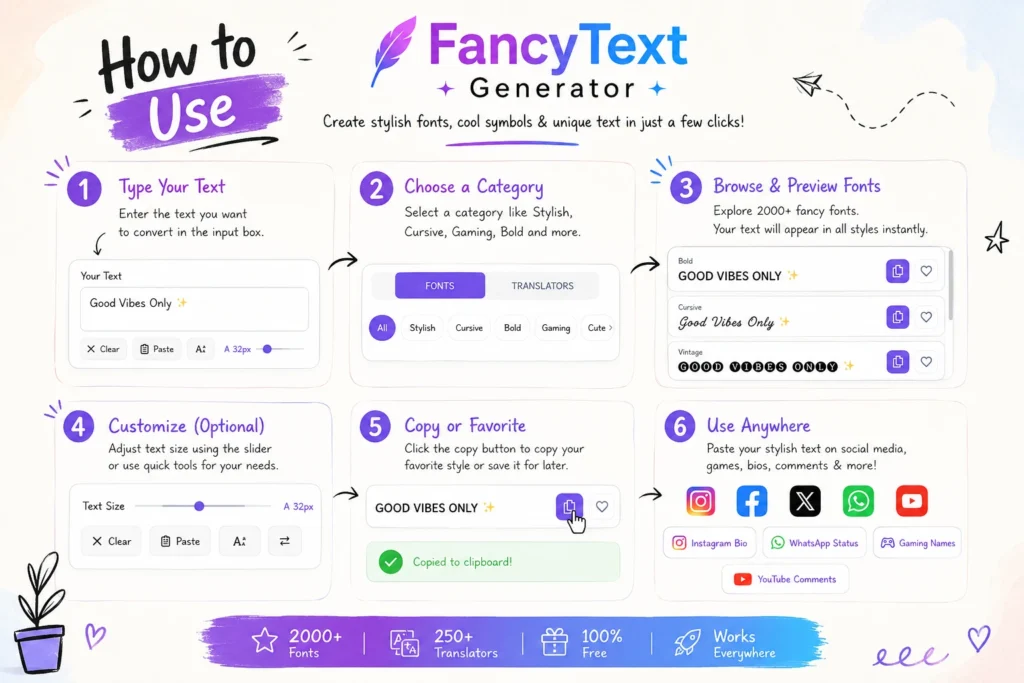
- Type your text — something like “Ankit Digital” works as a test.
- Generate styles — you’ll get a batch back: bold, script, aesthetic spacing, decorative variants.
- Pick one and copy it.
- Paste it — Instagram bio, WhatsApp chat, gaming username, a heading on your site.
No account, no download, no technical setup.
Picking a Generator That Actually Works
Most frustration with stylish text doesn’t come from the concept — it comes from generators outputting broken or half-supported characters.
Watch out for:
- Characters that look fine in the tool’s preview but break once pasted into the real app
- A style list padded with near-duplicates
- No indication of which styles are broadly supported vs. risky on older devices
A generator worth using should get right:
| Factor | What to look for | Why it matters |
|---|---|---|
| Speed | Converts as you type, no lag | You’ll usually test several styles in a row |
| Style range | Genuinely distinct styles, not padding | A long list with little real difference wastes time |
| Compatibility | Tested against major apps, not just a browser preview | This is where most failures happen |
| Output | Clean characters, no stray boxes | Broken output defeats the point |
Common Mistakes to Avoid
- Overusing it — a fully styled sentence is genuinely harder to read; save it for names or short phrases.
- Reaching for the most decorative style — heavily symbol-loaded fonts are also the most likely to break on older devices. Simpler styles (bold, light script) tend to be the safest bet.
- Not previewing before posting — what shows in the generator isn’t always what shows once pasted. Test it, then commit.
- Ignoring readability — cool-looking and readable aren’t the same thing.
Quick Troubleshooting
Text isn’t showing up correctly? → The character set is probably unsupported where you pasted it. Switch to a simpler style — bold or clean script have the widest support.
Looked fine in the generator, looks different after pasting? → Font rendering differs by app and device. Test on the actual device you’re posting from before relying on it.
Is It Safe to Use?
Yes. It’s Unicode text — no scripts, no embedded code, nothing that executes. The only real risk is a platform flagging heavy stylized spam (an entire caption in unusual characters, repeated across many posts), which is a moderation issue, not a security one.
FAQ
How do I copy and paste stylish text online? Type your text into a generator, pick a style, copy it, paste it wherever you need it.
Can I paste stylish text anywhere? Most platforms handle Unicode fine, but a few restrict certain character ranges (see the breakage table above).
What should I look for in a generator? Clean output, genuinely varied styles, and real compatibility across the apps you’ll actually use — not just the tool’s own preview.
Why isn’t my stylish text showing properly? The characters in that style probably aren’t supported on your platform or device. Simpler styles have fewer issues.
Does it work for Instagram, WhatsApp, and gaming usernames? Yes on all three — though some username fields are stricter than bio or chat fields.
What’s the fastest way to generate it? Generate once, copy the style you want, and reuse it — no need to regenerate each time.
Where This Is Headed
As more communication happens on short-form visual platforms, small personalization details matter more, not less. Styled text won’t replace real design or branding work, but as a low-effort differentiator in a crowded feed, it isn’t going away.
Final Thoughts
Plain text does its job — it just doesn’t get noticed. Used sparingly (a name, a short phrase, one highlighted line), stylish text makes something stand out without redesigning anything. Used everywhere, it just gets harder to read.
The short version: generate it, test it on the actual app before you rely on it, and save the styling for the parts worth the extra attention.