Have you ever typed your name somewhere and thought: “It looks way too basic.”
Same.
You open Instagram and see someone’s bio written like 𝓽𝓱𝓲𝓼.
Then you see a gaming username written like 𝔱𝔥𝔦𝔰.
And suddenly your normal-looking name feels a little boring.
The good thing is, you don’t need to download a font or learn graphic design just to make your text look different.
Normal text like: Ankit
can become:
- 𝓐𝓷𝓴𝓲𝓽
- 𝔸𝕟𝕜𝕚𝕥
- Ankit
- ᴀɴᴋɪᴛ
The words stay the same.
You’re simply changing how they look on the screen.
And the easiest way to do that is with a fancy text generator.
How to Convert Normal Text into Stylish Text?
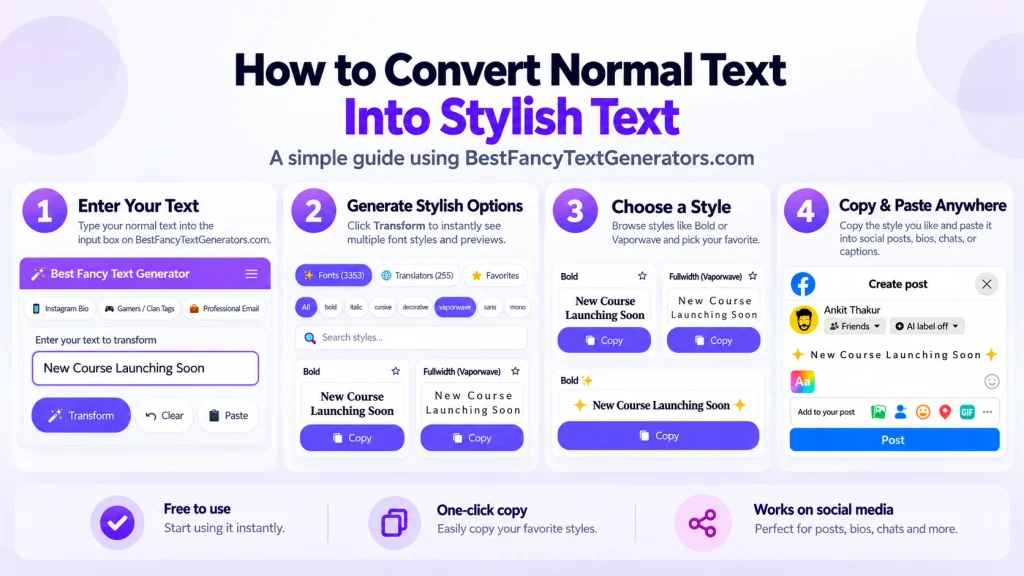
The process is basically:
Type → Preview → Choose → Copy → Paste
That’s it.
You don’t need to install anything.
Let’s say you want to style:
My Gaming Profile
1. Enter your normal text

Type your name, bio, username, caption, or any other text into the generator.
For example: My Gaming Profile
2. Look through the generated styles

The same text will appear in different styles.
You might see versions that look bold, cursive, gothic, wide, tiny, decorative, or completely different from normal text.
Don’t automatically choose the first one.
Scroll around and see which one actually fits what you’re trying to create.
3. Check whether you can still read it
This sounds obvious, but it’s probably one of the most important parts.
A style can look cool while you’re browsing, but that doesn’t mean it will work well as a username or bio.
For example:
𝓜𝔂 𝓖𝓪𝓶𝓲𝓷𝓰 𝓟𝓻𝓸𝓯𝓲𝓵𝓮
might work if you want something decorative.
But something simpler may be better if people need to read it quickly.
A useful rule:
If the style looks different but is still easy to understand, you’re probably choosing well.
4. Copy your favourite style
Once you’ve found one you like, copy it.
5. Paste it where you want to use it
You can try it in places such as:
- Instagram bios
- Instagram names
- WhatsApp statuses
- TikTok profiles
- Discord
- Telegram
- YouTube names
- Facebook posts
- Captions
- Gaming usernames
- Nicknames
After pasting, check how it actually looks before keeping it.
Try It Yourself
Instead of imagining what your name might look like, try your own text in our Fancy Text Generator.
Enter your name, username, or bio, compare different styles, and copy the version you actually like.
No font installation needed.
Are These Really Fonts?
This is where things get slightly confusing.
Most of the “stylish fonts” you see in online text generators aren’t fonts in the same way that Arial, Roboto, or Times New Roman are fonts.
Instead, many generators use special Unicode characters that visually resemble normal letters.
For example, a normal: A
can appear in forms such as: 𝐀 𝑨 𝓐 𝔄 𝔸
They’re different characters, even though your brain still reads most of them as the letter A.
That’s why you can usually:
Generate → Copy → Paste
instead of downloading a .ttf or .otf font file.
It’s also one of the reasons stylish text can behave differently across different apps and devices.
Why Does Stylish Text Sometimes Look Different After Pasting?
This was something we came across while working on our own collection of text styles.
A character can look perfectly fine in one environment but behave differently somewhere else.
Some may:
- appear slightly different,
- turn into a box or missing-character symbol,
- become difficult to read,
- render differently on another device,
- or not work properly in certain fields.
While building BestFancyTextGenerators.com, we didn’t want to include characters just because they looked unusual.
Some combinations that looked fancy weren’t actually useful once you tried using them properly, so styles that didn’t work well were filtered out.
That’s an important difference: Looking fancy isn’t enough.
The text should also be usable.
What Should You Do If a Stylish Font Doesn’t Work?
Don’t overthink it.
Try these: Use a simpler style
Highly decorative characters are usually more likely to cause readability or display problems.
If one style looks strange after pasting, choose another.
Check the actual app
Don’t judge a style only inside the generator.
Paste it into the place where you’re actually going to use it.
Check it on another device if it’s important
If you’re using stylish text for something other people need to read, checking it on another phone or browser can help.
Keep important information simple
Your name can be decorative.
Your bio headline can be decorative.
But information people need to understand usually shouldn’t be buried inside extremely complicated characters.
Don’t Always Choose the Craziest Style
This is probably the easiest mistake to make.
You find something like: ꧁༒☬𝓐𝓷𝓴𝓲𝓽☬༒꧂
and think: Yep. This is the one.
Maybe it is.
But maybe your profile doesn’t need twelve symbols around your name.
Different styles work for different situations.
For a gaming username, something unusual might be perfect.
For an Instagram bio, you might want something aesthetic but readable.
For a WhatsApp name, a simpler style might look cleaner.
More decoration doesn’t automatically mean better.
Readability Matters More Than People Think
Stylish text is mostly about visual personality.
But your text still has a job.
People need to understand it.
If somebody has to stare at your username for five seconds just to work out what it says, the style might be doing too much.
Heavily decorated Unicode text can also be less convenient for accessibility tools and screen readers.
So for important information, normal text is often the safer choice.
Use stylish text as decoration rather than making every word difficult to read.
Where Does Stylish Text Work Best?
There isn’t one style that’s perfect everywhere.
Here are a few ways I’d think about it:
| Use case | What usually works better |
|---|---|
| Instagram bio | Clean, aesthetic, readable |
| Gaming username | Bolder or more unusual styles |
| WhatsApp name | Simple decorative text |
| Caption | Mostly normal text with highlighted words |
| Discord profile | Creative but still readable |
| Facebook post | Use stylish text selectively |
| Important information | Normal text is usually better |
The point isn’t to make everything fancy.
It’s to make the right part stand out.
A Few Mistakes to Avoid
Making every word fancy
If your entire bio is decorated, nothing really stands out anymore.
Try styling only your:
- name,
- heading,
- short phrase,
- or one important part.
Ignoring readability
Something can be visually interesting and still be annoying to read.
Assuming every style works everywhere
Always test the final version after pasting.
Adding symbols just because they’re available
Symbols can help.
Too many can make a username feel messy.
Forgetting what the text is for
A gaming name and a professional profile aren’t trying to do the same thing.
Choose accordingly.
What We Learned While Building 2,000+ Styles?
BestFancyTextGenerators.com started from something pretty simple:
We wanted text — especially names — to look different.
While searching for fancy text generators ourselves, we noticed that many websites kept showing surprisingly similar styles.
Open one generator.
See a style.
Open another.
There’s something very similar again.
That became the interesting part of the project.
Instead of creating another generator with the same small set of styles, we started looking at what was already available, what seemed to be missing, and which other Unicode-based variations could actually be useful.
That process eventually grew into a collection of 2,000+ styles.
But building a bigger collection taught us something else:
More isn’t automatically better.
Once you have thousands of styles, finding one good style can become more annoying than having too few choices.
That’s why the collection was organised around categories, search, and previews rather than simply throwing thousands of results onto one page.
And that’s still how I think people should use stylish text.
Don’t try to find the most complicated style.
Try to find the one that feels like you and still works where you want to use it.
Do You Need to Download Anything?
Usually, no.
When you’re using a Unicode-based stylish text generator, you’re normally copying generated characters rather than installing a new font on your phone or computer.
So the basic process stays:
Type → Choose → Copy → Paste
You should still use normal internet safety when visiting any website, but generating stylish Unicode text itself generally doesn’t require installing a font file.
Can Stylish Text Be Used Everywhere?
Not necessarily.
Different platforms have their own rules.
A particular app may:
- limit the number of characters,
- reject certain symbols,
- display a character differently,
- or support only part of what you’ve pasted.
That’s why testing the final result matters.
The generator can show you the style.
The platform ultimately decides how it gets displayed.
Frequently Asked Questions
How can I convert normal text into stylish text?
Enter your normal text into a stylish or fancy text generator. Browse the generated versions, choose one you like, copy it, and paste it where you want to use it.
Do I need to install a font?
Usually, no. Most online stylish text generators use Unicode characters that can be copied and pasted directly.
Can I use stylish text on Instagram?
Many Unicode-based styles can be pasted into Instagram names, bios, captions, and other text fields. Some characters may appear differently depending on the device or app version, so check the result after pasting.
Can I use stylish text on WhatsApp?
Yes, many styles can be pasted into WhatsApp names, statuses, messages, and profile information.
Why does my stylish text look different after I paste it?
Different operating systems, apps, browsers, and fonts may render Unicode characters differently. If a style doesn’t display properly, try a simpler alternative.
Why do some stylish characters appear as boxes?
That usually means the device, font, browser, or application doesn’t properly support that particular character.
Are fancy fonts and stylish text the same thing?
People often use the terms interchangeably online. Technically, many “fancy fonts” generated by online tools are actually Unicode characters rather than installed font files.
Which stylish font should I choose?
Choose based on where you’re using it.
For a gaming username, you might want something bold or unusual.
For a social media bio, something cleaner and easier to read often works better.
Final Thoughts
Converting normal text into stylish text is actually the easy part.
Type. Choose. Copy. Paste.
The harder part is finding something that looks different without making your text difficult to read or use.
And after working with thousands of text styles, that’s probably the biggest lesson:
Different is good.
Different + readable is better.
You don’t need to completely change what you’re saying.
Sometimes you just want the same words to feel a little more like you.
Related Articles:
- How to Convert Text into Unicode Stylish Fonts
- What is Fancy Text?
- How to Generate Fancy Text Online (Copy & Paste Guide)

Ankit Thakur is an SEO Specialist and WordPress Developer with 4+ years of experience. He has generated ₹60L+ in revenue through SEO, built 50+ websites, and helped businesses generate measurable leads through organic search and local SEO.