Have you ever found a really cool font online, spent time making your name look perfect, and then realised you need to pay just to use or download it?
Or worse, the final image has a watermark on it.
Like, seriously?
You just wanted your Instagram name to look cool. You weren’t trying to create a whole movie poster.
The good news is that you can create fancy Unicode text without an image watermark, and it’s actually pretty easy.
Unlike design apps that export images, copy-and-paste fancy text generators give you characters you can paste directly into your bio, username, or status.
For example:
- Normal text: Your Name
- Fancy text: 𝒀𝒐𝒖𝒓 𝑵𝒂𝒎𝒆
- Another style: 𝕐𝕠𝕦𝕣 ℕ𝕒𝕞𝕖
No image download needed.
But there’s something worth understanding before we get into it.
Watermark-free, free to use, and completely unrestricted aren’t exactly the same things.
A tool can give you text without an image watermark and still have limits on certain features. And even when the generator is free, the app where you paste your text might not accept every character.
So here’s how to make fancy text without an image watermark, what restrictions you should know about, and how to choose styles that actually work.
How to Create Fancy Text Without Watermark or Restrictions?
You don’t need any design software for this.
Let’s use a simple example.
Say you want to make your Instagram name look a little different.

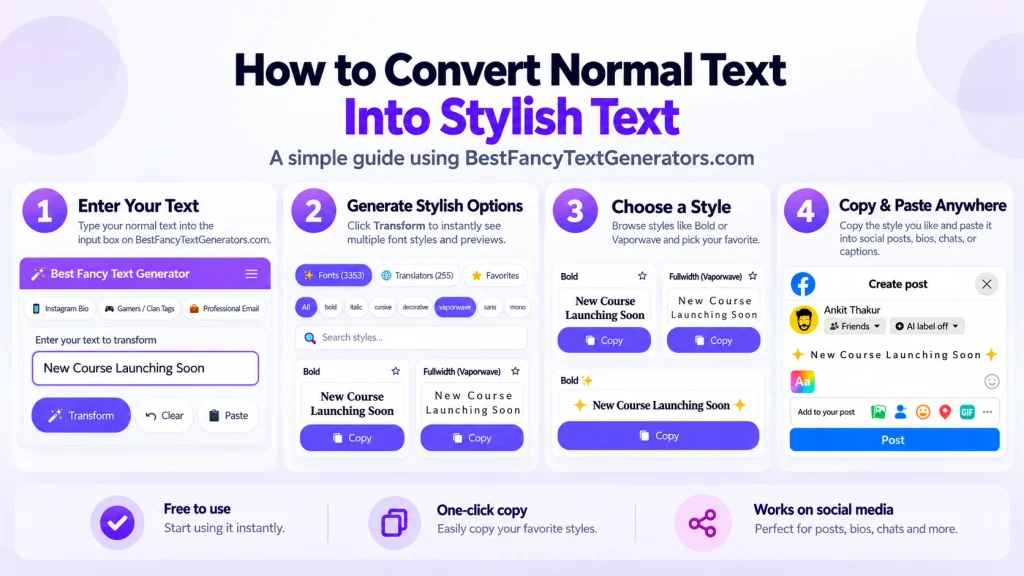
Step 1: Open a fancy text generator
Visit Best Fancy Text Generators.
The website describes its generator as free to use without creating an account or installing anything.
You’ll find a text input area, different style categories, and options for previewing the results.
Step 2: Type your text
Let’s say your name is Alex.
Type:
Alex
The generator can show you different-looking versions, such as:
- 𝐀𝐥𝐞𝐱
- 𝑨𝒍𝒆𝒙
- 𝔄𝔩𝔢𝔵
- Alex
You don’t need to type those fancy characters yourself.
The tool does the conversion.
Step 3: Find a style you actually like
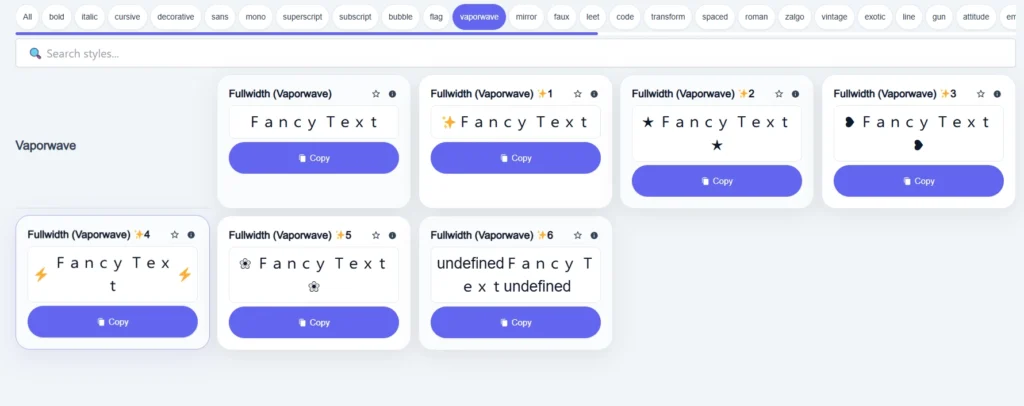
This is where you can have some fun.
Maybe you want a cute cursive name.
Or something bold for gaming.
Or a clean style that looks different without becoming impossible to read.
You can explore the available categories and previews.
And if you’re not sure what you want, try a few different options.
There’s no need to choose the first one you see.
Step 4: Copy your fancy text
Once you’ve found a style, use the copy option.
For example, you might copy:
𝓐𝓵𝓮𝔁
That’s the styled text itself, not an exported image.
So there’s no image watermark sitting on top of the letters.
Step 5: Paste it wherever you want
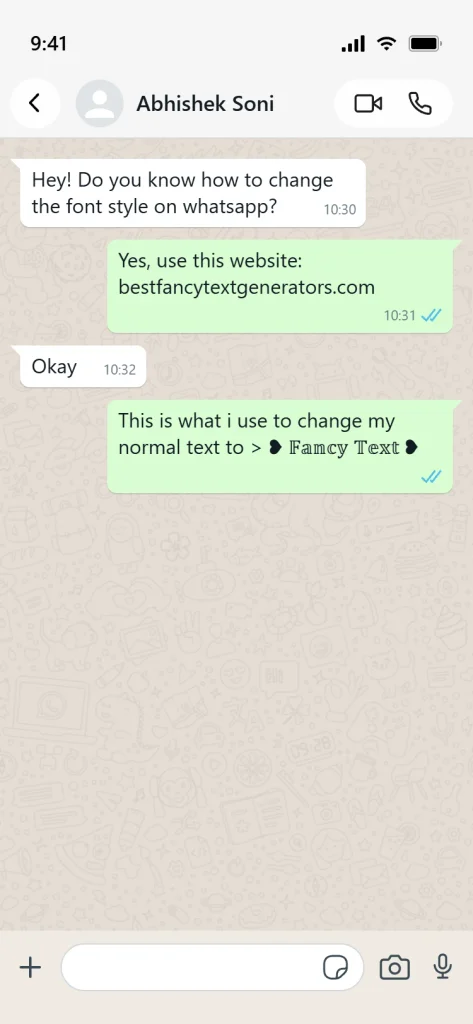
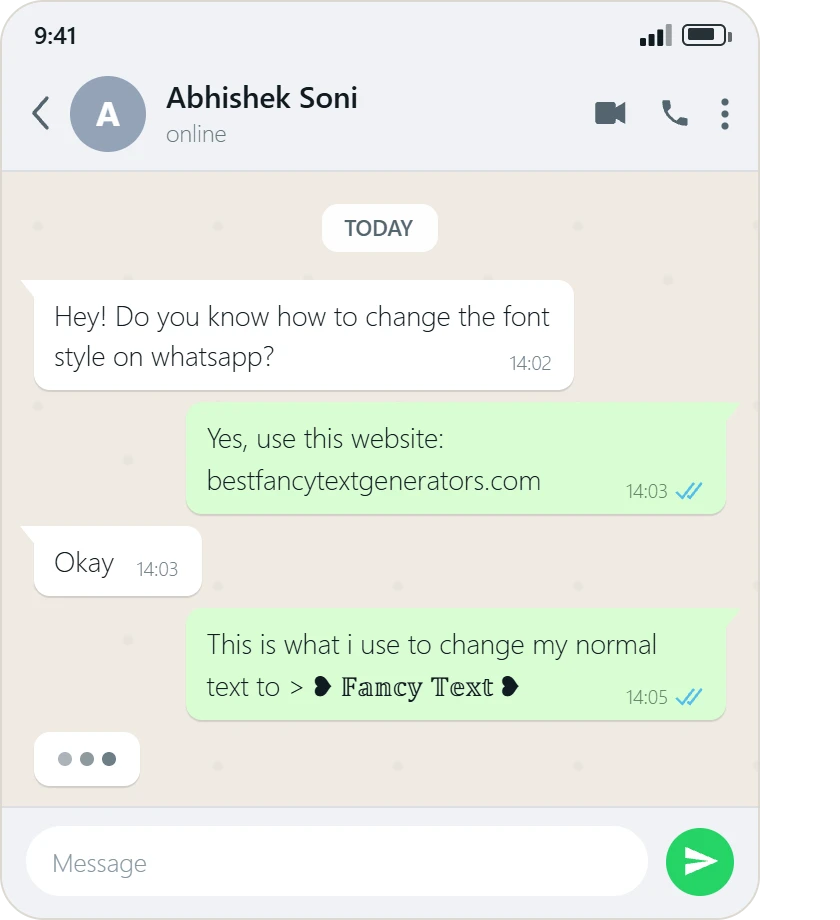
Now open Instagram, WhatsApp, Discord, or whichever app you want to use.
Paste the text into the appropriate field.
Before saving it, check how it looks.
Some platforms have character restrictions, and different devices can display the same Unicode characters differently.
If it looks strange, try another style.
That’s the whole process:
Type → Preview → Choose → Copy → Paste
Why Doesn’t Unicode Fancy Text Need an Image Watermark?
This sounds more technical than it actually is.
Let’s imagine you’re using a design app.
You create an image with some cool-looking text.
When you export it, the app might add its own logo or watermark, depending on the service and plan.
That’s because you’re downloading an image or design file.
A Unicode fancy text generator works differently.
Instead of giving you a picture of decorative letters, it can replace ordinary characters with different Unicode characters.
For example:
A → 𝐀 → 𝑨 → 𝔄
These aren’t simply four images of the same letter.
They’re different text characters.
So when you copy:
𝑩𝒖𝒊𝒍𝒅 𝒀𝒐𝒖𝒓 𝑩𝒓𝒂𝒏𝒅
you’re copying text.
Not a JPG.
Not a PNG.
Not a picture with a website logo printed over it.
That’s why an image watermark usually isn’t part of the process.
Of course, a website could still add its name to copied text or restrict certain features if it wanted to.
But there’s no technical requirement for a Unicode text generator to add an image watermark.
If you’re curious about the technical side, you can learn more from the Unicode Consortium.
Watermark-Free vs Free vs Unrestricted: What’s the Difference?
These words sound similar, but they mean different things.
And this is where people sometimes get confused.
| Term | What it means |
|---|---|
| Watermark-free | The output doesn’t contain a watermark added by the tool |
| Free to use | You can access the permitted features without paying |
| No sign-up required | You don’t need to create an account to use the tool |
| Unlimited copying | The tool doesn’t impose a numerical limit on copying, if that is its actual policy |
| Commercial use | Your intended business use is permitted under applicable terms and rights |
| Platform compatibility | The app where you paste the text accepts and displays those characters |
Here’s an example.
Imagine a website lets you generate fancy text for free but only allows ten copies per day.
That tool might be free and watermark-free.
But it isn’t unlimited.
Another website might let you copy as much text as you want, but a particular game could still reject the special characters.
That’s not necessarily a restriction from the generator.
It’s a restriction from the game.
So when you’re looking for a fancy text generator “without restrictions,” it’s worth checking what kind of restriction you’re actually trying to avoid.
Is Best Fancy Text Generators Really Free?
According to the information currently published on Best Fancy Text Generators, its main generator is free and doesn’t require sign-up, payment, or installation.
The website also provides features such as:
- A large collection of Unicode-based text styles.
- Categories for browsing different styles.
- Search options.
- Previews of generated text.
- Copy-and-paste functionality.
- Preview contexts for social media and gaming.
The tool is designed around a straightforward experience.
You enter your text, explore the results, and copy the style you want.
That doesn’t mean every possible feature, character combination, or use case has been independently tested.
And it doesn’t mean the website controls whether Instagram, WhatsApp, or a particular game accepts your fancy text.
Those platforms can have their own rules.
The website also describes its collection as having more than 2,000 styles and variations. That number reflects its advertised collection, not a promise that every style is visually unique or compatible everywhere.
Can You Make Watermark-Free Fancy Text on Your Phone?
Yes.
You don’t need a computer or a special keyboard app just to copy Unicode fancy text.
Let’s say you’re using an Android phone or iPhone.
Open your browser and visit a fancy text generator.
Type the name or sentence you want to style.
Find a result you like, tap the copy option, and paste the text into your chosen app.
For example:
Normal: Dream Big
Fancy: 𝓓𝓻𝓮𝓪𝓶 𝓑𝓲𝓰
With a symbol: ★ 𝓓𝓻𝓮𝓪𝓶 𝓑𝓲𝓰 ★
You can add emojis from your phone’s normal emoji keyboard too.
One thing I’d recommend is checking the text after pasting it.
If you’re making an Instagram bio, view the actual profile before deciding you’re finished.
A style that looks nice inside a generator might appear a little different in another app.
Where Can You Use Fancy Text Without a Watermark?
One of the best things about Unicode fancy text is that it can be copied into different apps without creating a separate image for each one.
But that doesn’t mean every app supports every character.
Here’s where people commonly try it.
Instagram bios and names
Maybe your Instagram bio looks a little boring.
You could use something like:
♡ 𝓒𝓱𝓪𝓼𝓲𝓷𝓰 𝓓𝓻𝓮𝓪𝓶𝓼 ♡
Or keep things simpler:
★ Dream Big ★
Both can make your profile feel a little different.
Just remember that fancy Unicode letters may not behave like normal letters in search.
If you want people to find your profile easily, keeping important searchable information in regular text can be helpful.
Gaming usernames
This is probably one of the most fun uses.
Imagine changing:
ShadowKing
to:
𝕾𝖍𝖆𝖉𝖔𝖜𝕶𝖎𝖓𝖌
Pretty cool, right?
But some games restrict which characters you can use in usernames.
So check whether your game accepts the name before saving it.
WhatsApp statuses
You can use fancy text in short statuses or messages.
For example:
💡 𝐊𝐞𝐞𝐩 𝐆𝐨𝐢𝐧𝐠
Or:
♡ 𝓖𝓸𝓸𝓭 𝓥𝓲𝓫𝓮𝓼
I’d avoid writing long, important messages in heavily decorated text, though.
People should still be able to read what you’re saying.
TikTok, Discord and other platforms
Fancy text can also be useful for short profile descriptions, nicknames, captions, and other supported text fields.
The important word there is supported.
Different platforms have different character rules.
If a certain style doesn’t work, try something simpler.
Can You Use Watermark-Free Fancy Text for Commercial Projects?
This is a different question from whether the output has a watermark.
For example, imagine you’re making an Instagram bio for your business.
You want to use:
𝐆𝐫𝐨𝐰 𝐘𝐨𝐮𝐫 𝐁𝐫𝐚𝐧𝐝
Copying those Unicode characters isn’t the same as downloading and redistributing a commercial font file.
But that doesn’t automatically mean every possible commercial design is free from legal restrictions.
You might still need to consider trademarks, copyrighted artwork, other intellectual property rights, and the relevant website terms.
There’s also a difference between using decorative Unicode text in a social media bio and designing a company logo.
For a professional logo, packaging, or other important brand asset, proper typography and clear usage rights can be more suitable.
And if you’re using an actual downloaded font rather than copy-and-paste Unicode text, check the font’s commercial license.
Watermark-free doesn’t automatically mean copyright-free or licensed for every commercial use.
What Building Our Own Fancy Text Generator Taught Us?
When I first got interested in fancy text, I honestly wasn’t thinking about watermarks or Unicode character standards.
I just wanted my name to look different online.
You know when someone has a cool Instagram bio or gaming username, and suddenly your own name looks boring?
That’s pretty much where the whole idea started.
So I searched Google for fancy text generators.
There were loads of websites.
But after opening a few, I kept noticing something.
Similar designs.
Similar styles.
And many of the same fancy-looking letters.
If people were using these tools to stand out, why were so many generators giving them nearly the same choices?
That question eventually led us to start building Best Fancy Text Generators.
We researched Unicode styles and variations that weren’t being offered as often.
We also found that not every fancy-looking character was actually useful.
Some styles didn’t render properly in the situations we checked, while others were difficult to read.
So we filtered those out instead of simply collecting everything we could find.
Eventually, the collection grew to more than 2,000 styles.
And then came another problem.
How do you help someone find one style when they’ve got thousands to choose from?
That’s why categories, search, and previews became important.
We wanted people to spend their time choosing a style they liked, not figuring out how to use the website.
The whole idea was simple:
Type → Preview → Choose → Copy → Paste
And that still explains what we wanted to build.
A tool where you could make your text look different without needing a complicated design editor just to change a name.

Why Fancy Text Sometimes Doesn’t Work After Pasting
There’s something worth remembering.
Just because a fancy text generator gives you a style doesn’t mean every app will display it perfectly.
And that usually has nothing to do with watermarks.
Some characters appear as empty boxes
This can happen when the device or app doesn’t have appropriate font support for a particular Unicode character.
If that happens, try a more commonly supported style.
Some apps reject special characters
Games and social media platforms can restrict which characters appear in certain fields.
For example, a game might accept regular letters but reject decorative Unicode characters in its username system.
The generator can’t override that restriction.
Fancy text can look different across devices
The same character may appear slightly different on Android, iPhone, Windows, or another operating system.
That’s because different devices can use different fonts and rendering systems.
Some styles can be difficult to read
This is probably the easiest problem to avoid.
A really complicated style might look great for a short username.
But imagine trying to read an entire paragraph written that way.
Not exactly fun.
Heavily stylised Unicode characters can also create difficulties for screen readers and text search.
So I’d use fancy text for short decorative pieces and keep important information in normal text.
Common Mistakes When Using Free Fancy Text Generators
You don’t need to overthink fancy text.
But a few things are worth avoiding.
Choosing a style just because it looks unusual
If you can’t read your own name properly, it’s probably not the best choice.
Assuming every tool has unlimited access
Some websites may have different plans, feature limits, or restrictions. Check the actual tool rather than assuming.
Confusing no watermark with unlimited rights
Text without an image watermark can still be subject to separate website terms or intellectual property considerations.
Not checking the pasted result
Always check how the text looks in the app where you want to use it.
Making everything fancy
Sometimes one decorated word looks better than a whole paragraph in unusual letters.
Frequently Asked Questions
Is there a free fancy text generator without a watermark?
Yes. Browser-based Unicode text generators can provide copyable fancy text without creating a watermarked image.
Best Fancy Text Generators currently describes its main generator as free and available without registration.
Can I copy fancy text without downloading anything?
Yes. Unicode-based fancy text can generally be copied directly from a generator and pasted into supported apps without downloading an image or installing a font.
Does watermark-free mean I can use the text commercially?
Not automatically.
A watermark and commercial-use rights are different issues. Check the relevant terms and any applicable intellectual property restrictions for your intended use.
Can I use fancy text without signing up?
Some generators allow this.
Best Fancy Text Generators currently states that users can use its main tool without creating an account.
Is there a limit to how many fancy text styles I can copy?
That depends on the website.
A generator can be free and watermark-free while still imposing copying limits or restricting particular features.
Don’t assume unlimited copying unless the website clearly supports that claim.
Can I use watermark-free fancy text on Instagram?
Yes, in supported text fields.
However, some stylised Unicode characters may display differently or behave differently in search compared with ordinary letters.
Can I use fancy text on Android and iPhone?
Yes. You can use a browser-based generator on either device, then copy and paste the text into compatible apps.
Why does fancy text sometimes show boxes or strange characters?
This usually happens because the device or app doesn’t properly support the selected Unicode characters.
Try another style or use ordinary text for important information.
Do I need a special keyboard for fancy text?
Not usually.
A browser-based fancy text generator can create copyable Unicode text without requiring you to install a separate keyboard.
Final Thoughts
So, can you create fancy text without a watermark or restrictions?
You can create and copy Unicode fancy text without an image watermark. You don’t need to download a picture just to make your name look different.
But remember that free access, unlimited copying, commercial rights, and platform compatibility are separate things.
That’s really the important part.
If you want to make your Instagram bio or gaming username look cooler, you shouldn’t have to learn complicated design software.
Type your name.
Try a few styles.
Pick something you like.
Copy it.
And check that it works wherever you want to use it.
That’s what we wanted when we first started looking for fancy text generators.
We weren’t trying to create something complicated.
We just wanted our names to look a little different.
And after researching thousands of styles, we learned that having more choices only helps when those choices are easy to find and use.
So don’t worry about choosing the fanciest style in the entire collection.
Choose the one that looks good, works where you need it, and feels like you.
Sometimes that’s all it takes to make your profile look a little more interesting.
Related Articles:
- How to Create Fancy Text Without Any App
- Are Fancy Text Generators Free or Do They Have Hidden Costs?
- How to Generate Fancy Text Online (Copy & Paste Guide)

Ankit Thakur is an SEO Specialist and WordPress Developer with 4+ years of experience. He has generated ₹60L+ in revenue through SEO, built 50+ websites, and helped businesses generate measurable leads through organic search and local SEO.